What Does a Social Media Campaign Look Like? a Visual Guide

Ryan Bennett • October 25, 2026
Find out what does a social media campaign look like in practice: objectives, channels, timelines, assets and KPIs, with templates and examples.
You've been asked to run a campaign, and you're staring at a blank document. You know how to write a post. You aren't sure how a post becomes a campaign, how many assets you need, or how you'll prove any of it worked.
That confusion is normal. A campaign isn't a bigger post. It's a connected system with a finish line, and you can learn to read it at a glance.
The Parts of a Social Media Campaign at a Glance
A social media campaign is a coordinated, time bounded effort that combines a defined audience, platform specific content, paid or organic distribution, and a measurable goal such as reach, leads, or sales. It matters because more than 5.4 billion people used social media worldwide in 2025, spending an average of 141 minutes per day on social platforms. With that much attention spread across platforms, one post can't carry a business result on its own.
Think of six parts that must agree with each other. To make them concrete, the example here is a bulk image generator launching to small marketing teams.
| Element | What It Contains | Example Setting |
|---|---|---|
| Objective | The business result the campaign must hit, with a number and a date | 200 demo requests from marketers by week six |
| Audience | Segments defined by need, role or buying stage, not only age | Two segments, marketing managers and in house designers |
| Channels | Two or three platforms where the audience already spends time | Instagram, TikTok and LinkedIn |
| Timeline | Brief, production, launch, optimization and report phases | Six weeks plus two weeks of preparation |
| Asset types | Video, image, carousel and caption variants sized for each platform | 12 to 18 finished assets in three sizes |
| KPIs | Delivery, engagement and business metrics tied to the objective | Cost per demo request, with reach and click through rate as diagnostics |
How the Parts Depend on Each Other
The objective decides the audience. If you need demo requests, you don't target everyone who likes design. You target people who can request a demo for a team.
The audience decides the channels, and the channels decide the assets. Marketing managers and designers at firms of five to fifty staff might meet you on LinkedIn for proof and on Instagram or TikTok for a quick visual demonstration. The KPIs then check every link in that chain.
Practical rule: If you change the objective, you must revisit every other box. A sales goal and an awareness goal don't need the same audience, assets, or proof.
Sketch your own campaign using these six boxes before you make anything. If a box is vague, the campaign will be vague in exactly that place.
Sketch the Campaign on One Board
Put the six parts on one page so you can see gaps before they become expensive. Use two rows of three boxes, then a timeline strip across the bottom.
The Top Row Sets Direction
- Objective, top left: Write 200 demo requests from marketers by week six, plus the date and your cost ceiling. A number without a date isn't a target you can manage.
- Audience, top middle: List two segments, marketing managers and in house designers. Add one line on the problem each segment wants solved.
- Channels, top right: List Instagram, TikTok, and LinkedIn. Write why each fits, for example visual proof, fast demonstration, or professional credibility.
The Bottom Row Shows Execution
- Asset types, bottom left: Note 12 to 18 assets in 1080 by 1920, 1080 by 1080, and 4:5 sizes. Give each file a naming code you'll recognize later in reports.
- KPIs, bottom middle: Put cost per demo request in large type. Put reach and click through rate underneath as diagnostics, not as the headline.
- Timeline strip: Mark preparation in weeks -3 to -2 and -2 to 0, launch in weeks 1 to 4, and wrap up in weeks 5 to 6.
Read the board with arrows in mind. Objective points to audience, audience points to channels, and channels point to assets. KPIs loop back to the objective to ask whether the whole chain worked.
An empty box means you aren't ready. That's useful information, not a failure. Fill the box, or change the boxes that depend on it.
Measure Business Impact Before the Creative
Start with the result that would justify the budget. "More engagement" can't do that job because you can't tell whether you hit it, or whether it mattered.
For the generator example, the result is 200 demo requests in six weeks. That single sentence forces useful decisions before anyone designs a graphic.
Build the Measurement Chain First
Map the chain from person to proof. Each link needs an owner and a test before launch.
- Segment: Marketing managers at five to fifty person firms see a specific message, not a generic brand post.
- Landing page: That message sends them to a page built for that segment, with one clear demo form.
- Conversion event: Submitting the form is the conversion event, the action your ads and reports will count.
- Tracking parameters: Every link carries tags that record platform, audience, and creative concept.
- CRM record: The form creates a record sales can check, so you can confirm real requests rather than counting clicks twice.
This order matters because proving return is hard for many teams. In one survey, 71% of social media managers identify measuring and proving ROI as their biggest challenge. Building the chain first won't remove uncertainty, but it'll show you where the uncertainty sits.
A post with lower reach can beat a viral post if it produces more qualified demo requests for the money you spent.
Separate What Each Metric Can Prove
Don't put every number on one flat dashboard. Group metrics by the question they can credibly answer.
| Tier | Example Metrics | Question It Answers | Caution |
|---|---|---|---|
| Delivery | Reach, frequency, viewable impressions | Did people have a chance to see it? | Viewable is an opportunity to see, not attention |
| Engagement | Engagement rate, video completion, click through rate | Did the content earn attention and a click? | Likes alone rarely predict revenue |
| Behavior | Landing page signup rate, cost per click, cost per acquisition | Did people take the next step? | Compare against the same audience's baseline |
| Business | Conversions, revenue, return on ad spend, incremental lift | Did the campaign cause results that would not have happened anyway? | Attributed conversions can overstate impact |
Delivery needs a precise definition. Under the IAB/MRC standard, a video impression is viewable when 50% of its pixels remain in view for two continuous seconds, and a display impression when 50% remains in view for one continuous second. That's an opportunity to see your content. It isn't proof someone paid attention or bought anything.
Use a Holdout to Test Cause
The strongest practical test is a holdout. Randomly assign matched regions to treatment and control, expose only the treatment group, and compare conversion outcomes. Hold pricing, landing pages, and promotion timing constant so the campaign is the main difference.
Incremental return on ad spend is incremental revenue divided by media spend. Scale campaigns that produce incremental conversions, not campaigns with high attributed counts that might have happened anyway.
Before creative work starts, answer one question in writing. What evidence would change the budget decision?
Channels and Formats Platform by Platform
Big reach numbers tempt teams to be everywhere. Don't follow reach alone. Choose where your audience already spends time and where the format fits your message.
Reported potential advertising reach in 2025 included approximately 2.53 billion people on YouTube, 2.28 billion on Facebook, 1.67 billion on Instagram, and 1.59 billion on TikTok. Those figures show scale. They don't tell you which platform will produce demo requests from a five person marketing team.

| Platform | Potential Ad Reach 2025 | Native Format | Campaign Role |
|---|---|---|---|
| YouTube | 2.53 billion | Long video, Shorts | Explainers and search led discovery |
| 2.28 billion | Feed images, video, carousels | Broad awareness and retargeting | |
| 1.67 billion | Reels, Stories, carousels | Visual product storytelling | |
| TikTok | 1.59 billion | Vertical short form video | Fast attention and creative testing |
| Not verified here | Document posts, text posts, video | Professional credibility and B2B demos |
The table is ordered by reach, not by priority for your campaign. LinkedIn's reach is left unverified because no verified figure was available for this comparison, and guessing would make the table look more certain than it is.
Adapt One Message, Don't Copy One File
Take one central message, such as "make a week of campaign visuals in one sitting." On TikTok and Instagram Reels, it becomes a 30 second vertical cut showing the before and after. On Instagram or Facebook feed, it becomes a square carousel of product stills.
On LinkedIn, the same message becomes a text post with one chart and professional commentary about time saved. On YouTube, it becomes a longer, search oriented demonstration. If you're planning the video versions, current approaches to social media video ads can help you decide what belongs in a short cut versus a full explainer.
Meta's guidance points in the same direction. It recommends comparing performance by demographic, country, placement, and creative asset, using measures such as quality ranking, engagement ranking, and conversion rate ranking. You can't make those comparisons if you publish one identical file everywhere and change the caption.
Pick two or three channels and drop the rest for this campaign. Spreading a small team across five platforms usually produces five weak versions instead of two strong ones.
Campaign Calendar From Brief to Wrap-Up
A calendar isn't a list of posting dates. It's a sequence of phases where each output opens the way to the next step.
A standard shape is six weeks of activity plus two weeks of preparation. A milestone sets the start, such as a product launch, seasonal promotion, or repositioning.
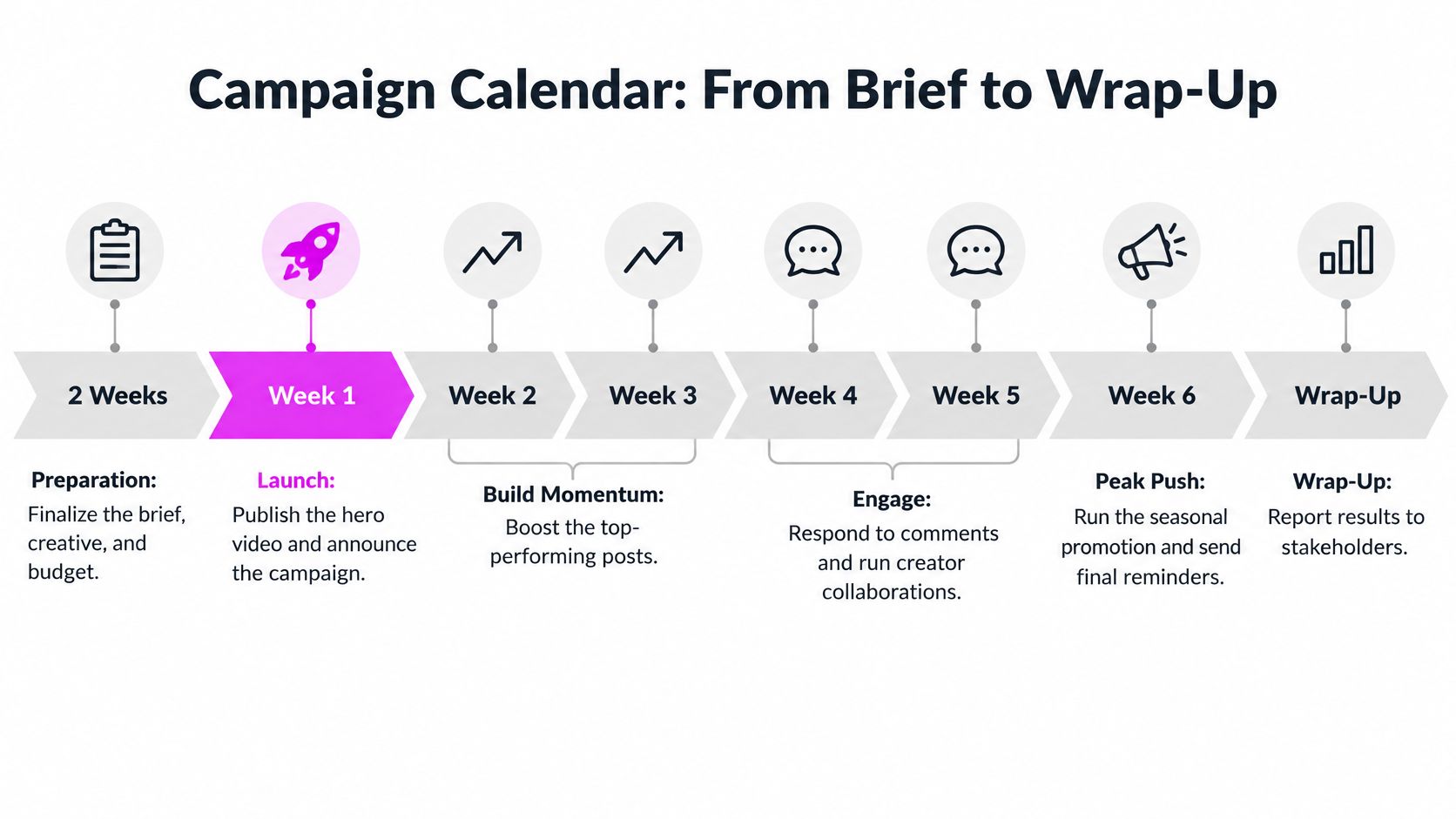
| Phase | Timing | Main Tasks | Output |
|---|---|---|---|
| Brief and audience setup | Weeks -3 to -2 | Set objective, segments, tracking and budget | Approved campaign brief |
| Creative production | Weeks -2 to 0 | Shoot or generate assets, write captions, build landing page | Named asset library with sizes |
| Launch and flighting | Weeks 1 to 4 | Publish organic posts, run paid flights, rotate variants | Daily delivery and early cost data |
| Optimization | Weeks 2 to 4, weekly review | Pause weak variants, brief new concepts from winners | Updated creative plan |
| Wrap up and report | Weeks 5 to 6 | Validate conversions, compare against holdout, document learnings | Campaign report and next budget decision |
Use Gates Between Phases
No creative goes live until its tracking link, landing page, and conversion event have been tested end to end.
That gate feels slow on launch week. It saves you from spending money you can't trace, which is slower to fix.
During flighting, a typical cadence is three to five posts a week per channel, adjusted to your team's capacity for replies and review. Paid flights often run in two week blocks so you can compare results before you move budget. For creators who publish video on a tighter cycle, content calendar tips for video creators offer a useful companion on keeping dates, owners, and approvals visible.
Keep one shared calendar with a row per asset. Show platform, publish date, owner, and approval status so nothing ships unreviewed.
Asset Types, Sizes and the Creative Matrix
Sizes come first because they decide what you can publish without awkward cropping. Decide your sizes from your chosen placements, then build concepts inside those limits. A practical reference for the best social media image sizes by placement helps you confirm dimensions before production starts.
| Asset Type | Common Size | Where It Runs | Typical Count per Concept |
|---|---|---|---|
| Vertical video | 1080 by 1920 | TikTok, Reels, Stories | 3 to 6 cuts |
| Square image | 1080 by 1080 | Feed posts, carousel cards | 4 to 8 images |
| Portrait image | 1080 by 1350 | Instagram and Facebook feeds | 2 to 4 images |
| Landscape video | 1920 by 1080 | YouTube, websites, LinkedIn video | 1 to 2 cuts |
| Carousel | 1080 by 1080 or 1080 by 1350 per slide | Instagram, LinkedIn | 1 set of 5 to 10 slides |
| Caption and copy | Varies by platform | All channels | 3 to 5 variants |
Organize Assets as a Matrix
A creative matrix crosses audience with concept and format. For a bulk image business, that might mean separate image families for marketers, educators, hobbyists, and branding agencies. Within each family, you test static product visuals against short demonstrations.
Keep dimensions, typography, and calls to action consistent inside each audience cohort. If you change the audience, format, headline, and image at once, you won't know which change caused the result. Creative relevance and placement fit affect downstream conversion, so your test design has to stay interpretable.
Name every file with a code that records audience, format, concept, and iteration. For example, a name might show marketer segment, vertical video, time saving concept, version two. Future you will thank present you when a report asks which asset produced the demo requests.
Govern Volume Instead of Chasing It
AI assisted production changes the bottleneck. Making dozens of images gets easier, but governing them gets harder. Human review, rights clearance, factual checks, localization, and pruning weak variants become the work that matters most.
Tools such as Bulk Image Generation can produce batches of platform sized visuals from a prompt, which is one option for filling a matrix once your rules exist. Set visual identity, accessibility requirements, and approval steps first. Check product details and representation before publishing, especially when generated images could invent features you don't offer.
Tie each variant to one hypothesis, such as "a demonstration will beat a static still for designers." Dozens of near identical images dilute learning and make a brand look repetitive. Structured variation teaches you something. Raw volume mostly creates sorting work.
A Worked Launch From Brief to Report
Let's follow a hypothetical launch so the parts stop feeling abstract. The figures and weekly outcomes in this example are illustrative, not results from a real company.
A bulk image generator wants 200 demo requests in six weeks from digital marketers. The brief defines four creative families for marketers, educators, hobbyists, and agencies, with three concepts per family. One matched set of regions forms a holdout where normal activity continues and the new campaign doesn't run.
Weeks One and Two
In week one, twelve static product visuals and two short demonstration videos go live. Every asset uses fixed dimensions for its placement and one call to action. Links carry audience and concept tags, and the demo form feeds the CRM.
In the week two review, the team compares cost per desired action by segment. In this illustrative account, the demo video earns a lower cost per request than static visuals in the marketer segment, but not in the agency segment. That split is exactly why segment level reporting matters.
The team pauses the two weakest variants. More importantly, they don't just generate another pretty image. They write new hooks from the winning demo concept, because the concept, not the single file, is what appears to be teaching the audience something.
- Pause decision: Two variants stop because their cost per request misses the agreed threshold.
- New brief: Writers keep the winning demonstration structure and test a new opening line.
- Agency segment: Static visuals stay live there while the team tests a different proof point.
Week Four and the Final Report
By week four in the example, exposed regions have produced more demo requests than matched holdout regions. Pricing, landing pages, and promotional timing stayed constant, so the team can describe the difference as incremental lift with more confidence. It's still not perfect certainty, and a good report says so.
The final report fits on a few pages. It states the objective result, total spend, cost per request, and incremental lift. It names the three assets that worked, notes which segment each one worked for, and records what the team would stop doing.
Most critically, it ends with a budget decision. Scale the winning concept, retest the agency approach, or stop. What does a social media campaign look like when it's finished? It looks like evidence you can argue from, not a folder of posts.
Confirm Your First Campaign Brief Before Launch
Before you publish, check the brief against the six parts from the opening table. If you're drafting it now, a step by step guide to writing a creative brief can help you structure the document. Then confirm these eight items are filled in.
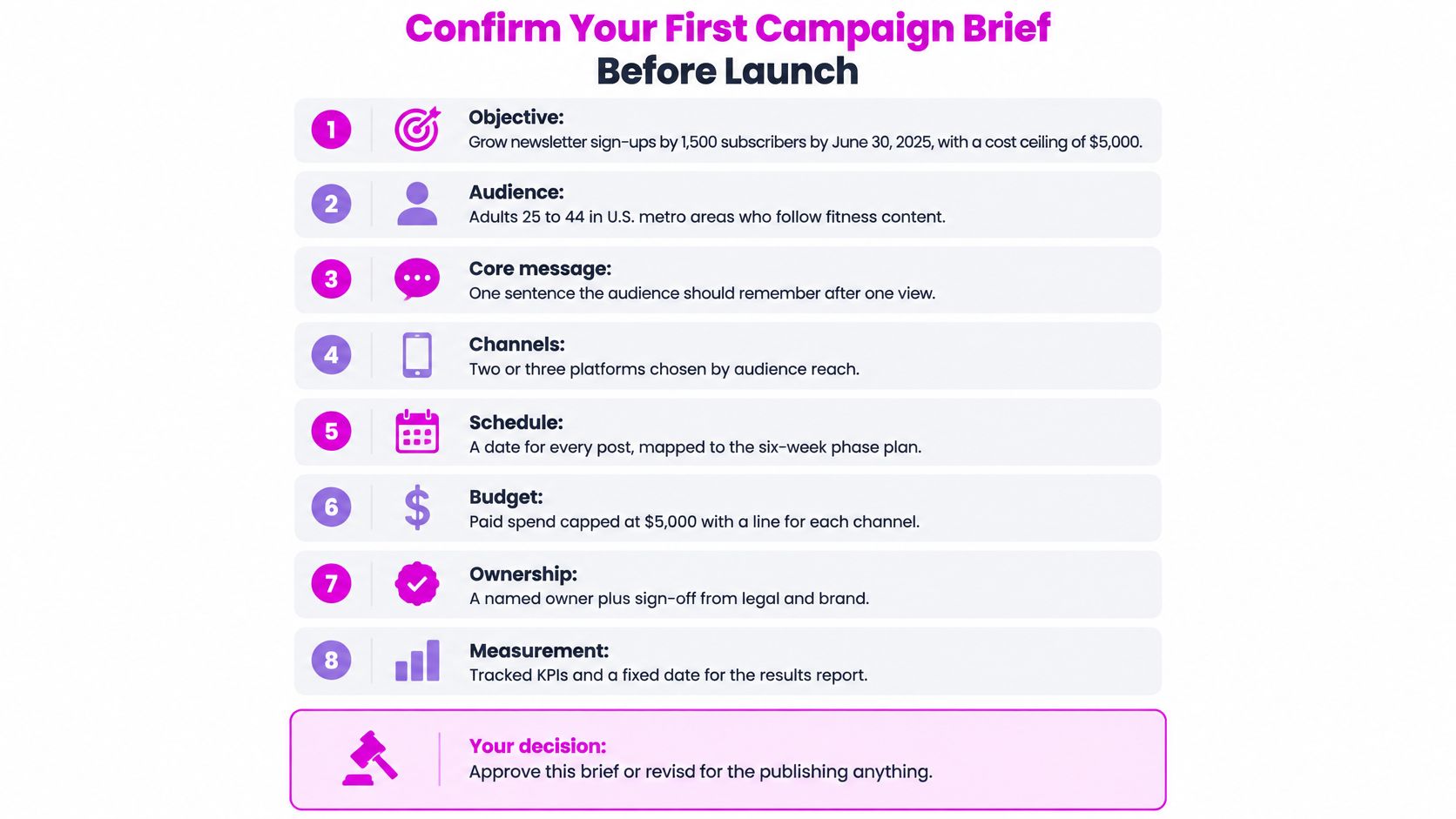
- Objective: A number, a date, and a cost ceiling.
- Conversion and tracking: The conversion event, plus tagged links and a tested landing page on every asset.
- Audience: Two or three segments defined by need or role.
- Platforms: Your chosen channels, with one sentence on why each fits the audience.
- Assets: The asset list with sizes and counts per concept.
- Calendar: Approval dates and a named owner for each asset.
- Measurement: KPI tiers and the holdout design for the business test.
- Stop and scale rules: The cost per desired action at which you pause a variant, and the result that justifies new budget.
Don't launch while an item is blank. A blank item won't stay blank. It'll become an assumption someone makes under deadline pressure.
Answer one final question in the brief itself. What result, measured how, would change the budget decision?
When your board is filled and your tests need structured variants, Bulk Image Generation lets you create batches of platform sized campaign visuals from natural language prompts and refine them with batch editing tools for resizing, background removal, and enhancement. Use it to fill your creative matrix by audience and format, then keep the variants that earn continued distribution. Visit the site to build your first asset set for your next campaign.
