
Face Swap AI Free: Step-by-Step Workflow

Ryan Bennett • September 25, 2026
Learn how to use face swap AI free tools with our step-by-step guide. Discover workflows without manual prompt engineering and batch processing tips.
You've got a campaign to finish, a folder of source portraits, and far more target images than you can realistically edit by hand. The first face swap looks acceptable. Then the lighting doesn't match, the edges break around the hair, and you realize the campaign needs dozens of variations rather than one finished image. Searching for face swap AI free tools makes the problem look simple, but the actual challenge is finding a workflow that's fast, visually consistent, and safe for the people whose faces you're uploading.
Free access also comes with trade-offs. You may encounter watermarks, advertising, export limits, cloud processing, or unclear retention policies. The practical question isn't only whether a tool can replace one face. It's whether the tool can support your production process without creating new editing, privacy, or licensing problems.
The Reality of Manual Face Swapping
Manual face swapping starts with a deceptively small task. You open a portrait in an image editor, isolate the face, transform it to match the target, adjust the skin tone, soften the edges, and hope the expression still looks natural. One image might take manageable effort. A campaign with multiple poses, backgrounds, and aspect ratios becomes a different kind of work.
The bottleneck isn't just the face replacement. You also have to correct masks, shadows, color balance, hair overlap, cropping, and composition. If the source face points toward the camera while the target subject is turned away, the editor may spend more time hiding the mismatch than creating the final asset.
Why one finished image isn't enough
Creators rarely need only one output. A social campaign may require square, portrait, and wide-format versions. A product marketer might need the same visual with different backgrounds, models, or regional adaptations. An educator may want a consistent character across a set of lesson materials.
That's where manual editing breaks down. You make one swap, save it, reopen another target, repeat the process, and discover that every image needs slightly different corrections. Guidance on blending two images effectively helps with individual composites, but it doesn't remove the repetitive work of preparing a whole set.
Practical rule: If the project needs more than a few finished images, optimize the workflow before optimizing the first image.
AI tools change the unit of work from one image at a time to a set of related images. They can detect faces, apply a consistent source identity, and handle supporting edits in the same run. That doesn't mean every output will be perfect. It means the creator can review a batch, reject weak results, and spend human attention where it matters instead of rebuilding every composite from scratch.
How AI Face Swap Technology Has Evolved
Face swapping became broadly accessible to mainstream users in 2016, when Snapchat introduced face swapping to an audience of over 150 million daily users, as documented in Dictionary.com's history of face swap technology. Before that shift, face replacement generally involved manual or semi-automatic image processing. Mobile apps turned a technically difficult edit into a familiar social feature that people could use without professional editing skills.
The next major change came from deep learning. 2017 marked the rise of deepfake methods using generative adversarial networks, or GANs. Desktop tools such as FakeApp lowered the barrier further, allowing non-experts to generate realistic swapped faces. The same technical progress that improved creative experimentation also made consent, impersonation, and misleading media harder for audiences to evaluate.
Why free tools are more capable now
Modern face swap systems do not just paste pixels from one image onto another. They analyze facial structure, encode identity, generate a replacement, and restore or blend the result. That broader pipeline explains why current tools can handle expressions, lighting, and composition more convincingly than early novelty filters, although difficult angles and occlusions can still expose weaknesses.
The category has also become commercially significant. One 2026 industry estimate values the global AI face swap software market at USD 1,915.47 million in 2026, projects USD 2,060.66 million in 2027, and estimates USD 3,696 million by 2035, with a projected 7.58% CAGR across the forecast period, according to IndustryResearch.biz's market estimate. A separate technology overview describes the market as already valued at over USD 1.5 billion, placing free apps inside a substantial consumer and professional ecosystem.
That scale affects the user experience. Face swapping now appears inside social platforms, mobile editors, creator suites, and bulk production tools. A focused comparison of face swap tools can help identify features, but the better choice depends on your input quality, output volume, privacy requirements, and intended use.
The Four Stages of a Face Swap Pipeline
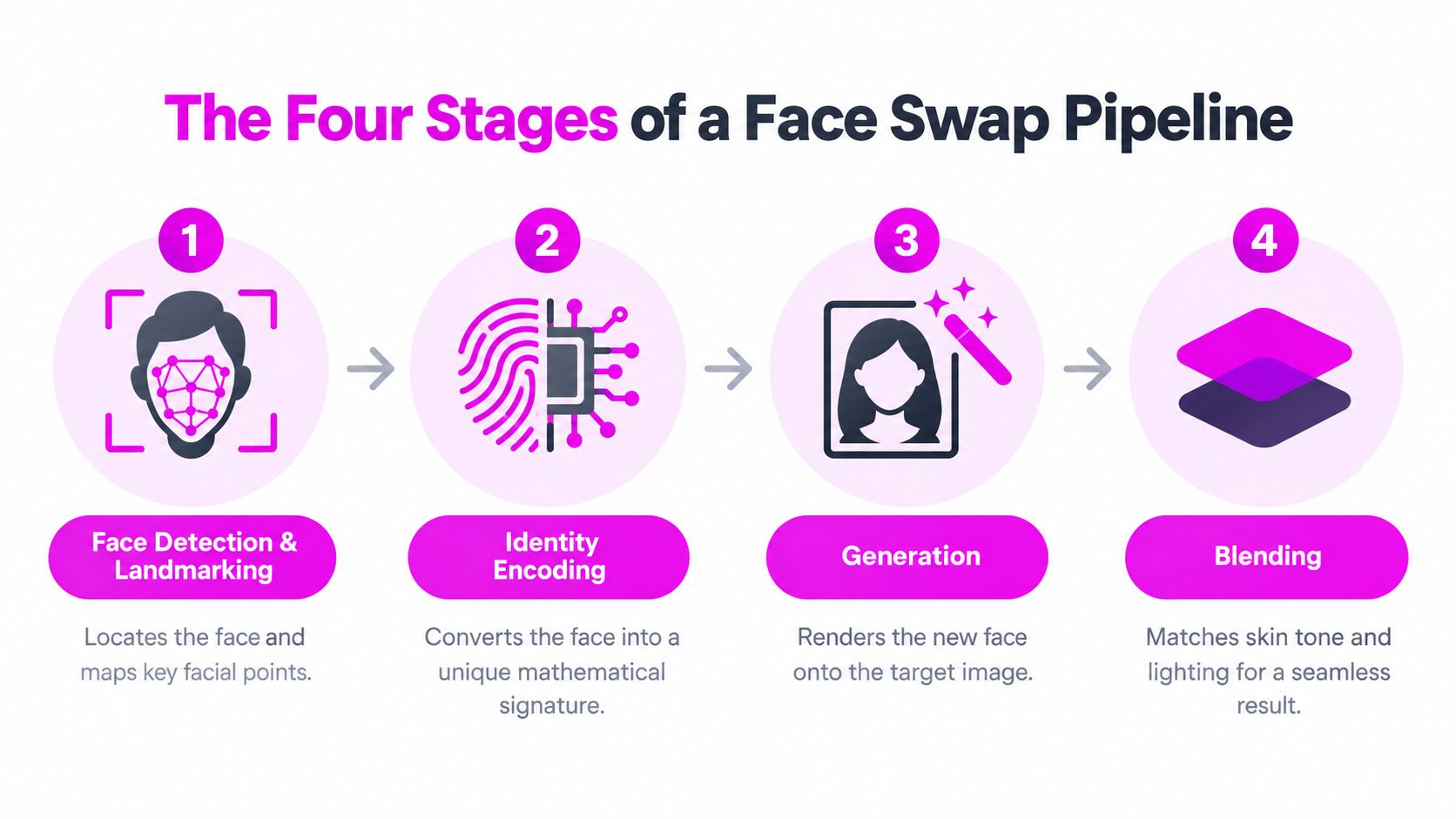
A face swap is easier to troubleshoot once you understand what the software is doing. Most practical pipelines contain four stages: detection and landmarking, identity encoding, generation, and blending or restoration.
Detection and landmarking
First, the system locates the face and maps important points such as the eyes, nose, mouth, and jawline. InsightFace or RetinaFace-style detectors are commonly described for this task. If the face is partially hidden, heavily tilted, poorly lit, or surrounded by several faces, the detector may select the wrong subject or create an unstable alignment.
Identity encoding
Next, the system converts the source face into a mathematical representation of identity. ArcFace-style embeddings are used in widely described implementations. Think of this as creating a compact identity signature, not copying the complete face pixel by pixel. The target image supplies the pose, expression, and surrounding context, while the source supplies identity features.
Generation
The generation stage combines the source identity with the target attributes. A GAN-based or diffusion-based swapper renders the replacement face into the target geometry. This stage determines whether the result preserves recognizable features without flattening expression or creating unnatural proportions.
Blending and restoration
Finally, the system composites the generated face into the target image. Masked composition helps define the replacement area, while restoration tools such as CodeFormer or GFPGAN can improve facial detail. A closer look at image-to-image AI workflows is useful if you're combining face replacement with broader visual changes.
Input quality still sets the ceiling. Controlled tests and vendor guidance commonly point to frontal faces, good lighting, and at least 512 px source resolution as practical conditions for stronger results, as described in WaveSpeed's technical walkthrough. When source and target shapes differ substantially, identity bleeding and texture inconsistency become more likely. Video adds another problem, frame-to-frame drift, because the generated face has to remain aligned as the subject moves.
Streamlining Your Workflow with a Batch Editor
A batch workflow makes sense when the job includes repeated face replacement plus ordinary post-production. Rather than opening each target individually, you prepare a source face, upload the target set, define the intended result in natural language, and let the editor process related tasks together.
Bulk Image Generation is one practical example. Its batch editor supports tasks including background removal, resizing, enhancement, and face swapping, while its workflow lets users describe the visual goal without manually engineering every prompt. The publisher states that the platform can create up to 100 unique visuals in under 20 seconds, as described in its product information. Treat that as a platform capability rather than a guarantee for every face-swap job, since processing time and output quality depend on the operation and source files.

A zero-prompt batch workflow
The useful idea is not “generate everything and publish everything.” It's batch first, review second.
-
Prepare the source face. Choose a clear, front-facing image with even lighting and enough resolution. Avoid sunglasses, severe shadows, heavy occlusion, or expressions that conflict with the target set.
-
Organize target images. Put the images into a consistent folder or upload group. Remove near-duplicates and files with faces that are too small to identify reliably.
-
State the production goal plainly. Describe the desired output, such as replacing the target face while preserving pose, clothing, background, and lighting. You don't need to write a complex prompt for every file.
-
Add supporting edits to the same run. If the campaign needs a fixed aspect ratio, background cleanup, or consistent sizing, include those operations rather than exporting and reopening every image.
-
Review contact-sheet style. Look for identity drift, mismatched shadows, broken hair edges, incorrect face selection, and unnatural proportions. Keep strong outputs and rerun only the failures.
Here's how the approaches compare:
| Workflow | Strength | Main bottleneck | Best fit |
|---|---|---|---|
| Manual editing | Maximum local control | Repetitive masking and correction | A small number of complex composites |
| Single-image AI tool | Fast first draft | Repeated uploads and exports | Occasional social edits |
| Batch editor | Consistent processing across a set | Requires careful input preparation and review | Campaigns, catalogs, and recurring content |
Consider a marketer who needs product visuals with several backgrounds and a consistent spokesperson. Manual editing forces the marketer to repeat the same correction pattern for every asset. A batch editor can apply the face swap and formatting together, leaving the marketer to focus on selection, brand review, and final approvals.
Automation doesn't remove quality control. It moves quality control to the stage where it has the most impact. Instead of spending the entire session editing, you spend the session designing a clean input set and checking the outputs that need attention.
Critical Considerations for Privacy and Safety
“Free” describes the price at the point of access. It doesn't explain how the provider earns money, what happens to uploads, or which restrictions appear during export. Free face-swap services may rely on advertising, offer limited trials that lead into subscriptions, add watermarks, restrict resolution, or process images on remote servers.
The privacy difference between local and cloud processing is significant. A local tool keeps the source files on your device unless you choose to share them. A cloud tool requires an upload, which means you need to understand the provider's handling of that file, including retention, deletion, access, and possible use for service improvement. Marketing language about automatic deletion or privacy protection isn't a substitute for clear, verifiable terms.
Evaluate the offer, not just the preview
Use this checklist before uploading identifiable faces:
- Check retention terms. Look for a specific explanation of how long uploads and generated files remain available, and whether deletion is automatic or user-controlled.
- Confirm processing location. Determine whether the tool works locally or sends images to a remote service.
- Inspect export restrictions. Check for watermarks, resolution limits, download caps, and required attribution.
- Read commercial-use language. Personal experimentation and client campaigns may have different permissions.
- Understand monetization. Note intrusive advertising, trial expiration, recurring subscriptions, credit systems, and paid access to clean exports.
- Protect source files. Don't upload sensitive portraits, private client material, or identity documents to a service whose terms you can't understand.
Privacy rule: If you can't explain where the image goes, how long it stays there, and who can use the result, don't upload a recognizable face.
Safety matters just as much as technical quality. Use images only when you have permission and avoid edits that could make someone appear to say or do something they didn't. Non-consensual intimate content, deceptive impersonation, scam advertising, political manipulation, cyberbullying, and malicious distribution are serious misuse patterns associated with synthetic media. Laws differ across countries and can also depend on consent, publication, commercial use, defamation, and whether viewers could mistake the result for authentic footage.
The technology itself is neutral, but the workflow isn't. A harmless creative edit might involve consenting participants, clear labeling, and private sharing. A misleading public post involving another person's likeness creates a very different risk profile. If your project involves public figures or talking-character content, guidance on how to make AI celebrity videos can provide additional context, but you still need to verify rights and consent for your specific use.
Before publishing, ask three questions: Did I have permission to use the source image? Could the audience mistake the edit for real evidence? Does the platform and intended use permit this kind of content? If any answer is unclear, pause the export and resolve it first.
Bulk Image Generation offers a batch face-swap workflow for uploading a source face and applying it across target images, alongside resizing, background removal, and other post-production tasks. If you're testing a face swap AI free workflow for a campaign or recurring content set, visit Bulk Image Generation to organize the process around batch production rather than one image at a time.