Photo Editing AI: A Guide to Smarter Visual Workflows

Ryan Bennett • January 20, 2026
Discover how photo editing AI transforms creative workflows. Learn to automate tedious tasks, scale content production, and create stunning visuals with ease.
Photo editing AI isn't just another tool; it's an intelligent system designed to automate the complex, repetitive, and frankly, boring parts of image editing. Instead of spending hours on pixel-by-pixel adjustments, these AI-driven tools can handle everything from background removal to creating objects out of thin air, giving creators back a massive amount of time.
The New Age of Smart Photo Editing
Remember the soul-crushing hours spent meticulously tracing an object to cut it out of a background? Or painstakingly color-correcting dozens of product shots, one by painful one? That era is officially over. We've entered a new age where editing is no longer a barrier to creativity but a catalyst for it.
This guide is all about that fundamental shift—moving from old-school, hands-on editing to a smarter, AI-powered workflow. Picture this: you're a marketer who needs 50 unique ad variations for a social media blitz by tomorrow morning. A few years ago, that would’ve meant an all-nighter for a full design team. Today, it’s entirely possible.
Meet Your Creative Co-Pilot
Think of photo editing AI as your creative co-pilot. It’s not just a piece of software; it’s an intelligent partner trained on millions of images. It understands context, lighting, and composition, allowing it to perform incredibly complex tasks almost instantly.
This smart automation takes care of the grunt work. That frees you up to focus on the big picture: your creative strategy, your brand’s story, and your campaign goals. The benefits are impossible to ignore:
- Speed: Tasks that took hours—like zapping unwanted objects or swapping backgrounds—are now done in seconds.
- Scale: You can generate hundreds of consistent, high-quality images for different platforms without repeating a single manual step.
- Accessibility: You no longer need to be a Photoshop wizard to produce professional-grade visuals.
By automating the repetitive stuff, AI gives creators back their most valuable asset: time. This opens the door for more experimentation and strategic thinking, which ultimately leads to more impactful visual content.
What Is Photo Editing AI at Its Core?
At its heart, photo editing AI is a system that truly understands visual information. It can spot a person in a photo, cleanly separate them from their background, or even conjure up a brand-new object from a simple text description.
This magic is built on machine learning models that have been trained to recognize patterns and make decisions just like a human editor would—only thousands of times faster.
As we dive deeper, we'll break down exactly how these tools work, see how they stack up against manual methods, and show you how to plug them into your own projects. The future of visual content is already here, and it’s more efficient and creative than ever before. To get a taste of what’s just around the corner, check out the emerging AI image generation trends for 2025 that are already shaking up the industry.
How Does AI Photo Editing Actually Work?
The "magic" you see in AI photo editors isn't really magic at all. It's the result of some seriously clever algorithms and a whole lot of data.
Think of these AI models as digital apprentices who have spent years studying millions of images. They’ve learned to spot the difference between a stray hair and a shirt wrinkle, recognize the subtle shifts in lighting on a face, and trace the clean edge of a product against a chaotic background.
This deep learning is what allows the AI to make smart, context-aware edits. When you ask it to remove an object, it doesn't just crudely delete pixels. It analyzes the surrounding area and predicts what should be there, painting in a replacement that perfectly matches the texture, lighting, and color. That predictive power is what separates a true AI editor from a simple filter or preset.
The Brains Behind the Operation
At the heart of any photo editing AI are neural networks—complex computing systems inspired by the structure of the human brain. These networks are "trained" on enormous libraries of labeled images. For instance, to get really good at background removal, an AI is fed millions of photos where a human has already manually outlined the subject.
Through this process, the AI starts to recognize the common features of a person—like the curve of a shoulder or the fine texture of hair—and learns to distinguish them from whatever is behind them. The more data it sees, the sharper it gets, until it can isolate a subject with near-perfect accuracy in just a few seconds. That’s a job that could take a skilled human editor several minutes, or even hours, for a really complex image.
The real power of AI isn't just speed; it's the ability to understand visual context. A well-trained model knows that the shadow under a car is part of the scene, but a distracting photobomber is not. This contextual intelligence is what makes AI edits look natural rather than artificial.
Key Functions Demystified
Things start to click when you look at the specific jobs these AIs are trained to do. Each feature you use is typically powered by a specialized model trained for one particular task. Let's break down a few of the most common ones.
-
Generative Fill: This is like having a master artist on call 24/7. When you select an area to remove or expand, the AI analyzes the entire image for style, lighting, and patterns. It then generates entirely new pixels that blend seamlessly into the scene. It’s perfect for getting rid of unwanted objects or extending an image's canvas.
-
Automated Retouching: Instead of spending ages with a healing brush on every little imperfection, AI models trained on portrait photography can identify and fix skin blemishes automatically. They recognize things like acne, wrinkles, or uneven skin tone and apply subtle corrections that look completely realistic, not overly processed.
-
Style Transfer: This one is just plain cool. It lets you apply the artistic style of one image (like a Van Gogh painting) to another (like a photo you took on your phone). The AI breaks down the style elements of the source image—its color palette, brushstrokes, and textures—and intelligently reapplies them to your photo's content.
To see these ideas in action, check out how a modern AI Social Media Content Generator uses these very techniques to create stunning visual posts with minimal effort. It’s a great real-world example of how this technology comes together.
From Pixels to Practical Tools
At the end of the day, the goal of all this complex technology is to create simple, powerful tools that anyone can pick up and use. The AI does all the heavy lifting—the pixel-by-pixel analysis, the object detection, the pattern recognition—so you can focus on the final creative vision.
You no longer need to be a wizard with layers, masks, or cloning tools to get a professional result. You just need to describe what you want. This shift from technical skill to creative direction is the real breakthrough of AI photo editing, opening the door for everyone to create high-quality visuals, no matter their background.
Comparing Manual Editing With AI-Powered Workflows
To really get a feel for the shift from old-school photo editing to AI, let’s imagine a common scenario. Two marketers, Alex and Ben, get the same assignment: create a visual campaign for a new product launch. They both need 50 unique images for social media, ads, and their website. The deadline? One week.
Alex, a talented designer who knows Photoshop inside and out, goes the manual route. Ben, a marketer with a great eye but no formal design training, decides to use a photo editing AI platform instead.
The Race Against Time and Budget
Alex kicks things off by meticulously masking out the product in all 50 photos. Clicking paths, refining edges with brushes—it’s a painstaking process that eats up the first two days. The next two days are spent dropping the product onto new backgrounds, carefully adjusting the lighting and shadows for each one to make it look believable. By day five, Alex is burnt out and still has to tackle color corrections and resizing.
Ben has a completely different experience. On day one, Ben uploads all 50 images and uses a batch-processing tool to remove the backgrounds. The whole thing takes less than 10 minutes. Ben then types a simple description of the campaign’s vibe, and the AI instantly generates dozens of on-brand background options. By the end of day one, all 50 images are done and ready for final review.
This diagram shows you exactly what’s happening under the hood that gives AI such a massive head start.
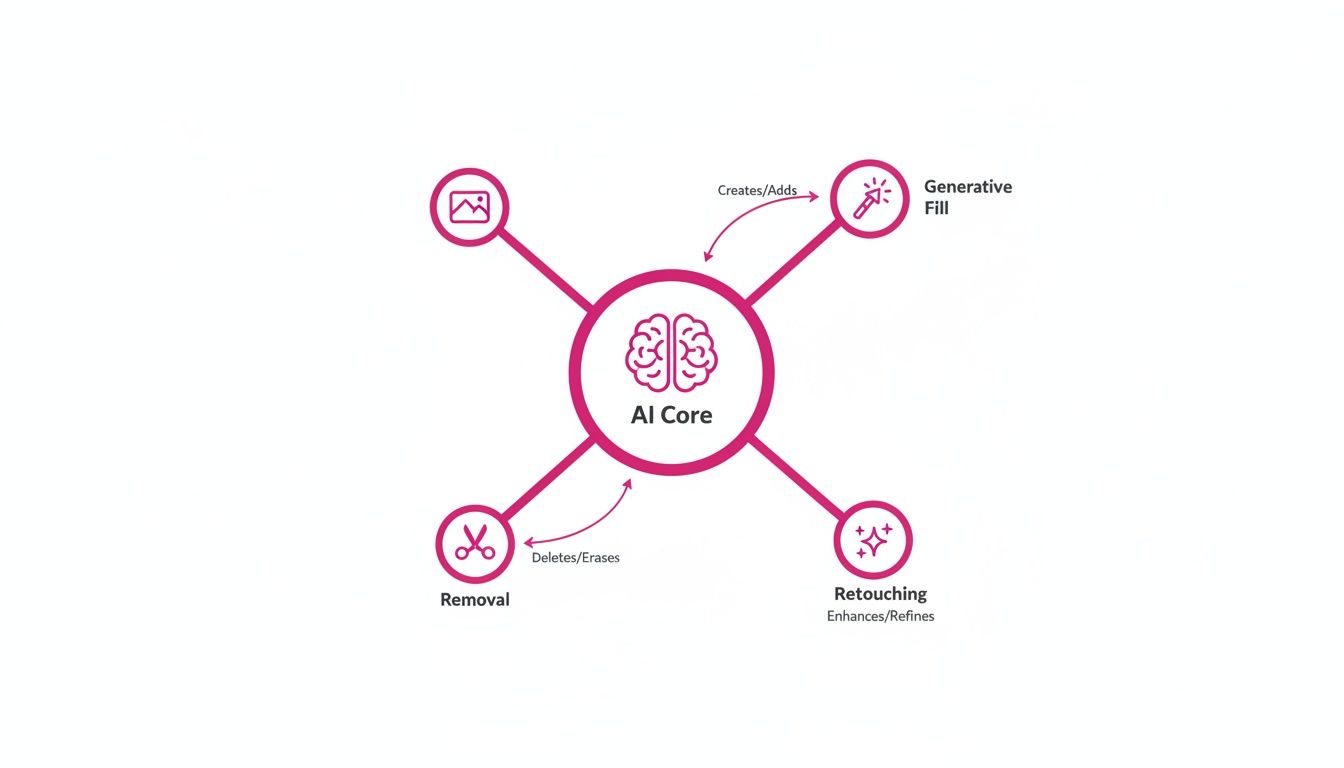
As you can see, the AI handles the heavy lifting—like Generative Fill, object Removal, and automated Retouching—which are the exact tasks that bog down manual workflows and drain creative energy.
Quantifying the Difference
When we look at the final results, the contrast is stark. Alex’s manual effort took nearly 40 hours of highly skilled work. Ben, on the other hand, finished the entire project in just four hours. The difference isn't just about speed; it's about efficiency, consistency, and ultimately, cost.
Let's break down how these two approaches stack up against each other. The table below gives a clear, head-to-head comparison based on the factors that matter most to any business or creator.
Manual vs. AI Photo Editing: A Head-to-Head Comparison
| Factor | Manual Editing (e.g., Photoshop) | AI-Powered Editing |
|---|---|---|
| Time Spent | Roughly 40 hours for 50 images | Around 4 hours for 50 images |
| Required Skill | High (Expertise in masking, lighting, composition) | Low (Basic creative direction and prompting) |
| Consistency | Variable; depends entirely on human precision | High; AI applies styles flawlessly every time |
| Cost | High (Designer's hourly rate or salary) | Low (An affordable monthly subscription) |
This comparison makes it obvious: photo editing AI doesn't just make things faster. It opens the door for non-designers to get professional-grade results, completely flipping the script on the economics of creating content.
But What About Creative Control?
One of the biggest hang-ups creators have about AI is the fear of losing artistic control. It’s a fair question. Does automation just make you a button-pusher?
The answer is a hard no.
Modern photo editing AI works more like a partnership. It’s not here to replace your creative vision—it’s here to execute it faster. The AI handles the repetitive, technical stuff, leaving you to be the creative director.
You’re still the one calling the shots on what matters: the composition, the mood, the color story, and the final sign-off. You can tell the AI to generate a specific kind of background, then jump in yourself to fine-tune the placement or tweak the color grade. It’s a collaboration that lets you focus on the big picture instead of getting lost in the weeds of pixel-pushing.
Ultimately, the story of Alex and Ben isn’t about one method being "better" than the other in a creative sense. It shows that AI is a powerful equalizer. It gives individuals and small teams the ability to produce content at a scale and quality that, until recently, was only possible for huge companies with massive design departments. It levels the playing field for everyone.
Real-World Examples of Photo Editing AI in Action
Talking about the nuts and bolts of AI is one thing, but the real “aha!” moment happens when you see it solve actual problems. The magic of photo editing AI isn't just about the cool tech; it's how that tech helps real creators and businesses get things done every single day. So, let’s get out of the weeds and look at some tangible examples of this stuff in the wild.
From scrappy e-commerce startups to massive social media campaigns, AI has quickly become the silent partner that makes modern visual content possible. It eats up all those tedious, repetitive tasks that once drained budgets and schedules, putting pro-level results in reach for just about everyone.
The numbers don't lie. The market for AI photo editors is expected to rocket to $8.9 billion by 2034, and the AI product photography niche alone is projected to hit $5 billion by 2035. This explosive growth is a clear sign that businesses are ditching tedious manual work for smarter, AI-driven workflows. Autoenhance.ai has a great report that digs deeper into these photography statistics if you want to see the full picture.
Revolutionizing E-commerce Product Photography
For anyone selling online, product photos are your storefront, your salesperson, and your brand all rolled into one. Get them right, and you sell. Get them wrong, and you're invisible. The big challenge is producing thousands of crisp, consistent images that meet the unique specs for Amazon, Shopify, and social media.
This is where AI completely changes the game. Let's say you sell handcrafted leather bags.
- The Problem: You’ve got 50 new bags to launch. You need clean shots on a pure white background for your store, plus a bunch of lifestyle photos for your Instagram ads. Doing this the old way means days of shooting, editing, and staging.
- The AI Solution: You snap one good photo of each bag. With an AI tool, you can strip the background from all 50 images in one go. Next, you generate hundreds of new scenes just by typing what you want—a clean white backdrop, a cozy café setting, a minimalist studio.
- The Result: In less than an hour, you have a massive library of marketplace-ready shots and compelling lifestyle images. Everything is perfectly consistent.
This isn't just about saving time. It unlocks new marketing strategies. Suddenly, you can A/B test a dozen different backgrounds to see what converts best—a task that used to be a major project is now a quick experiment.
We walk through exactly how to do this in our guide to AI product photography, showing you how to get incredible shots step-by-step.
Scaling Social Media Content for Digital Marketers
Digital marketers are always fighting to feed the content beast. A single campaign demands a constant flow of fresh, thumb-stopping visuals, each one tweaked for a different platform and audience. Manually creating dozens of unique graphics for one promotion is a recipe for burnout.
A photo editing AI is like a force multiplier for your content team. Imagine a marketer launching a new summer drink.
- The Problem: They need 20 unique images for Instagram, another 20 for Facebook, and 10 for their email newsletter, all featuring the drink in different summery scenes.
- The AI Solution: The marketer uploads one high-quality product photo. Using generative AI, they can create endless variations: the drink sitting next to a sparkling pool, on a picnic blanket, or on a sun-drenched beach. Each scene can be generated in the perfect aspect ratio for Instagram Stories, Facebook carousels, and more.
- The Result: An entire campaign's worth of visual content is ready in minutes, not days. The brand stays fresh and active without the crazy costs of constant photoshoots or the slow pace of manual design.
Creative Projects for Hobbyists and Educators
AI photo editing isn't just for big business. It's a fantastic tool for sparking creativity and making educational projects more engaging and accessible for everyone.
For example, a teacher or parent can whip up custom learning materials in no time.
- The Problem: You want to create a fun set of animal-themed coloring pages for a classroom activity, but your drawing skills are a bit... limited.
- The AI Solution: Just type a simple prompt into a text-to-image tool, like "simple line drawing of a friendly lion, coloring book style" or "outline of a dolphin jumping, for kids to color."
- The Result: You can generate an entire coloring book's worth of unique, high-quality pages in minutes, ready to print.
From designing custom patterns to generating concept art for a story, AI gives anyone the power to bring ideas to life, no formal artistic training required. This democratization of creativity is one of the most exciting things about where photo editing AI is headed.
How to Fit Photo Editing AI Into Your Workflow
Diving into photo editing AI can feel like you're learning a whole new skill, but it's way more straightforward than you might think. Forget about mastering complicated software. The real goal is just to clearly explain your creative vision to a smart assistant who's ready to do the work.
Think of it as a simple loop: decide what you want, describe it, and let the AI take care of the tedious parts. The steep learning curves of old-school photo editors are gone. Today's tools are built for one thing: getting your ideas out of your head and onto the screen, fast.
This move toward simpler creative tools is why the market is exploding. Generative AI is expected to push the photo editing industry to a massive USD 229.6 billion by 2035. This isn't just hype; it's driven by real-world demand. On software review sites like G2, traffic to AI image editing tools has shot up by 441% year-over-year, mostly from e-commerce businesses desperate to create better product shots.
Step 1: Figure Out Your End Goal
Before you click a single button, the most important thing you can do is know exactly what you're trying to make. A clear goal is your roadmap—it guides every instruction you give the AI and ensures you get what you actually need. Don't think about tools or features yet. Just picture the final result.
Start with a simple, concrete objective. Here are a few examples to get your brain working:
- For an e-commerce store: "I need 30 product mockups for my new skincare line. Each bottle should be on a clean, marble countertop with soft morning light."
- For a social media campaign: "I need 15 cool images of our new sneakers for Instagram. I want them in different city settings, like against a graffiti wall or on a busy sidewalk."
- For an educational project: "I need to generate 10 simple, unique line-art coloring pages of jungle animals for my classroom."
A well-defined goal is the heart of a great prompt. The more specific you are about the final image you want, the better the AI can understand and deliver something you'll love.
Step 2: Generate Images with Plain English
Once you know your goal, it’s time to turn it into simple instructions for the AI. This is where people sometimes get stuck, thinking they need to become "prompt engineers." The truth is, modern AI is built to understand how people actually talk. If you can describe it, the AI can probably create it.
You don't need technical jargon. Just use clear, descriptive words. For that skincare product example, your prompt could be as simple as: "a sleek, white bottle of face serum on a white marble surface, with soft, natural morning light coming from the side."
The trick is to include the little details that help the AI "see" what's in your head. If you're ever feeling uninspired or need a hand polishing your descriptions, our free AI image prompt generator is a great way to get the perfect text for your project.
Step 3: Edit in Bulk with Batch Processing
Making one awesome image is great, but the real magic of AI is working at scale. That's where batch processing comes in. It lets you apply the same edit—like removing a background or adding a filter—to a whole folder of images at once. This saves a ton of time and keeps your brand looking perfectly consistent.
Let's go back to our e-commerce store. Instead of editing all 30 product photos one by one, you can use batch features to do it all in one go:
- Remove Backgrounds: Upload all 30 images and strip out their original backgrounds with a single click.
- Apply New Scenes: Generate that consistent marble countertop background and apply it to the entire set instantly.
- Enhance and Resize: Tweak the brightness and contrast for all images at once, then resize them for your website automatically.
This kind of workflow turns what used to be a multi-day project into something you can knock out in less than an hour. Many creators rely on advanced AI content generation tools to handle this kind of automation. By sticking to this simple three-step process—define, describe, and batch—you can go from a basic idea to a full set of professional images faster than ever.
Where Do We Go From Here?
If you think today's photo editing AI is impressive, just wait. We're quickly moving past simple touch-ups and entering an era where entire visual campaigns are spun up from a few lines of text. The tools of tomorrow won't just be smarter; they'll feel like a natural extension of our own creative process.
Imagine typing out a paragraph describing a new marketing video and watching it come to life, complete with dynamic scenes and your brand's unique style. Or picture creating hyper-realistic AI avatars to act as brand ambassadors, each one perfectly suited for different global markets. This isn't science fiction—it's the next logical step.
Your Creative Partner, Not Your Replacement
Let's get one thing straight: AI is here to amplify your creativity, not replace it. Think of it as a tireless assistant that handles all the tedious, technical grunt work. It’s the digital equivalent of mixing paints or prepping a canvas, freeing you up to focus on the big picture—the strategy, the story, and the truly innovative ideas.
AI automates the repetitive tasks that used to eat up hours, giving creators back their most valuable asset: time. Time for strategic thinking, for experimenting, and for focusing on being a creator, not just an editor.
This shift is tearing down the barriers to entry for producing incredible visuals. The global AI Image Editor Market is already on track to hit USD 8.9 billion by 2034. Some forecasts even suggest the broader market could balloon to an incredible USD 1.81 trillion by 2030. You can dig into these AI image statistics to see just how fast this field is exploding.
Embrace the Visual Revolution
The future belongs to those who learn to work with these intelligent systems, not against them. By bringing photo editing AI into your workflow, you’re not just hopping on a trend. You're putting yourself at the forefront of a fundamental shift in how we create. Now is the time to experiment, to push the boundaries, and to lead the charge into this exciting new chapter of visual content.
Your Questions About Photo Editing AI, Answered
Anytime a powerful new technology shows up, it’s natural to have questions. When it comes to photo editing AI, everyone from seasoned graphic designers to first-time creators is wondering how it all works and where it fits in.
Let’s cut through the noise and tackle the big questions head-on. My goal is to give you direct, practical answers so you can start using these tools with total confidence.
Will AI Replace Photographers and Graphic Designers?
Nope. The goal isn't replacement; it's collaboration. Think of photo editing AI as the most efficient assistant you’ve ever had. It’s built to take over the tedious, soul-crushing tasks—like cutting out a hundred product images from their backgrounds or removing tiny blemishes from a series of headshots.
This frees up creative pros to pour their energy into the stuff humans will always do better:
- Big Picture Vision: Dreaming up the core concept and artistic direction.
- Strategic Creativity: Figuring out how an image serves a larger brand or campaign goal.
- Human Connection: Actually talking to a client, understanding their vision, and bringing it to life.
The creatives who thrive won't be the ones replaced by AI. They’ll be the ones who master it. AI is a tool for amplifying your talent, not making it obsolete.
Is It Difficult to Start Using AI Photo Editors?
Not at all. In fact, one of the biggest wins for modern AI tools is how ridiculously easy they are to use. The days of needing to conquer the steep learning curve of traditional software like Photoshop are fading fast. You don’t have to become an expert in layers, masks, or confusing tool panels anymore.
Most of these new platforms are designed around plain English. You just describe what you want, and the AI makes it happen. Instead of painstakingly selecting a sky and fiddling with color sliders, you can just type, "make the sky look like a dramatic, stormy gray." That accessibility is the whole point—it opens up pro-level editing to absolutely everyone.
Can I Use AI-Generated Images for Commercial Purposes?
Yes, for the most part, you absolutely can. Leading photo editing AI platforms were built from the ground up with commercial use in mind. They’re designed to support marketers, e-commerce brands, and entrepreneurs. When you create an image, you’re typically granted full ownership and commercial rights to use it however you need.
That means you can confidently use your AI creations for all sorts of business needs, like:
- Social media ads and marketing campaigns
- E-commerce product photos for Shopify or Amazon
- Website banners and blog post illustrations
That said, it’s always smart to spend two minutes checking the terms of service for any tool you use. It’s a simple step that ensures you’re fully compliant and can use your images without any legal headaches later on.
Ready to stop editing one image at a time and start creating at scale? With Bulk Image Generation, you can produce hundreds of unique, professional-quality visuals in seconds. Describe your vision in simple terms and let our advanced AI handle the rest. Start generating for free today and see the difference for yourself!
