Create Stunning Visuals Instantly with a Fast AI Image Generator

Ryan Bennett • December 19, 2025
Unlock your creative workflow with a fast AI image generator. Learn expert prompting, bulk creation, and engine selection to produce quality visuals at scale.
Let's be honest, the demand for high-quality visuals is relentless, but the deadlines keep getting shorter. This is where a fast AI image generator stops being a novelty and becomes an essential part of your toolkit.
We’re talking about tools designed to create professional-grade visuals in seconds, not hours—transforming what was once a multi-day grind into a task you can knock out in minutes.
How Fast AI Image Generators Are Changing Creative Workflows
For marketers, designers, and e-commerce managers, these tools are a complete game-changer. Forget about slow renders and endless back-and-forth revisions; we're now able to produce commercial-grade images at a scale that was previously unimaginable.
This guide isn't about theory. It’s a deep dive into practical, actionable strategies for weaving these powerful tools into your professional workflow. The goal is simple: save a ton of time and multiply your output without ever compromising on quality.
The Sheer Scale of Modern AI Image Creation
The impact of this shift is staggering. By mid-2023, fast AI image generators were cranking out an estimated 34 million AI images every single day.
Think about that. Since 2022, over 15 billion AI images have been created. It took traditional photography nearly 150 years to reach a similar volume. That’s the kind of speed we're dealing with, thanks to platforms like Stable Diffusion, Midjourney, and DALL·E.
This incredible velocity has completely redefined workflows across industries:
- Marketing: Teams can now generate and A/B test dozens of ad variations in a single afternoon.
- E-commerce: Need lifestyle mockups or catalog images? You can create them without booking a single expensive photoshoot.
- Content Creation: A blogger or social media manager can produce a month's worth of unique illustrations in one go.
The real win here isn't just raw speed—it's the creative velocity it unlocks. When you can test a visual idea in 30 seconds, you’re free to explore bolder concepts and land on a better final product faster than ever.
Beyond Images: The Broader AI Creative Suite
This acceleration isn't just happening with static pictures. In the same way AI image generators have automated visual content, an AI video generator for ads is doing the same for motion content—automating the creation, editing, and scaling of video.
It’s all part of a clear trend toward automated, scalable creative production. The skills you pick up mastering a fast AI image generator, like prompt engineering and batch processing, are directly transferable to these new video and animation tools. It puts you right at the forefront of a major industry shift.
Choosing the Right Engine for High-Speed Generation
The model card for a popular engine like Stable Diffusion XL provides crucial details on its intended uses and limitations, helping you align its capabilities with your project needs. A quick review of this information can save you hours by ensuring you're using the right tool for the job from the start.
Your first big decision is picking the right engine. It’s a classic tradeoff: do you need flawless, print-ready visuals, or are you just trying to pump out rapid-fire concepts for social media? The model you choose directly impacts everything—generation speed, image quality, and how much creative freedom you have.
The Speed vs. Quality Tradeoff
Not all AI image generators are built the same. If speed is what you're after, look for models with names like "Turbo," "Lightning," or "Distilled." These are the stripped-down, supercharged versions of their larger, more complex cousins.
They sacrifice a little bit of nuance and fine detail, sure. But in return, they can crank out images in a fraction of the time. This makes them perfect for brainstorming or generating dozens of variations in the time it takes a full model to render just one. For instance, a full-sized Stable Diffusion XL model might take several seconds per image, but its SDXL Turbo counterpart can spit out a solid result in under a second. When you're generating in bulk, that difference is everything.
Generalists vs. Specialists
Next up, you need to decide if you want an all-purpose workhorse or a highly trained specialist.
-
Generalist Models: Think of tools like Stable Diffusion, DALL·E 3, and Midjourney. These are the jack-of-all-trades models, capable of creating anything from photorealistic portraits to abstract digital art. They’re your best bet for varied projects where you need a wide range of styles and subjects.
-
Specialist Models: These engines are trained on very specific datasets to master one particular task. For example, some StyleGAN models are unbelievable at creating hyper-realistic human faces. You'll also find specialized AI image generators, such as a baby AI generator, that are fine-tuned for niche use cases. If your project has a narrow focus—like creating character avatars or product mockups—a specialist model will almost always deliver higher quality and consistency faster than a generalist one.
Key Takeaway: For creative flexibility across diverse projects, go with a generalist model. But if you need top-tier quality and consistency for a single, repetitive task, a specialist model is the way to go.
AI Image Generator Performance Comparison
To really understand the performance differences, it helps to see the numbers side-by-side. The choice of model isn't just about personal preference; it's a strategic decision based on measurable performance data. This table breaks down some popular model types to help you match the right engine to your workflow.
| Model Type | Typical Latency (per image) | Best For | Quality Trade-off |
|---|---|---|---|
| Full Diffusion (e.g., SDXL) | 0.5 - 12 seconds | High-fidelity art, print-quality images | Slower generation, higher computational cost |
| Turbo/Distilled Models | 0.1 - 0.5 seconds | Rapid prototyping, social media content, bulk variations | Sacrifices fine detail and some nuance for speed |
| Specialist (e.g., StyleGAN) | Under 0.3 seconds | Hyper-realistic faces, character avatars, mockups | Highly limited to a specific domain (e.g., only faces) |
| API-Based (e.g., DALL·E 3) | 2 - 15 seconds | Ease of use, complex prompt understanding | Slower, less control over generation parameters |
As you can see, the latency can vary dramatically. A turbo model that slashes generation time by 3 to 10 times can turn an hour-long batch job into a ten-minute task, completely changing how you approach a project. A 5-second difference might seem small for one image, but it becomes a massive bottleneck when you’re trying to generate a batch of 500. That's the kind of math that separates an efficient workflow from a frustrating one.
Mastering Your Prompts for Speed and Consistency
The single biggest factor in getting great images from a fast AI generator is the quality of your prompt. It’s what separates a lucky guess from a predictable, professional result. A well-crafted prompt is your direct line to the AI, telling it exactly what you want and saving you from that painful cycle of endless re-rolls and tweaks.
Think of it this way: a basic prompt is a suggestion, but a detailed one is a blueprint. The more specific you are—covering the subject, style, lighting, composition, and even camera angles—the less the AI has to guess. That precision leads directly to faster, more reliable images every single time.
Structuring Prompts for Repeatable Success
The real unlock for speed is creating prompt templates. Instead of winging it every time you need an image, you can build a library of foundational prompts that already lock in your core style. Imagine you're running a social media campaign; your template would have your brand’s color palette and overall mood baked right in.
For instance, a solid template might look something like this:
- Core Subject: [Insert product or character here]
- Action/Pose: [Insert specific action]
- Setting: Minimalist studio, soft overhead lighting
- Style: Vibrant product photography, clean lines, high-resolution,
#FF6347accent color - Mood: Energetic and modern
By only swapping out the bracketed parts, you can generate an entire series of images that feel cohesive and on-brand. For anyone trying to produce visuals at scale, this templated approach is a non-negotiable.
A great prompt isn't just a description; it's a repeatable recipe. When you standardize your style and composition, you turn a creative process into a reliable production line—which is the whole point of bulk image generation.
The Power of Negative Prompts
Telling the AI what you want is only half the battle. You also have to tell it what you don’t want. This is where negative prompts are a lifesaver. These are simply instructions that explicitly banish unwanted elements from your image, saving you a ton of time on clean-up or re-rolls.
Some of my go-to negative prompts include:
blurry, grainy, low-resolutionextra limbs, deformed hands, poorly drawn faceswatermark, text, signatureugly, tiling, out of frame
Using negative prompts right from the start cleans up your images before they even exist. Generating professional headshots? Adding sunglasses, hats to your negative prompt ensures a consistent look without having to manually filter them out later. If you’re tired of seeing six-fingered hands, a strong negative prompt is your best friend.
Iterating and Refining Your Prompts
The final piece of the puzzle is what I call iterative prompting. It's the art of taking a prompt that works and making small, deliberate changes to create a series of related, yet distinct, images. Instead of starting from scratch for each variation, you just tweak a keyword or two. If you need a solid foundation to start from, you can play around with a free AI image prompt generator to see how small changes impact the final image.
Let's say you landed on a great prompt for a "futuristic cityscape at sunset." From there, you can iterate methodically:
- Swap
sunsetformidnightto instantly change the mood. - Add
flying vehiclesto dial up the complexity. - Change the style from
photorealistictoanimefor a completely different vibe.
This methodical approach lets you explore creative variations quickly and efficiently. When you build and refine a personal library of go-to prompts and templates, you can absolutely fly through your workflow with any fast AI image generator, guaranteeing every image is both high-quality and consistent.
Implementing Bulk Generation and Batch Processing
Generating images one by one is a massive bottleneck. Let's be honest, it's painful. True speed comes when you shift to a bulk generation pipeline, firing off a single command to create hundreds of images at once. This is where a fast AI image generator stops being a toy and becomes a serious asset for your workflow.
Instead of endlessly tweaking and typing individual prompts, you can set up a system that works from a simple CSV file. Imagine each row in that spreadsheet becoming a unique image—you could generate 50 product mockups on different backgrounds or an entire month's worth of blog illustrations in one shot.
Setting Up Your Bulk Generation Pipeline
The whole idea here is to automate the repetition. You're not creating a single image; you're defining a template and letting the system fill in the blanks with variables. This is the bedrock of high-speed, high-volume visual content creation.
A common workflow looks something like this:
- Create a Prompt Spreadsheet: Your first column might be
product_name, the secondbackground_style, and a thirdart_style. Super simple. - Use a Templated Prompt: The AI gets a base prompt like, "Product photo of a
[product_name], on a[background_style]background,[art_style]." - Run the Batch Job: The tool just reads each row, plugs the variables into your template, and spits out a corresponding image.
This systematic approach turns a manual chore into an automated system that works for you. It's a non-negotiable step if you need to scale up your content, whether you're creating visuals for a huge e-commerce catalog or a month's worth of social media. Using a dedicated bulk social media image generator makes this process even smoother since it's built for exactly this purpose.
Automating Post-Production with AI
The automation doesn't have to stop once the images are generated. Batch processing is just as critical for all the tedious post-production tasks. This is where you save countless hours of manual editing that would normally follow a big generation job.
Many modern tools now include AI-powered batch editors that let you apply changes across hundreds of images at the same time. This is a lifesaver for tasks like:
- Background Removal: Instantly strip the background from an entire product photoshoot in one click.
- Automated Resizing: Generate versions for Instagram Stories, Facebook posts, and website banners from a single master set of images.
- Consistent Enhancements: Apply the exact same color correction or sharpening filter to an entire batch to keep your brand looking consistent.
The infographic below breaks down a simple, repeatable process for structuring your prompts—which is really the first step in any successful batch job.
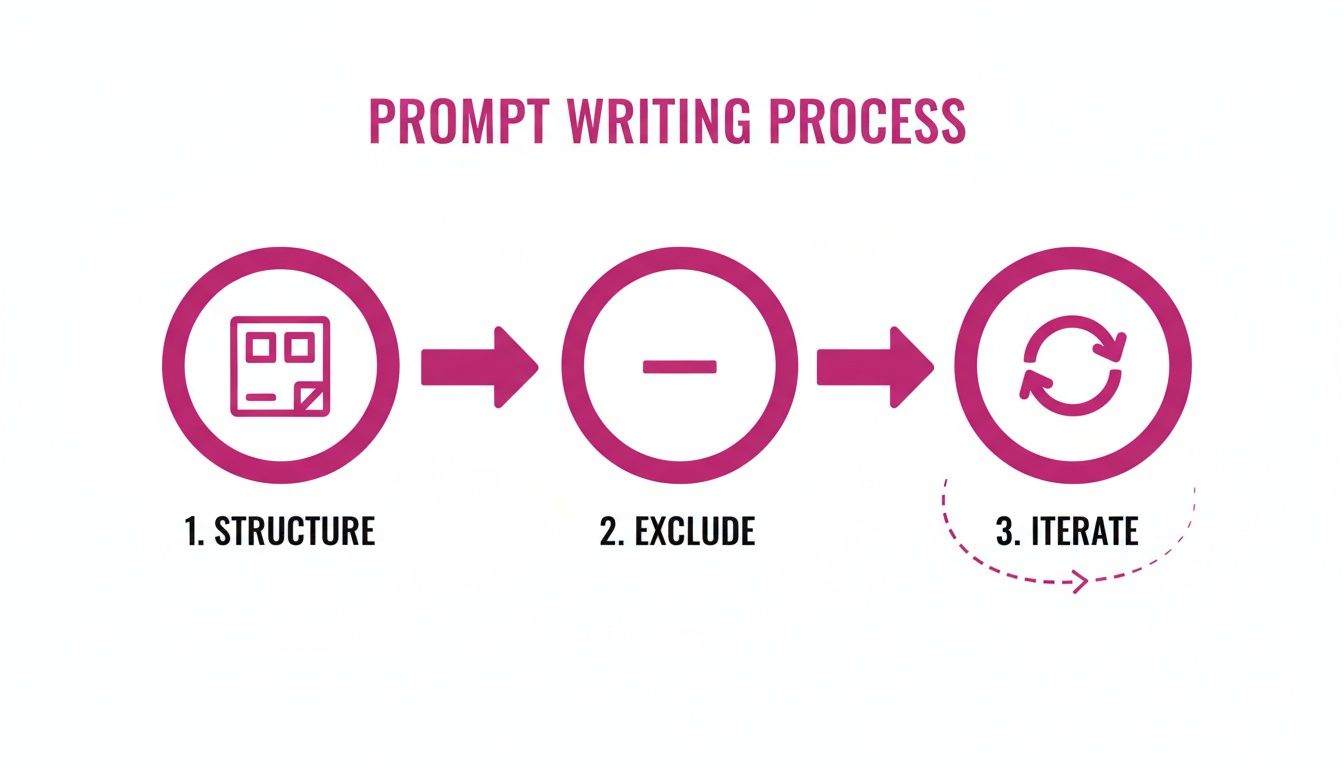
This simple loop—structuring, excluding, and iterating—is the engine that drives efficient bulk generation. It’s what ensures you get consistent, high-quality results every single time. And the industry is catching on fast.
In fact, the use of generative AI in marketing shot up from around 33% in 2023 to a staggering 71% in 2024. More than a third of those organizations are using it specifically for image production. You can dive deeper into these trends in this detailed report on generative AI image use statistics.
Practical Templates to Get You Started Fast
All the theory in the world doesn't help when you're staring at a blank prompt box. The quickest way to get results from any AI image generator is to jump in with proven, real-world templates that you can tweak for your own projects.
That's exactly what this section is for—a handful of tangible, copy-pasteable prompts and workflows for common business needs. Think of them as mini-tutorials, complete with model recommendations and prompt structures that deliver professional quality right out of the gate.
E-Commerce Product Mockups
Imagine generating consistent product shots without ever booking a photography studio. It's a massive time-saver, especially for digital products or lifestyle mockups. The secret is locking in your lighting, background, and camera angle to get a uniform look across your entire catalog.
For something like this, you'll want a model that excels at photorealism. A structured prompt is your best friend here.
- Prompt Template:
Vibrant e-commerce product photography of [Product Name], placed on a minimalist [Surface Type] in a brightly lit studio. Soft, even lighting, clean background, high resolution, 8K, commercial quality. - Example Usage:
Vibrant e-commerce product photography of a luxury skincare bottle with a gold cap, placed on a minimalist white marble slab in a brightly lit studio. Soft, even lighting, clean background, high resolution, 8K, commercial quality.
By keeping the core prompt identical and only swapping out the [Product Name], you guarantee every image looks like it belongs to the same professional shoot. If you need more ideas, this guide on how to create stunning digital product images using AI is packed with inspiration.
Ad Creative Variations
Everyone knows A/B testing ad creative is non-negotiable, but actually making dozens of variations is a total grind. With an AI template, you can generate a whole set of character poses, expressions, and settings in minutes.
The name of the game is controlled variation. You want the core elements to stay the same while you tweak specific details to see what your audience clicks on.
- Prompt Template:
Dynamic full-body action shot of a [Character Description] [Performing an Action], wearing [Clothing Style]. Bright, energetic colors, modern illustration style, plain background. - Example Usage:
Dynamic full-body action shot of a cheerful female runner in her 20s tying her shoelaces, wearing neon-colored athletic gear. Bright, energetic colors, modern illustration style, plain background.
From this single prompt, it's incredibly easy to iterate. Just change the action (running, stretching, looking at a phone) and you've got a full suite of ad creatives ready for testing.
The real power of templates is turning your creative vision into a repeatable process. Once you have a prompt that works, you can generate an endless supply of on-brand visuals with minimal effort, making your workflow incredibly efficient.
Cohesive Blog Illustrations
A consistent visual style is what makes a blog's brand memorable. Instead of endlessly scrolling through stock photo sites for an image that almost fits, you can generate a perfectly matched set of illustrations for every single article.
The trick is to define a unique artistic style right in your prompt and then apply it to everything you create.
- Prompt Template:
Minimalist line art illustration of [Concept], using a limited color palette of #0A0A0A and #FFC300. Clean lines, flat design, abstract, on a white background. - Example Usage:
Minimalist line art illustration of a lightbulb turning on, using a limited color palette of #0A0A0A and #FFC300. Clean lines, flat design, abstract, on a white background.
When you reuse this stylistic formula, you're building a signature look for your content. Every illustration, no matter the topic, will instantly feel like it belongs to your brand, strengthening your visual identity with every post you publish.
Common Questions About Fast AI Image Generation
Jumping into high-speed AI image creation, you're bound to run into some practical questions. Getting straight answers is the difference between a workflow that flies and one that grinds to a halt. We've tackled the most common hurdles people face.
This isn't just about tweaking settings. It's about the real-world stuff—like keeping your brand's look on lock or figuring out if "faster" really means "better." Let's get into it.
How Can I Keep My Images On-Brand?
This is probably the biggest concern I hear. When you're creating images in bulk with a fast AI image generator, how do you stop them from looking generic and all over the place? The answer is to create a simple "prompt style guide" for your brand. Think of it as your secret recipe.
Here’s what you should lock down:
- Specific Color Palettes: Don't just type "blue." Get specific. Use the exact hex codes like
#0A4ABFto nail your brand colors every single time. - Style Keywords: Define your look with a few go-to phrases. Are you "minimalist line art," "vibrant product photography," or "soft pastel illustration"? Stick to them.
- Consistent Seeds: Some tools let you reuse a seed number. If you're creating similar compositions, doing this can give you shockingly consistent results.
- Character References: Running a campaign with a recurring mascot or character? Use features that let you upload a reference photo. It's a lifesaver for keeping their look consistent across dozens of different scenes.
A little structure upfront saves you from the headache of guesswork later, ensuring every image feels like yours.
Are Faster Turbo Models Always the Best Choice?
Not always. Look, those "turbo" or "lightning" models are fantastic for brainstorming, getting concepts out fast, and churning through tons of images when perfection isn't the goal. They get you 80% of the way there in 20% of the time, which is incredible for iteration.
But for those hero images on your landing page or a graphic you plan to print? Slow down. The full, more detailed models almost always win. That extra bit of processing time can mean richer textures, more nuanced lighting, and way fewer weird artifacts.
My rule of thumb is simple: Turbo models for speed and iteration. Full models for the final, polished masterpieces. It's a trade-off that's usually worth it.
What Is the Biggest Mistake People Make in Rapid Image Generation?
Hands down, the most common mistake is firing off vague, one-line prompts and hoping for the best. It feels fast, but it’s a trap. You end up in a frustrating loop of re-rolling images over and over, wasting way more time than you saved.
The real shortcut is investing an extra 60 seconds to write a detailed, well-thought-out prompt. A good prompt is like giving the AI a perfect blueprint. It dramatically boosts your chances of getting what you want on the first try. Always include the subject, style, lighting, composition, and—this is critical—a negative prompt to tell it what not to do. That little bit of effort upfront pays off massively by cutting down on revisions and speeding up your whole project.
Ready to stop generating one image at a time and start thinking in batches? Bulk Image Generation gives you the tools to create hundreds of professional, on-brand images in seconds. Streamline everything from the prompt to post-production and see just how fast your creative workflow can get. Start creating with Bulk Image Generation today!