Create Personalized Coloring Pages with AI

Ryan Bennett • September 23, 2026
Learn to create unique personalized coloring pages with AI. This guide shows you how to use AI image generators to make custom designs for any occasion.
Personalized coloring pages aren't just a simple hobby anymore. They've become a genuinely meaningful creative outlet, letting you design pages that are truly yours. Forget the generic patterns you find in every store. Now you can color pages with your name, your dog, or even bring a special memory to life. It’s a huge leap from standard coloring books into a world where your creativity is the only limit.
Why Personalized Coloring Is Your Next Creative Project
There’s a clear shift happening. People are moving away from mindless pastimes and looking for activities that genuinely support their well-being. We’re all seeking ways to de-stress and express ourselves, and personalized art is the perfect fit. This isn't just about coloring inside the lines; it's about connecting with your own creativity on a much more personal level.
The numbers back this up, too. The global adult coloring book market, which is closely linked with the demand for personalized coloring pages, hit a value of USD 151.23 million in 2024. Experts project it will more than double to USD 320.45 million by 2030. This growth is largely driven by a rising awareness of the real mental health benefits, like stress relief, that coloring provides.
From Hobby to Meaningful Activity
So, what makes this so special? When you make a coloring page for a specific person or moment, the finished piece becomes more than just a colorful sheet of paper—it turns into a keepsake. Picture giving a child a coloring book where their favorite cartoon characters appear right alongside their own name. Or imagine creating a set of intricate mandalas for a friend that weaves in symbols that are special to them.
This is what elevates the mindfulness aspect of coloring. Because the subject matter actually means something to you, it's so much easier to get lost in the activity. This focus provides a much deeper sense of stress relief than you’d get from coloring in random, impersonal patterns. If you need a little help getting your imagination going, you can explore these 10 Innovative Ways to Spark Creativity.
There's a reason personalized coloring is catching on so quickly. It taps into several key human desires for connection, creativity, and mindfulness.
Key Drivers Behind the Personalized Coloring Trend
Here's a quick look at what's making this trend so popular.
| Driver | Impact on a User |
|---|---|
| Emotional Connection | Coloring images of loved ones or special memories creates a deeper bond with the art. |
| Unique Gifting | It transforms a simple gift into a thoughtful, one-of-a-kind present. |
| Therapeutic Benefits | Focusing on personally relevant subjects enhances mindfulness and stress relief. |
| Creative Expression | Users can bring their unique ideas to life instead of relying on pre-made designs. |
Ultimately, personalization makes the entire experience more engaging and memorable for both the creator and the person coloring.
My personal "aha!" moment came when I designed coloring sheets for my daughter’s birthday party. I created a different fantasy creature for each page and added one of her friend's names to it. The kids absolutely lit up seeing something made just for them. It turned a simple party favor into something they'd actually remember. For more ideas like this, check out our complete guide to creating personalized coloring pages.
Choosing the Right AI Image Generation Tool
Picking the right AI image generator is your first real step toward creating awesome personalized coloring pages. The market is flooded with options, but for this specific job, you need a tool that’s a rockstar at creating clean, crisp line art—not just another photorealistic image machine.
The secret is finding a platform that actually gets stylistic instructions. I've seen plenty of generators that are built for realism completely fall apart when you ask for simple, black-and-white outlines. You need one that can correctly interpret phrases like "coloring book page" or "vector line art" every single time. This is non-negotiable, especially if you're making pages in bulk for something like a kid's party or a small business.
Key Features to Look For
When you're trying out different tools, here are the three things I always focus on:
- Style Control: Can the AI reliably stick to a specific illustrative style? For instance, can it switch from generating simple cartoon animals for kids to intricate mandalas for adults without a fuss?
- Ease of Use: Is the interface intuitive? You shouldn't need a Ph.D. in prompt engineering to get a decent-looking page. A straightforward user experience is a must.
- Bulk Generation Capability: If you're planning to make more than just a handful of pages, a bulk creation feature is an absolute game-changer. This lets you produce dozens of unique images from one master prompt and a list of different subjects.
Comparing Popular AI Generators
Powerhouses like DALL-E 3, Midjourney, and Stable Diffusion are all impressive, but they shine in different areas. From my experience, DALL-E 3 is fantastic at understanding exactly what you want from your prompt, which makes it great for very specific or detailed requests.
You can see here how DALL-E 3 can produce totally distinct art styles from simple text prompts, which is exactly what you need for creating a variety of coloring pages. While you're looking into creating personalized coloring pages, it’s also worth seeing how different AI content generation tools can be used for other types of visual content, too.
The demand for these kinds of creative outlets is booming. By 2025, the adult coloring book market is on track to hit about USD 1.5 billion worldwide. A lot of that growth is driven by people looking for creative ways to manage stress.
At the end of the day, the "best" tool is the one that fits your project and how comfortable you are with the tech. Don't be afraid to try a few before you settle on one.
Crafting the Perfect AI Prompt for Coloring Pages

The real secret to generating incredible personalized coloring pages isn’t the AI tool itself—it’s the quality of your prompt. You have to move beyond a simple request like "a drawing of a cat." The trick is using specific, directive language that tells the AI exactly what kind of image to produce.
Think of it like commissioning an artist. You wouldn’t just ask for a picture; you’d clarify the style, the medium, and the subject. For AI, certain phrases are like cheat codes, steering the output toward the perfect coloring page.
The Magic Words for Line Art
To get consistent results, you need to bake specific keywords into every single prompt. These phrases tell the generator to ditch the color, shading, and complex textures, leaving you with nothing but clean, colorable outlines. I've found that starting with these terms creates a solid foundation for any coloring page project.
Here are the most effective phrases to sprinkle in:
- Coloring book page: This is the most direct command and often works like a charm all on its own.
- Clean line art: This tells the AI to focus on crisp, well-defined lines.
- Black and white: Explicitly removes color from the equation, preventing those pesky shaded or grayscale images.
- Vector outline: This pushes the AI toward a clean, graphic style with uniform line weight.
- No shading: A critical negative prompt to ensure the final image is purely an outline, ready for crayons or markers.
Pro Tip: Don't be shy about combining these terms. A prompt starting with "Coloring book page of a..., clean black and white vector outline, no shading" will almost always give you a better result than just "A drawing of a..."
If you ever hit a creative wall or just want to see what's possible, a specialized tool can be a huge help. Check out our free AI image prompt generator to get some fresh ideas and see how different elements can be mixed for fantastic results.
Controlling Detail and Personalization
Once you've nailed the basic style, it's time for the fun part: adding layers of detail and personalization. This is where you can dial the complexity up or down and weave in those special touches that make the pages truly unique.
For instance, to make a page simpler for a young child, you can add modifiers like "simple lines" or "for a kid's coloring book." For a more intricate design aimed at adults, you could ask for a "detailed mandala pattern" or an "intricate floral design."
Want to add a name? Be descriptive. "A friendly dragon holding a wooden sign that says 'LUCY'" gives the AI clear instructions. You can even get more creative, like "An intricate floral pattern with the name ANNA woven into the vines," which works surprisingly well with modern AI models. This is the kind of control that turns a generic image into a truly personalized coloring page.
Kicking Off Your First Bulk Generation Project
Alright, you've got your ideas. Now, how do you go from a single creative thought to churning out hundreds of personalized coloring pages? This is where the magic happens, and it’s simpler than you might think. The key is organizing your work with a basic spreadsheet, like Google Sheets or Excel.
Think of this spreadsheet as your project’s command center. It’s where you'll line up all your creative variables—names, themes, animals, you name it. This setup ensures every single coloring page you generate is unique and perfectly customized. No fancy software needed, just a simple table to keep everything straight.
This simple workflow shows just how easy it is to take a theme and turn it into a finished, personalized page.
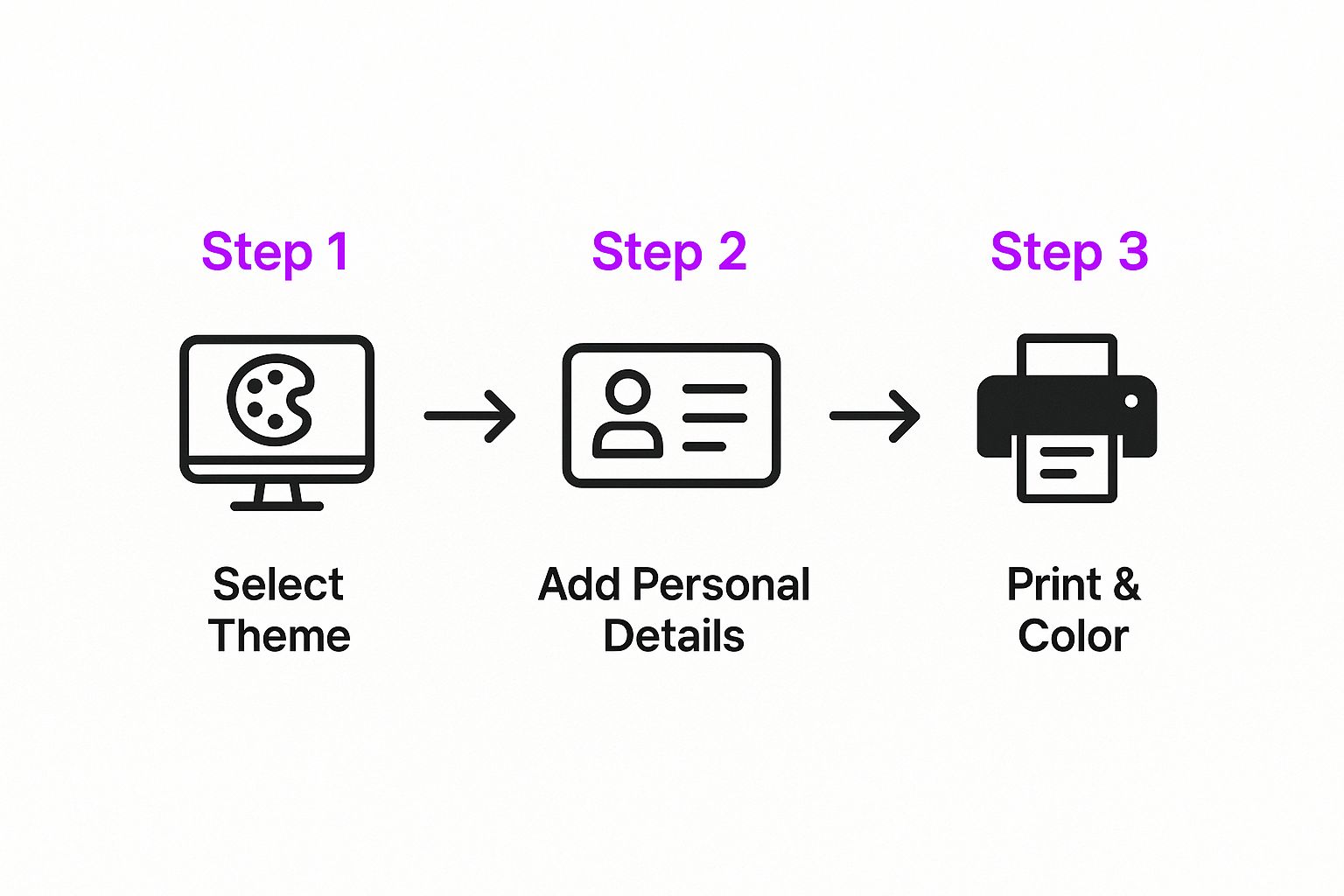
As you can see, the whole process boils down to picking your main idea, plugging in the personal details, and getting it ready for someone to color.
Building Your Spreadsheet
First things first, open a new sheet and lay out your columns. The goal here is to keep the fixed parts of your prompt separate from the parts that will change. I’ve found a three-column setup works great to start:
- Variable 1: This is perfect for names like "Chloe," "Leo," or "Maya."
- Variable 2: Use this one for your main subjects—think "astronaut," "dinosaur," or "unicorn."
- Final Prompt: This column will automatically combine your base prompt with your variables from the other columns.
Let's say your master prompt is something like: Coloring book page of a cute [Variable 2] with a sign that says '[Variable 1]', simple lines, black and white vector outline, no shading.
With a straightforward spreadsheet formula (like CONCATENATE in Google Sheets), you can instantly generate dozens or even hundreds of unique prompts. This little trick is the engine behind your entire bulk creation process, saving you from mind-numbing manual work. Once your list is ready, you just copy and paste the prompts directly into your bulk AI generator.
A classic mistake I see people make is trying to get too fancy with their prompts right away. My advice? Start simple. Run a small test batch of 5-10 images using just one variable, like different animals. This quick test helps you make sure the AI is on the same page with your base prompt before you start adding more layers of personalization.
This organized method is the secret to producing a large volume of high-quality, personalized coloring pages without feeling like you're drowning in details. It turns what could be a messy, chaotic task into a smooth, repeatable workflow.
Polishing Your Pages for Printing

The AI has done the heavy lifting, but now it’s your turn to add the final human touch. A few quick refinements can elevate your pages from good to truly special.
Even the most sophisticated AI generators can sometimes leave tiny imperfections—think a stray pixel here or a line that doesn't quite connect there. Don't worry, you don't need to be a graphic designer to fix these.
User-friendly (and free!) tools like Canva or Photopea are perfect for these minor clean-ups. Just zoom in, erase any unwanted dots, or use a simple brush tool to complete a broken outline. This small bit of effort is what makes your final personalized coloring pages look clean, sharp, and professional.
Assembling Your Print-Ready Book
Once your individual images are looking pristine, it’s time to bring them all together into a single, cohesive document. The industry standard is a multi-page PDF, which works perfectly whether you're printing at home or sharing the file digitally. Most image editors and countless online converters can easily combine your JPG or PNG files into one PDF.
Here are a few pro tips I've learned for creating a polished final product:
- Add a Title Page: It sounds simple, but a dedicated first page with a title like "Chloe’s Magical Creatures" or "A coloring adventure for Liam" makes it feel like a real book.
- Check Page Orientation: Make sure every page is consistently set to either portrait or landscape. It’s a small detail that prevents printing headaches later.
- Optimize File Size: If you plan on emailing the file, look for a "compress PDF" function. This will shrink the file size, making it much easier to send. Our guide on the bulk image resizer has more great advice for managing your image files.
This attention to detail is what separates a fun hobby project from a high-quality, sellable product. In 2024, the market for adult coloring, which includes personalized coloring pages, exploded into a massive USD 2.5 billion global industry. Why? Because digital tools now empower anyone to create professional-grade items right from their desk.
And if you want to go all out and turn your collection into a physical book with a beautiful, professional binding? I highly recommend using professional book printing services to bring your masterpiece to life.
Common Questions About AI Coloring Pages
As you get your hands dirty making personalized coloring pages, you're bound to run into a few questions. The world of AI image generation is a blast, but it can feel like a bit of a maze at first. Let's clear up some of the most common hurdles so you can keep creating with confidence.
One of the first things people ask is about the legal stuff: can you actually sell the AI images you make? The short answer is: it all comes down to the terms of service of the tool you're using. Many platforms, especially the paid ones, give you full commercial rights to whatever you create. On the other hand, free or research-focused tools might have some strings attached, so always do a quick check of the fine print before you plan to use your pages for anything more than fun.
Getting the Best Results
Another common headache is getting the AI to cooperate with specific requests, like adding a name to a page or making sure a design is simple enough for a little kid. So how do you get it to listen?
-
Adding Names: This is all about descriptive prompting. Instead of just telling the AI to add a name, paint a picture for it. Something like, "A friendly dragon holding a sign that says MARK." If the text still comes out a little wonky—which can happen—just generate the image without it and pop the name in later with a simple tool like Canva.
-
Making It Kid-Friendly: The prompt is your best friend here, too. You'll want to use phrases like "simple lines," "for a child's coloring book," "bold outlines," and "no complex patterns." These act as direct instructions, telling the AI to tone down the complexity and create something perfect for crayons.
Here's the key takeaway: the more specific and descriptive your prompt is, the better your final image will be. Think of the AI as a very literal artist—you have to give it crystal-clear instructions to get the masterpiece you're imagining.
Choosing the Right Tools and Techniques
Finally, a lot of creators wonder which AI tools are really the best for making coloring pages. My experience shows that the top performers are the ones that are naturally good at illustrative or line-art styles.
Tools like Midjourney, especially with its Niji model for anime and illustrative looks, are fantastic. Stable Diffusion is another powerhouse if you use custom line-art models. And you can't count out DALL-E 3, which is amazing at understanding really detailed and complex prompts.
The most critical feature to look for is how well the AI understands commands like "coloring book page," "black and white outline," and "no shading." If a tool nails those instructions every time, you're well on your way to creating beautiful personalized coloring pages.
Ready to create stunning, unique images at scale? With Bulk Image Generation, you can produce up to 100 high-quality, personalized coloring pages in under 20 seconds. Start your creative project today!
