Creating Mechanical Concept Art with Modern AI Tools

Ryan Bennett • January 4, 2026
A practical guide to creating stunning mechanical concept art with AI. Learn prompting, composition, and workflow tips from real-world examples.
Mechanical concept art is all about dreaming up the machinery, vehicles, and robots you see in video games and movies. It’s where engineering logic smashes into pure artistic vision, giving birth to designs that are believable, functional, and just plain cool—long before anyone starts building a 3D model.
The Enduring Appeal of Mechanical Art
There’s just something about the gritty, complex world of mechanical design that grabs you. Whether it’s a colossal mech from a sci-fi epic or the intricate clockwork of a steampunk world, these designs fire up our imagination. They tell stories of power, conflict, and innovation through the visual language of gears, pistons, and exposed wiring.
This isn’t a new fascination, either. It has deep roots in the early 20th century, when artists were first trying to make sense of the massive changes brought on by the Industrial Revolution. In the art world, this turned into a full-blown celebration of machinery. Fernand Léger’s "mechanical period" from 1918 to 1923, for example, produced over 50 major works that transformed geometric machine parts into stunning visual poetry.
This artistic movement happened right alongside a 300% surge in mechanical engineering patents between 1900 and 1920, giving creators a tidal wave of new inspiration.
From Industrial Design to Digital Creation
Today, that same design language is still shaping our entertainment. The core ideas haven't changed, but the tools are a world apart. What once demanded years of painstaking technical drawing is now wide open to anyone, thanks to AI image generators. These tools let artists and designers do some amazing things:
- Bring ideas to life, fast. Instantly turn an abstract thought like "a retro-futuristic submarine" into a concrete visual you can work with.
- Explore endless variations. Churn out dozens of different takes on a single concept without having to start over from scratch every time.
- Open up creativity to everyone. Give people without a formal art background the power to create their own mechanical visions with incredible speed and detail.
The real magic of using AI for mechanical concept art is its knack for interpreting complex ideas. You can describe a machine’s job, its environment, and even its mood, and the AI will blend it all into a coherent design. It's less of a tool and more of a creative partner.
AI as a Modern Sketchbook
Don't think of modern AI platforms as a replacement for artists. Think of them as the most advanced sketchbook you've ever owned. They do the heavy lifting of rendering complicated machinery, which frees you up to focus on the big picture—the story, the style, and the feeling you want to create.
Instead of getting lost in the details of every last nut and bolt, you can iterate on high-level ideas, closing the gap between what's in your head and what ends up on the screen. To see just how much AI is reshaping creative work, check out our guide on AI image generation trends for 2025.
2. Turning Your Vision into an AI-Ready Concept
Great AI art doesn’t start with a prompt. It starts with a clear, well-defined vision.
Just telling the AI to make "a cool robot" is a recipe for generic results. The real magic happens when you can translate that spark of an idea into a detailed blueprint the AI can actually work with. Think of yourself as an art director briefing your most literal-minded assistant—every detail matters.
Are you picturing a gleaming, futuristic android? Or a rust-covered automaton pulled from a forgotten factory? Nailing down these specifics is the first step toward creating something truly compelling.
Defining Your Core Aesthetic
First things first, you need to lock down the specific sub-genre you're aiming for. "Mechanical art" isn't a single style; it's a huge universe of different looks, each with its own visual language and emotional weight.
Choosing an aesthetic gives you a foundational vocabulary. It hands you a ready-made set of keywords and visual cues that will become the backbone of your prompts.
Here’s a quick breakdown of some popular styles to get you started:
| Style | Core Elements | Color Palette | Example Prompt Keywords |
|---|---|---|---|
| Steampunk | Intricate brass clockwork, polished wood, steam-powered pistons, Victorian-era tech. | Warm browns, antique gold, copper, deep reds. | ornate brass gears, polished mahogany, glowing vacuum tubes, riveted copper plating. |
| Dieselpunk | Gritty, heavy machinery from the 1920s-1950s. Riveted steel, oily engines, raw power. | Muted earth tones, rust orange, gunmetal gray, oily blacks. | heavy riveted steel, grease-stained engine block, art deco chrome, exposed pistons. |
| Industrial Realism | Functional, modern-day machinery. Practical, worn designs emphasizing utility. | Cold grays, faded safety yellow, chipped paint, oxidized metal. | welded steel frame, hydraulic actuators, worn diamond plate, exposed wiring harness. |
| Cyberpunk | Sleek tech augmented with neon, holograms, and complex wiring. A blend of high-tech and urban decay. | Electric blues, neon pinks, deep purples, chrome, stark blacks. | glowing neon trim, holographic data display, carbon fiber plating, biometric sensors. |
Picking a lane like this early on saves a ton of time and helps the AI zero in on the exact vibe you're after.
This idea of blending technical detail with a strong artistic vision isn't new. Centuries before AI, Leonardo da Vinci's 15th-century notebooks were filled with meticulous engineering sketches for things like ball bearings and chain drives that were also beautiful works of art. This fusion was a cornerstone of the Renaissance, where Italy saw a 150% jump in patents for water-powered technology.
Building a Visual Mood Board
Once you have a style in mind, it's time to gather your references.
Fire up a tool like Pinterest or PureRef and create a digital mood board. Start collecting images that capture the textures, colors, shapes, and lighting you envision. Don't just look at other concept art—pull from real-world photos of old engines, weathered factory walls, or even insects with interesting exoskeletons.
Your mood board acts as your visual dictionary. When you're struggling to find the right words to describe a certain texture or lighting effect, you can just look back at your collected images. This process does more than just give you ideas; it actively sharpens your eye and expands the vocabulary you can use in your prompts.
This flow chart breaks down how a solid concept, rooted in real-world industrial design, feeds into the AI to produce better, more believable results.
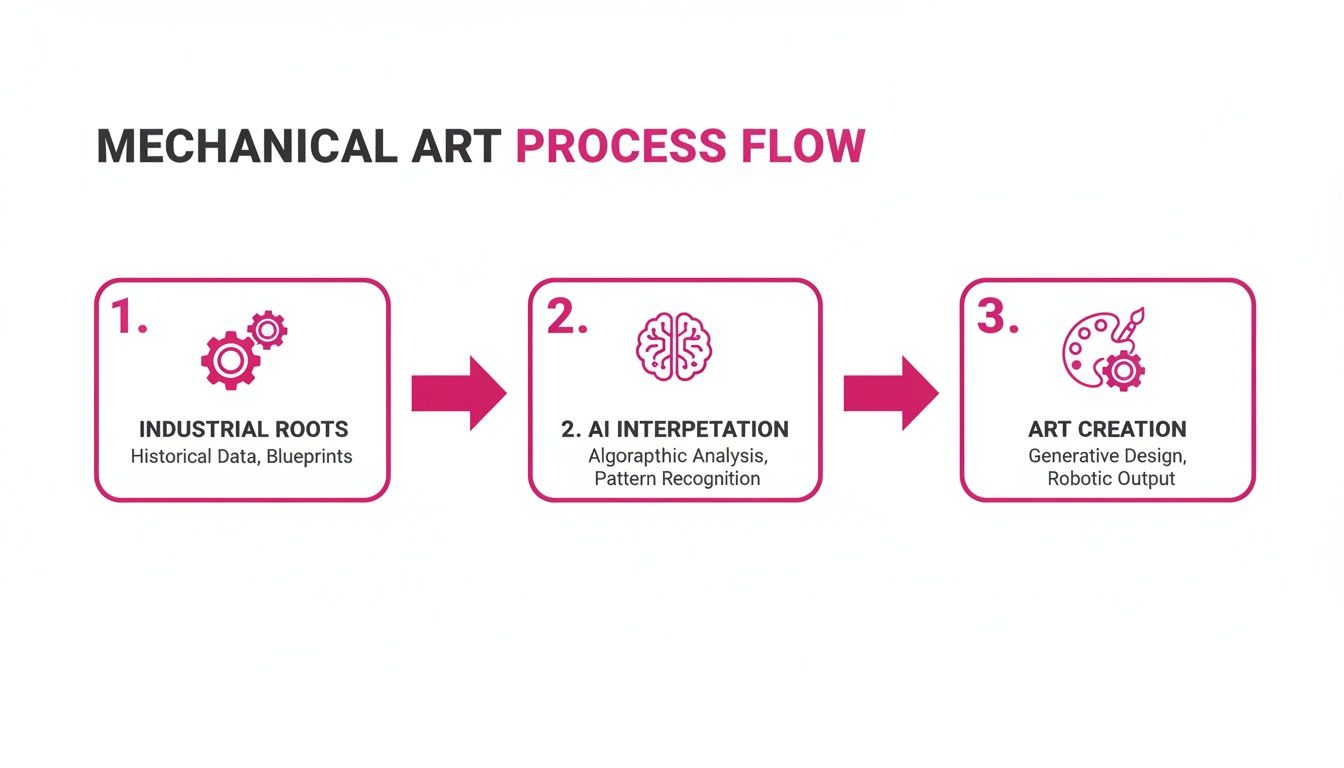
As you can see, a strong foundation in real-world design principles directly informs the AI’s interpretation, pushing it beyond generic concepts toward something truly creative.
From Pictures to Prompts
This is where the rubber meets the road. You need to turn your mood board into words the AI can understand. Look at your reference images and start writing down specific, descriptive phrases for what you see.
- Instead of "old metal," try "pitted iron casting with heavy rust bleed."
- Instead of "glowing lights," try "flickering amber vacuum tubes behind a grimy glass panel."
This is the level of detail the AI thrives on. The more specific your language, the more control you have over the final image.
If you ever get stuck trying to find the right words, a free AI image prompt generator can be a great way to brainstorm new keywords and phrasing. By breaking your vision down into its core components—material, form, condition, and environment—you can build a powerful, effective prompt piece by piece.
Crafting Prompts That Generate Incredible Machines
A powerful prompt is the engine behind your AI art. Think of it as the direct line between your creative vision and the AI's rendering power. If you want to move beyond generic outputs and start creating truly stunning mechanical concept art, you have to master the language of prompts. It’s about learning to be specific, descriptive, and strategic with every word you choose.
It’s less like writing a sentence and more like building a machine from individual parts. Each component of your prompt serves a distinct purpose. When they all work together seamlessly, the result is a cohesive and compelling image that actually matches what you had in your head.
Deconstructing the Perfect Mechanical Prompt
The best prompts I’ve written always follow a logical structure, layering details to give the AI a crystal-clear picture. While there isn't a single magic formula, a solid framework almost always includes a few key ingredients that just work. I’ve found that breaking my prompts into four core components consistently delivers the goods.
Here’s how I structure my prompts:
- Subject & Action: Start with the "who" or "what." Be as specific as you can. Instead of just "a robot," try "a colossal bipedal mech." Then, give it something to do, like "patrolling a desolate wasteland." This simple step immediately grounds the entire concept.
- Material & Texture: This is where your machine starts to feel real. Don't just say "metal"—describe it. Is it "brushed titanium with fine scratches" or maybe "pitted, rust-covered iron plating"? Tossing in words like "grimy," "oil-stained," or "sand-blasted" gives the AI tangible textures to render.
- Environment & Context: Where is this machine located? The setting adds story and mood. A mech in a "sun-scorched desert under a hazy sky" feels worlds apart from one in a "rain-slicked neon-lit city alley." This context is crucial because it informs the lighting and reflections on your subject.
- Artistic Style & Modifiers: Finally, you need to guide the AI's "hand." This is where you specify the overall aesthetic ("dieselpunk concept art"), the lighting ("dramatic cinematic lighting, volumetric haze"), the camera shot ("dynamic low-angle shot"), and the quality you're after ("hyper-detailed, intricate design, 8k").
By layering these elements, you move from a vague request to a detailed set of instructions. This precision is what separates a generic, AI-looking image from a piece of art that feels intentionally designed and directed.
Real-World Prompt Examples
Let's put this structure into practice. You'll see how subtle shifts in language can produce wildly different results for your mechanical concept art, even when the core subject is the same.
Example 1: The Sleek Android
Here, the goal is a clean, futuristic, and almost pristine machine. The keywords focus on smooth surfaces, advanced materials, and a polished look.
- Prompt:
Sleek humanoid android, polished chrome and white ceramic plating, glowing blue fiber-optic cables, standing in a sterile laboratory, minimalist design, clean reflective surfaces, cinematic studio lighting, hyper-realistic, 8k.
Example 2: The Weathered Automaton
Now, let's aim for the complete opposite. We want a machine that feels old, functional, and worn down by its environment. The prompt reflects this with words that suggest age and decay.
- Prompt:
Hulking industrial automaton, heavy riveted iron plates with deep rust bleed, exposed copper wiring, standing in an abandoned factory, grimy and oil-stained, harsh fluorescent overhead lighting, dieselpunk aesthetic, gritty textures, highly detailed.
The difference is night and day. The first prompt gives you a clean, high-tech vision, while the second produces a heavy, story-rich machine with a real sense of history. It just goes to show that your choice of adjectives is one of the most powerful tools you have. Understanding the broader picture of AI's impact on creative campaigns using ChatGPT can even offer some cross-disciplinary lessons for crafting more effective prompts.
Battle-Tested Prompt Templates for Flux 1.1
To get you started, here are some ready-to-use templates built on this exact framework. These are designed for newer models like Flux 1.1 and GPT-Image-1, which are fantastic at interpreting detailed, natural language descriptions.
Template 1: Steampunk Explorer
Photorealistic concept art of an ornate steampunk submersible, crafted from polished brass and rich mahogany, intricate clockwork gears visible behind a glass porthole, navigating a deep abyssal trench, bioluminescent flora casting a faint glow, volumetric light shafts piercing the dark water, dynamic underwater shot, Jules Verne aesthetic, hyper-detailed.
Template 2: Cyberpunk Drone
Concept art of a sleek reconnaissance drone, carbon fiber body with glowing purple neon trim, holographic data streams projecting from its optical sensor, hovering silently in a rain-soaked back alley of a futuristic metropolis, reflections on wet pavement, cinematic night lighting, blade runner style, detailed.
Feel free to copy, paste, and tweak these. Swap out the subject, change the materials, or adjust the environment to fit your own ideas. For more inspiration, check out this excellent list of the 25 best prompt ideas for an AI image generator to spark new creative directions. The key is to experiment and see how each word influences the final image, letting you gradually develop your own unique prompting style.
Art Directing Your Scene with Composition and Lighting
A killer prompt can generate an incredible machine, but even the best ideas fall flat without intentional art direction. This is where composition and lighting come in. By mastering a few key phrases, you stop being a passive observer and start directing the AI like a seasoned cinematographer.
This is how you transform a default render into a piece of compelling mechanical concept art.
Simply put, these elements give your image a story. They control what the viewer feels, where their eyes go, and how they interpret your creation. A few carefully chosen words make all the difference between a flat, uninspired image and a dynamic, emotionally resonant scene.
Mastering the AI Camera
One of the fastest ways to inject drama and scale into your designs is by taking control of the virtual camera. Left to its own devices, an AI model often spits out a straightforward, eye-level shot. To break out of that mold, you have to give it specific directorial commands.
Think like a film director. Do you want your machine to feel imposing and heroic? A low-angle shot is your best friend. Want to create a sense of vulnerability or give a top-down tactical view? An overhead shot gets the job done.
Here are a few powerful camera prompts to get you started:
Dynamic low-angle shot: Instantly makes your subject look powerful and monumental.Extreme close-up on intricate gears: Perfect for focusing on specific details and adding a sense of complexity.Wide-angle establishing shot: Use this to show your machine within its environment and convey a massive scale.Dutch angle shot: Tilting the camera adds a sense of unease, tension, or dynamic action.
Beyond just the angle, you can also control the camera's lens. Adding phrases like heavy bokeh background or shallow depth of field creates that professional, photographic look in an instant. This technique blurs the background, forcing the viewer's eye right where you want it—on your mechanical subject, making it pop.
Sculpting with Light and Shadow
Lighting is arguably your most powerful tool for setting the mood. The exact same mechanical design can feel heroic, sinister, mysterious, or sterile, based entirely on how you light it. Your prompt is the light switch, giving you complete control over the atmosphere.
A common mistake is just asking for "good lighting." The AI has no idea what that means. You need to be specific about the type and quality of light you're after. This is where your art direction truly shines.
Let's look at two lighting scenarios for the same subject: a heavy industrial mech.
Scenario 1: The Heroic Sentinel Imagine we want our mech to feel like a protector. We’d use lighting prompts that suggest hope, strength, and clarity.
- Prompt keywords:
Golden hour lighting, cinematic lens flare, strong key light, soft fill light, epic heroic pose. - The Result: The mech gets bathed in the warm, dramatic light of a sunrise or sunset. The light catches its edges, highlighting a powerful silhouette and making it feel like a noble guardian.
Scenario 2: The Sinister Hunter Now, let's flip the script and make the same mech feel menacing and dangerous. We'll use lighting that creates mystery and dread.
- Prompt keywords:
Harsh top-down lighting, deep shadows, cinematic rim lighting, volumetric fog, grimy industrial fluorescence, lurking in the darkness. - The Result: Here, the mech is partially hidden in shadow, with only sharp edges catching a cold, unforgiving light from above. This hides details and creates unease, turning our hero into a terrifying predator.
As you can see, the subject never changed, but the entire story did.
Creating a Balanced Composition
Finally, you need to guide the AI toward a visually pleasing arrangement. While models have gotten much better at composition on their own, they can still produce cluttered or awkwardly framed images. You can easily steer them with a few simple terms.
Use phrases like minimalist composition to create clean images with lots of negative space—perfect for showcasing a single, killer design. On the other hand, try asymmetrical balance to create a more dynamic and visually interesting layout. If you want a classic, stable feel, just ask for a symmetrical composition, centered subject.
By actively directing the camera, sculpting with light, and guiding the composition, you elevate your role from a simple prompter to a true art director. This is how you create mechanical concept art that doesn't just look cool—it tells a story.
Scaling Your Ideas with Batch Generation
Creating one perfect piece of mechanical concept art is a victory. But what about generating a hundred distinct variations in just a few minutes? That's how you really kick your creative workflow into high gear. Shifting from single images to batch creation is a fundamental change, turning what was once a slow, methodical process into a rapid-fire exploration of ideas.
This is especially true when you're developing a whole suite of assets for a project. Let's say you're designing a series of enemy drones for a game. Each one needs to feel like it belongs to the same family, but with its own unique details. Prompting each variation by hand would be incredibly tedious. Batch generation automates this, letting you explore dozens of possibilities while you go grab a coffee.
From One Concept to an Entire Fleet
The real magic here is the ability to scale your creativity without watering down the quality. Instead of getting bogged down in repetitive prompting, you can stay focused on the bigger picture—the overall vision. This approach is a lifesaver for:
- Character Design Sprints: Generate 50 different takes on a single character brief, then cherry-pick the strongest designs that emerge.
- Environmental Concepting: Quickly produce a dozen different lighting conditions or atmospheric effects for the same sci-fi city block.
- Asset Production: Create a full set of themed props, from weapons to machinery, all while ensuring a consistent aesthetic.
This is a massive leap from where AI art started. Think back to early pioneers like Harold Cohen's AARON program in 1973, which created over 1,000 unique images by 1980. That was groundbreaking then. Today, a game studio might need 500 mechanical concepts, and tools like Bulk Image Generation can slash the production time for 100 images from days to mere seconds. This can cut down manual prompt engineering by 90% and slice post-production time in half with integrated batch editing features.
Smart Workflows for Post-Production
The efficiency doesn't stop once the images are generated. A proper batch workflow extends right into post-production, which is where some of the biggest time savings really happen. Modern platforms now have built-in batch editing tools that let you apply changes to your entire collection of images at the same time.
Just think about the manual labor this wipes out. No more opening each image one-by-one to make routine edits.
The goal is to offload the repetitive, soul-crushing tasks to the machine. This keeps you in a creative headspace. It's not about replacing the artist; it's about giving the artist better tools to execute their vision at scale.
Some of the most common batch editing functions include:
- Background Removal: Instantly pull dozens of your mechanical designs off their generated backgrounds, prepping them for integration into larger scenes.
- Color Correction: Apply a consistent color grade across an entire set of assets, making sure they all fit your project's established color palette.
- Resizing and Cropping: Reformat 100 images for different social media platforms or project specs in a single click.
By marrying rapid generation with efficient post-production, you build a pipeline that’s both fast and incredibly flexible. It’s an approach that lets you spend less time on tedious manual work and more time doing what actually matters—refining your ideas and creating truly unforgettable mechanical concept art.
Common Questions About AI Mechanical Art
Jumping into AI for mechanical concept art always brings up a few familiar roadblocks. I've spent countless hours wrestling with these myself, so let's get you past them and on to the fun part—making incredible art.
How Do I Keep My Mechanical Designs Consistent?
This is the big one. You’ve finally generated a mech you love, but now you need to see it from another angle or with a different weapon. How do you keep it looking like the same mech?
The trick is to start with a rock-solid, highly detailed base prompt. Once you have that locked in, you only tweak one or two things at a time. Maybe it's the camera angle or a small detail like an antenna. If your tool supports it, using a specific seed number is a game-changer. It essentially freezes the AI's "randomness," giving you a stable foundation to build on. This is my go-to method for creating character turnarounds or a set of cohesive game assets.
The secret to consistency isn't finding some magic prompt. It's about a disciplined, iterative workflow. Nail your core concept first, then methodically explore variations. This is how you stop the AI from drifting away from your original vision.
How Can I Get More Realistic Materials?
Just typing "metal" into your prompt will give you something flat and generic every time. You have to paint a picture for the AI with your words.
Instead of "metal," try describing the story of the material. Think about things like "brushed aluminum with fine scratches," "pitted and weathered iron casting," or "corroded copper with a heavy green patina."
Even better, add words that imply texture and history, like "dented," "grimy," or "sandblasted." The real magic happens when you combine materials with lighting. A prompt for "rain-slicked titanium reflecting neon signs" tells a much richer, more believable story than just "titanium."
Can AI Actually Make Technical Blueprints or Orthographic Views?
I get asked this a lot. While AI is incredible for brainstorming and generating stunning concept art, it’s not quite ready to create the precise, clean orthographic views (front, side, top) you'd need for 3D modeling.
You can definitely nudge it in the right direction with prompts like "orthographic view of a sci-fi helmet, blueprint schematic, clean lines". But honestly, the results almost always need a heavy dose of cleanup in a real design program like Illustrator or a CAD tool.
For now, think of AI as your creative partner for the ideation phase, not a replacement for proper technical software.
Ready to stop generating one image at a time and start building entire fleets of mechanical marvels? With Bulk Image Generation, you can churn out hundreds of high-quality concepts in seconds and streamline your entire creative workflow. Try Bulk Image Generation for free and scale your ideas today!
