Mastering Image to Prompt AI for Creative Projects

Ryan Bennett • November 8, 2025
Unlock your creative potential with image to prompt AI. Learn how to turn any visual into a powerful text prompt and refine your workflow with expert tips.
Ever found an image that just clicks? The lighting, the mood, the whole vibe is exactly what you’re after. But trying to describe it to an AI art generator can feel like shouting into the void. That's where an image to prompt AI comes in.
Think of it as a reverse-engineering tool for creativity. You feed it a picture, and it spits back a detailed text prompt—the exact kind of language models like Midjourney or Stable Diffusion understand. It translates the visual into precise keywords.
Why Image To Prompt AI Is a Creative Game Changer
Let's be real: finding the right words is half the battle. Instead of fumbling around, trying to guess what combination of terms will get you close to your vision, an image to prompt AI acts as your personal creative translator. It deconstructs the image and hands you a ready-made blueprint.
But this is more than just a shortcut. It's an incredible way to learn. By seeing how an AI interprets a visual, you start picking up the vocabulary that actually moves the needle. You'll quickly learn the difference between prompts for "soft lighting" versus "dramatic shadows," or what keywords generate a "painterly style" instead of something "photorealistic."
Accelerate Your Ideation Process
We’ve all been there. Staring at a blank screen, stuck in a creative rut because we can't quite articulate the idea buzzing around in our heads. An image to prompt AI completely demolishes that barrier.
You can feed it a dozen different inspiration images and get descriptive starting points back in seconds. It flips the script on brainstorming, turning it from a slow, manual grind into a fast-paced collaboration with an AI partner. This is a big reason the creative AI space is blowing up.
In fact, the market for AI prompt marketplaces was valued at USD 1.41 billion in 2024 and is projected to skyrocket to nearly USD 11 billion by 2033. The image prompts segment is set to be the fastest-growing piece of that pie. If you want to dive deeper, you can check out the full research about the AI prompt marketplace.
By reverse-engineering visuals, you gain a deeper understanding of what makes an image compelling. It's like getting a peek behind the curtain of AI art generation, giving you the vocabulary to direct your own masterpiece.
Here’s how this simple tool can completely reshape your workflow:
- Deconstructs Inspiration: It instantly breaks down complex visuals into their core components—subject, style, composition, lighting, you name it.
- Teaches AI Language: You learn the specific, nuanced keywords that AI art generators actually listen to. No more guesswork.
- Sparks New Ideas: The generated prompts give you a solid foundation you can then tweak, combine, and build upon to explore completely new creative avenues.
How to Turn Your Image Into the Perfect AI Prompt
Let's get one thing straight: the quality of the prompt you get from an image to prompt AI tool is only as good as the picture you feed it. Think of it like giving directions. A clear, specific image is a perfect roadmap for the AI. A blurry, chaotic, or overly abstract photo? That's like mumbling your order and hoping for the best.
For standout results, you need an image with a clear subject and a distinct artistic style. A sharp photo of a lone lighthouse against a stormy sky will spit out a far more useful and specific prompt than a grainy, crowded concert photo ever could. When the AI doesn't have to guess what it's looking at, it can identify and label the important stuff with much greater accuracy.
Selecting Your Source Image
Before you even think about uploading, take a second to really look at the image you've chosen. A strong source photo does half the work for the AI, which gives you a much better starting point for your own creative projects.
Choosing The Right Image For AI Prompt Generation
To make it even clearer, I've put together a quick comparison of what makes an image a great candidate for prompt generation versus what's likely to give you a headache.
| Image Characteristic | Good for AI Prompts | Bad for AI Prompts |
|---|---|---|
| Subject Clarity | A single, well-defined subject (e.g., a person, building, animal). | Multiple, overlapping subjects with no clear focal point. |
| Composition | Strong, balanced composition (e.g., rule of thirds, leading lines). | Cluttered or confusing layouts that are visually noisy. |
| Lighting | Distinct and intentional lighting (e.g., golden hour, dramatic shadows). | Flat, washed-out lighting that hides details and mood. |
| Style | A clear artistic style (e.g., minimalist, surreal, watercolor). | Generic, low-quality snapshots with no identifiable aesthetic. |
Getting a high-quality prompt starts with a high-quality image. Choosing a photo with clear subjects, strong composition, and a defined style gives the AI the best possible chance to understand your vision and translate it into a powerful, descriptive prompt.
Once you’ve picked a winner, the next part is easy. Most tools, including a good free AI image prompt generator, have a simple drag-and-drop or upload button. Just select your file, and let the tool do its thing.
Understanding the Generated Prompt
After a few moments of analysis, the AI will serve up a text description. But this isn't just a simple caption—it's a structured collection of keywords and descriptive phrases that AI art generators are built to understand.
For example, if you upload a photo of a sun-drenched Italian coastal village, you might get a prompt that looks something like this:
"Vibrant Italian coastal village, pastel-colored houses on a cliffside, sun-drenched, sparkling turquoise sea, cinematic lighting, photorealistic, wide-angle shot, detailed architecture, midday sun."
This is prompt engineering in action. The AI has broken down the scene into its core components.
It identifies the subject (Italian village), sprinkles in specific details (pastel houses, turquoise sea), notes the lighting (sun-drenched, cinematic), and even captures the composition (wide-angle).
This generated text is your new starting block. From here, you’ll want to understand how to prompt AI to create an image and refine this text into something that perfectly matches your vision. It's ready for you to tweak, iterate, and get creative with.
Refining and Iterating on Your Generated Prompt
Getting a prompt from an image to prompt AI is a brilliant first step, but it’s almost never the final one. Think of it as a rough sketch or a block of marble—the basic shape is there, but now it’s your job to refine the details and bring your vision to life. This is where your creative instinct takes over.
The raw output gives you the essential vocabulary, but the real artistry comes from tweaking it. You'll want to add, remove, and adjust keywords to steer the AI exactly where you want it to go. This refinement process is what turns a generic AI image into something that truly reflects your unique style.
This little infographic breaks down the core idea perfectly.
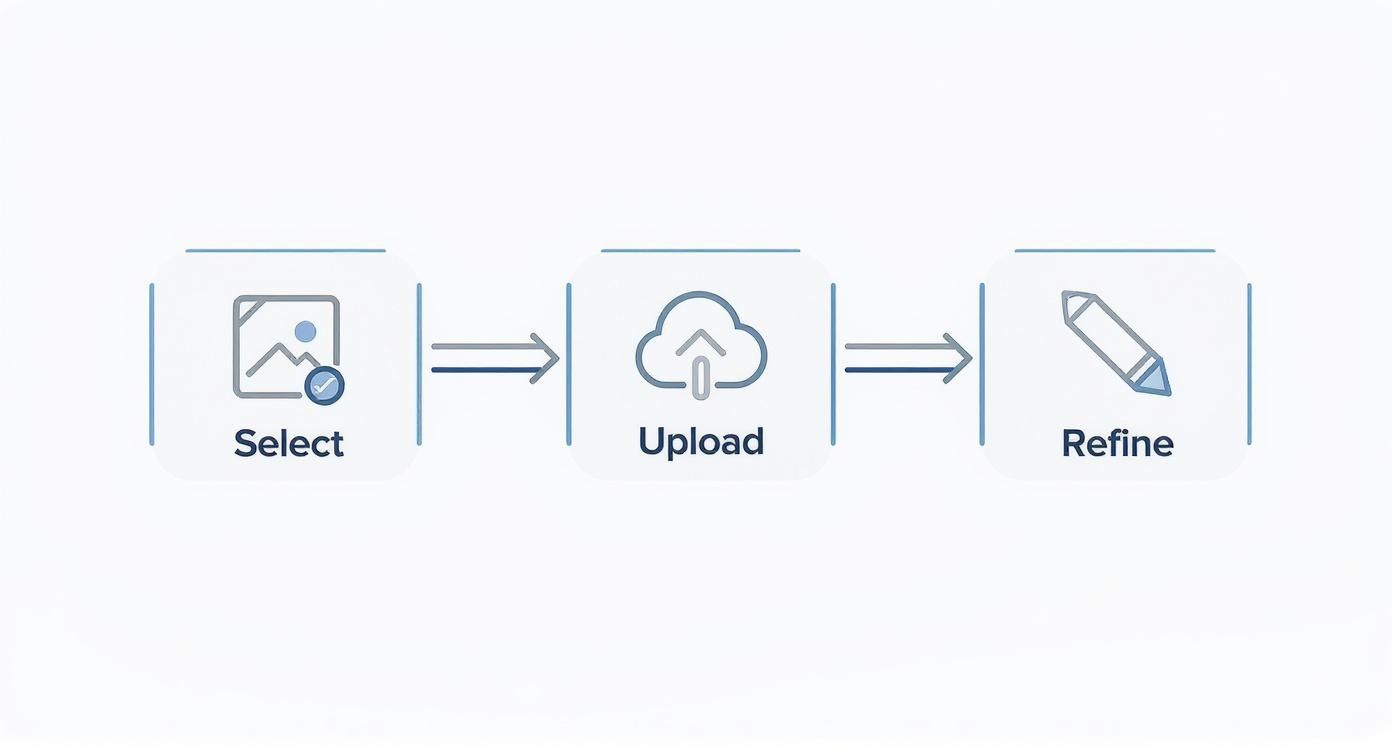
As you can see, the journey doesn't stop after the first generation. That "Refine" step is where you inject your creativity and take control.
Practical Refinement Techniques
Let's get into the nitty-gritty. One of the most powerful tools in your kit is the negative prompt. Say your image of a peaceful landscape keeps adding random people or text into the scene. Simple. Just add --no people, text to your prompt. This tells the AI exactly what not to include, giving you much cleaner results.
Another crucial technique is playing with keyword weights. Most AI generators let you give certain words more oomph. For instance, in a prompt like "a tranquil forest, vibrant green leaves, soft morning light," you might want the color to really pop. You can often do this with syntax like (vibrant green leaves:1.5) to give it 50% more importance than everything else.
The goal isn't just to perfectly describe the original image, but to use its DNA to build something new. Swapping just one or two stylistic keywords can completely transform the mood and medium of your final piece.
Swapping and Experimenting
Here’s where the fun really begins. Don't be afraid to just mess around and see what happens when you change stylistic terms. Take the AI's suggestion of "photorealistic" and swap it for something totally different—you might be surprised by how much the entire mood shifts.
Here are a few simple swaps I try all the time:
- Change "photorealistic" to "watercolor sketch" for a softer, more artistic vibe.
- Replace "cinematic lighting" with "noir lighting" to get those high-contrast, dramatic shadows.
- Swap "vibrant colors" for "muted earth tones" if you're going for a more rustic or somber atmosphere.
This cycle of tweaking, testing, and refining is the key to getting good at AI art. If you need some fresh ideas, browsing a list of the 25 best prompt ideas for AI image generators can give you a ton of stylistic terms to experiment with.
Ready to move past the basics? Let's get into the expert-level strategies that really separate the casual creators from the prompt masters. Once you stop relying on a single tool, a whole new world of creative control opens up.
A powerful technique I use all the time is running the same source image through several different image-to-prompt converters. You'll see right away that each tool has its own personality, its own "flavor."
One might get obsessed with the texture of a character's clothing, while another is a genius at capturing the mood and atmospheric lighting.
By comparing these different takes, you're essentially building a richer vocabulary for your final prompt. You can pull the most evocative phrases from each result and stitch them together into a master prompt—one that's way more detailed and specific than any single AI could've managed on its own.
Blending Prompts to Create Something New
This naturally leads to the idea of prompt blending. Let's say you have two completely different images you love. One is a killer character portrait with an amazing description of their gear, and the other is a moody landscape with unbelievable lighting.
Instead of just working with one, you can blend their prompts:
- Prompt A (The Character): "A weathered cyberpunk mercenary, augmented reality visor, worn leather jacket..."
- Prompt B (The Vibe): "Rain-slicked neon-lit alleyway, dense fog, reflections on wet pavement, cinematic..."
- Blended Prompt: "A weathered cyberpunk mercenary with an augmented reality visor and worn leather jacket, standing in a rain-slicked neon-lit alleyway with dense fog and reflections on wet pavement, cinematic..."
Just like that, you're combining the best elements from totally separate sources to create an original scene that never existed before.
The real art here isn't just about replication; it's about deconstruction and recombination. You're using AI to dissect visual DNA and then splicing it together to create something entirely new and compelling.
Fine-Tuning for Different AI Art Platforms
One last thing: remember that not all AI art generators speak the same language. A prompt that whips up a masterpiece in Midjourney might fall completely flat in Stable Diffusion. You have to pay attention to how each platform interprets specific words and phrases.
This is a huge deal, especially as the AI image generator market keeps exploding. It was valued at USD 257.2 million back in 2022 and is on track to hit USD 917.4 million by 2030. That growth, kicked into high gear by the pandemic's demand for digital content, means more tools and more nuances to learn. You can dig into more stats about the AI image generator market growth if you're curious.
Getting a feel for these platform-specific quirks is what will keep your work ahead of the curve.
Weaving This Workflow Into Your Creative Projects
This is where the rubber meets the road. An image to prompt AI workflow is more than just a neat trick; it's a practical bridge between a flash of inspiration and a real, tangible result. I've seen it solve real-world problems for creatives in a ton of different fields.
Let's say you're on a marketing team. You spot a competitor's ad that's absolutely crushing it, and you want to tap into that same vibe without outright copying them. Easy. Upload their visual, and the AI will spit out a prompt that breaks down the style, the lighting, and the overall mood. Now you have a recipe to create a fresh campaign that feels familiar but is entirely your own.
For Artists and Designers
I’ve seen concept artists use this exact method to speed up their world-building process immensely. You can take a simple photo of a forest, run it through the converter, and get back a whole series of detailed prompts. One might focus on "ancient, moss-covered trees," while another hones in on "dappled sunlight filtering through the canopy." It allows for incredibly fast visual exploration of a single idea.
This kind of practical use is a huge reason the AI text-to-image generator market is blowing up. It’s expected to jump from USD 401.6 million in 2024 to over USD 1.5 billion by 2034. The growth is just staggering.
This workflow isn't about replacing your creativity—it's about giving it a supercharger. It provides a solid starting point, cutting out hours of guesswork and letting you focus on the artistic direction and final polish.
Ultimately, bringing an image-to-prompt tool into your process saves time, sparks new ideas, and helps you lock in a consistent visual style. To really nail your creative projects, you need a solid set of tools. For some great ideas on building out your toolkit, check out this guide to the best UGC creator tools.
And if you're focused on product visuals, you'll definitely want to read our guide on how to create stunning digital product images using AI.
Common Questions About Image To Prompt AI
So, what’s the catch with these image-to-prompt tools? Most operate on a freemium model. You typically get a handful of free generations to test the waters. If you like what you see, paid plans usually unlock unlimited use, faster processing, and other cool features. It’s always a good idea to check the pricing page before you commit.
How Good Are The Prompts, Really?
Honestly, it depends. The quality of the prompt hinges on two things: the clarity of your original image and how smart the AI is.
If you upload a picture with a clear subject and a distinct artistic style—say, a cyberpunk portrait—you’ll likely get a surprisingly accurate prompt. But for more abstract or jumbled scenes, the AI might miss a few details. That’s where you come in. Learning to tweak and refine the output is what separates a decent result from a professional one.
Can I Use A Prompt From One Tool On Another AI Platform?
You bet. The descriptive parts of a prompt—like "a golden retriever in a field of sunflowers"—are pretty universal. The only thing you'll need to adjust is the platform-specific syntax. Commands for aspect ratio (
--ar 16:9in Midjourney) or style intensity might look a little different on a platform like Stable Diffusion. A quick tweak is usually all it takes.
Ready to stop guessing and start creating? Use the free AI tools from Bulk Image Generation to turn any image into a powerful prompt in seconds. Try it now at https://bulkimagegeneration.com.
