Create Amazing AI Comic Book Style Art A Practical Guide

Ryan Bennett • February 1, 2026
Transform your ideas into stunning visuals with our guide to the AI comic book style. Learn to craft perfect prompts and generate dynamic, professional art.
The comic book style is a powerhouse of visual language, defined by its bold linework, splashy color palettes, and get-right-to-it action sequences. It’s a timeless look that just works, grabbing attention instantly whether you're building a marketing campaign or just having fun with a personal project.
Why The Comic Book Style Just Clicks With People
So, what gives the comic book aesthetic its magnetic pull? It’s way more than just superheroes and speech bubbles. At its heart, it’s a masterclass in storytelling that packs emotion and energy into every frame with incredible efficiency. This style has a knack for boiling down complex ideas into visuals that are easy to digest and fun to look at.
This isn't some niche hobby, either. The universal appeal has fueled massive growth in the comics industry. In 2024 alone, the U.S. market hit an estimated USD 1,953.3 million, and it's projected to climb over USD 3,592.5 million by 2033. It’s a global cultural and economic force. You can get a closer look at the comic book market's impressive growth in the full report.
The Core Elements of Visual Impact
The style's power comes from a few key ingredients working together:
- Bold and Expressive Linework: Think thick, confident outlines. They create instant clarity and guide your eye exactly where the artist wants it to go. This isn't just about tracing shapes; it's about using the line itself to show weight, motion, and feeling.
- Vibrant and Strategic Color: Comic art often leans on saturated, high-contrast colors to set a mood or punch up the action. You see it in the classic primary colors of a hero or the dark, gritty tones of a noir mystery. Color is a narrative tool, plain and simple.
- Dynamic Action and Composition: Angled panels, streaking action lines, and dramatic perspectives all work to create a sense of movement that pulls you right into the scene.
Ultimately, the comic book style is all about visual efficiency. Every line and color is there for a reason—to deliver the biggest narrative punch in a single glance. That makes it an incredibly powerful tool for anyone trying to capture and hold an audience's attention.
Modern Tools for a Classic Look
In the past, getting this look right meant years of honing your drawing skills. Not anymore. Technology has completely changed the game. AI tools can now replicate these complex artistic elements with shocking accuracy, letting creators without a traditional art background produce professional-quality comic visuals.
For instance, an AI platform can generate all the assets you need in moments.
It’s never been easier to bridge the gap between a creative idea and a finished product. You can get that compelling comic book style without ever opening a complicated piece of software.
Translating Comic Book Art for AI Generation
To get incredible results from an AI, you have to learn to speak its language. Just telling it to "make a comic book style image" is a gamble. The real trick is to break that aesthetic down into specific, machine-readable instructions.
Think of yourself as an art director giving a brief to an artist who takes everything literally. We're going to dissect the visual DNA of comic art—linework, color, and texture—and translate it into keywords the AI actually understands. This is how you move from generic outputs to having precise, granular control over the final image.
Mastering the Art of Linework
Linework is the soul of the comic book style. It sets the mood, defines every shape, and carries a ton of emotion. The keywords you choose here will have a massive impact on what you get back.
Looking for that clean, sharp look of a modern digital comic? Use phrases like "clean line art," "precise inking," or even "vector illustration style." These tell the AI you want smooth, consistent outlines with almost no variation—perfect for a contemporary, almost animated feel.
But maybe you want something with a bit more grit and personality. To channel the heavy, expressive ink work of the Golden Age or the raw energy of an indie comic, try throwing in keywords like "heavy ink," "bold outlines," "rough hatching," or "expressive brushstrokes." This nudges the AI to add texture and weight to the lines, giving you a much more dynamic, hand-drawn vibe.
Pro Tip: Specific artist names are a powerful shortcut. Mentioning an artist like Jack Kirby will get you those heavy, kinetic lines, while referencing someone like Edward Gorey can produce images with fine, scratchy cross-hatching and a distinct gothic atmosphere.
To get the most out of your prompts, it helps to break down the comic book aesthetic into its core components. The table below outlines these key elements and provides the specific keywords you can use to steer the AI toward the exact style you're envisioning.
Core Comic Book Style Elements for AI Prompts
| Artistic Element | Description | Keywords for AI Prompts |
|---|---|---|
| Linework | The style of outlines and details, from clean to gritty. | "clean line art", "bold outlines", "heavy ink", "rough hatching", "expressive brushstrokes", "precise inking", "vector illustration" |
| Color Palette | The range and application of colors, from vintage to modern. | "limited color palette", "CMYK color palette", "vibrant primary colors", "digital painting", "cinematic lighting", "dark and gritty colors" |
| Texture & Effects | The subtle details that mimic physical printing processes. | "Ben-Day dots", "halftone pattern", "paper texture", "distressed", "vintage print effect", "screen tone" |
| Composition | The arrangement of elements within the frame to tell a story. | "dynamic action pose", "dutch angle", "cinematic shot", "wide angle", "close-up on face", "panel layout" |
| Speech Bubbles | The containers for dialogue or narration. | "speech bubble with text", "narration box", "thought bubble", "sound effect text" |
By combining keywords from these different categories, you can build a highly descriptive prompt that gives the AI a clear, multi-faceted brief. This approach is your best bet for generating images that truly capture the specific comic book feel you're after.
Choosing Your Color Palette
Color in comics is a core storytelling tool, not just decoration. Early comics were shaped by the limits of printing technology, which led to a distinct look defined by a restricted color count and dot patterns. That limitation became an iconic part of the entire aesthetic.
To capture that classic, vintage vibe, use prompts that reference the printing methods themselves:
- "CMYK color palette" pushes the AI toward the classic four-color process.
- "Limited color palette" is great for achieving a similar retro feel by reducing the complexity of the colors.
- "Vibrant primary colors" channels the bold, simple look of early superhero comics.
If you’re aiming for a more modern, digitally colored appearance, you’ll want to use keywords that suggest richness and depth. Phrases like "vibrant colors," "cinematic lighting," and "digital painting" will generate images with smoother gradients and a much wider, more nuanced range of tones. You can also guide the mood directly, with prompts like "dark and gritty color scheme" or "bright, optimistic colors."
Adding Authentic Texture and Effects
The final layer of authenticity often comes down to texture. These subtle details mimic the physical printing processes of the past, adding a tangible quality to the artwork that prevents it from feeling too clean or digitally sterile.
The most famous of these is the "Ben-Day dot" pattern, which was used to create colors and shading in old-school comics. Including this term is a surefire way to get that classic pop-art feel. Another crucial keyword is "halftone pattern," which uses dots of different sizes to simulate tones and gradients on printed paper.
These textural elements are absolutely essential for creating depth and a sense of realism. If you want to dive deeper into manipulating these kinds of effects, check out our guide on using an AI texture generator for even more fine-tuned control.
When you start combining specific instructions for linework, color, and texture, you’re no longer just asking for an image—you're building a comprehensive blueprint. This layered approach gives the AI a clear, detailed vision to work from, making sure the final result is a perfect match for the authentic comic book style you have in mind.
How To Write Prompts For Comic Book Style Images
Alright, this is where the magic really happens. A well-crafted prompt is the difference between a generic, forgettable image and something that looks like it was pulled straight from the pages of a graphic novel. It's all about layering your instructions—subject, action, setting, and style—to paint a crystal-clear picture for the AI.
Think of your prompt as a recipe. The more specific your ingredients, the more predictable and delicious the final dish. Let's get past the basic requests and start building prompts that consistently nail that perfect comic book style.
Building Your Core Prompt
The foundation of any great prompt is a solid, repeatable structure. Through tons of trial and error, I've found that organizing my prompts into four key parts gives me the most reliable results. This approach ensures you've covered all your bases, giving the AI a strong framework to work from.
A simple, effective structure looks like this:
- Subject: Who or what is the focus? Get descriptive.
- Action: What are they doing? Give it some energy.
- Setting: Where is this all going down? Set the mood.
- Style: What specific artistic elements are you after? This is crucial.
For instance, don't just ask for a "superhero." A much better subject is "a female cyberpunk detective with glowing cybernetic eyes." And instead of a generic "city," try a setting like "a rain-slicked neon alleyway at midnight." Every layer adds a vital piece of the puzzle.
Practical Prompt Examples
Let's put this structure into practice. Notice how layering in different keywords we talked about earlier can produce wildly different outcomes, even when the core subject is similar.
Example 1: Gritty Noir Detective
- Prompt:
A hardboiled detective in a trench coat, grim expression, standing under a flickering streetlamp, 1940s noir city street, heavy ink shadows, stark black and white, dramatic lighting, comic book style. - This one is all about mood and light to get that classic noir feel. Keywords like "heavy ink" and "stark black and white" are doing a lot of the work here.
Example 2: Classic Superhero Action
- Prompt:
Dynamic action shot of a superhero in a vibrant red and blue costume flying over a bustling metropolis, sense of motion, bold outlines, Ben-Day dots, vibrant primary colors, Golden Age comic book style. - Here, the prompt leans into color and texture to capture a specific era. "Ben-Day dots" is a killer term for getting that vintage printed look.
When crafting prompts, remember that the comic book industry itself has exploded with stylistic diversity. This isn't just an artistic choice; it's a reflection of publishers reaching new audiences in a massive global market. While physical comics led with USD 1,953.3 million in the US in 2024, digital formats are surging fastest at over 9% CAGR, grossing USD 5.20 billion globally. Your prompts can reflect this by calling for characters and scenes from all kinds of backgrounds. To dig into the numbers, you can read the full market analysis on Technavio.
If you're looking to really level up your prompting game, the advice in this guide on AI book cover design that actually sells has some fantastic insights that apply here, too.
Advanced Prompting Techniques
Once you've got the basics down, you can start weaving in more advanced elements to get even more control. These techniques are my go-to for dialing in the composition and kicking unwanted visual artifacts to the curb.
Controlling Composition And Angle
Think of your prompt as a director's shot list. By tossing in a few camera-related terms, you can dictate the entire perspective and composition of the shot. It's a game-changer.
Dynamic angleorDutch anglecreates a sense of tension or action.Cinematic shotorwide angleis perfect for those big, scenic views.Close-up on faceorextreme close-uplets you zero in on a character's expression.
These small additions have a massive impact, turning what might be a flat, centered image into something far more engaging and professional.
Using Negative Prompts
A negative prompt is your "don't do this" list for the AI. It's an incredibly powerful tool for cleaning up common issues and steering the generator away from things you don't want.
For comic art, I often use negative prompts like these:
--no photorealism, realistic, 3D render--no blurry, out of focus--no disfigured, extra limbs, bad anatomy
By explicitly telling the AI what to avoid, you reinforce the stylized, illustrated look you’re aiming for and seriously improve the quality of things like hands and faces. Don't sleep on negative prompts—they're just as important as your main prompt for achieving a polished comic book style. And if you ever feel stuck, a free AI image prompt generator can be a great way to brainstorm some new combinations.
Scaling Your Creative Workflow With Bulk Generation
Nailing a single, perfect comic book style image feels great. But what happens when you need ten? Or a hundred? Trying to build out a social media campaign, a set of branding assets, or an entire graphic novel one image at a time is a recipe for frustration. It's slow, tedious, and keeping the style consistent is a nightmare. This is where you need to scale.
The trick is to work smarter, not harder. Instead of plugging away at individual images, you can generate an entire series in one go. This doesn't just save a ton of time; it locks in a cohesive look and feel across all your visuals, turning a scattered creative process into a streamlined production line.
Setting Up Your First Batch Job
Let's walk through a real-world example. Imagine you're creating social media posts for a new sci-fi podcast. You need a consistent character—a cyberpunk detective—in different scenes around a neon-drenched city.
First, you need a strong core prompt that nails down the elements that won't change. This is your foundation.
- Character:
A grizzled male cyberpunk detective, trench coat, robotic prosthetic arm, neon city glow reflecting in his weary eyes. - Setting:
Rainy, hyper-detailed cyberpunk city at night, holographic advertisements flickering. - Core Style:
Bold outlines, cinematic lighting, gritty textures, modern comic book style.
With that foundation set, you can now create variations for the action. Just use a spreadsheet or even a simple text file to list out the different scenarios you want to see.
...leaning against a futuristic vehicle....analyzing a holographic clue....in a high-speed chase through aerial traffic....talking to a mysterious informant in a dimly lit bar.
When you feed these prompts into a bulk generator, the AI produces a unique image for each line while keeping your character, setting, and style perfectly consistent. You’ve just automated hours of manual work.
Streamlining Post-Production With Batch Edits
Getting the images generated is only half the battle. The old way meant opening every single image to make edits—a mind-numbing process where inconsistencies can easily creep in. Batch editing tools change the game completely. You can apply the same adjustments to your entire set of images at once, which is a massive win for efficiency. I’ve seen this cut post-production work by 50% or more.
Here are a few common batch edits that are perfect for a comic book workflow:
- Background Removal: Instantly pop your characters or key objects out from their generated backgrounds. This is a must for creating transparent PNGs you can drop into social media templates, website banners, or anywhere else.
- Color Adjustments: If the AI's colors aren't quite on-brand, you can apply a consistent filter or color adjustment across every single image. This ensures all your visuals share the same mood and tone.
- Upscaling: Need high-res images for printing or large displays? Upscale the entire set at the same time so everything is ready to go.
By combining bulk generation with batch editing, you create a powerful, repeatable system. This workflow allows you to maintain artistic consistency and brand alignment across dozens or even hundreds of images without the soul-crushing repetition of manual edits.
Organizing Your Generated Assets
Once the AI is done, you're going to have a lot of files on your hands. A little bit of organization here will save you a massive headache later. Before you even click "generate," decide on a clear naming convention.
A simple but effective structure is: [ProjectName]_[Character]_[Action]_[VersionNumber].png.
For our detective, a file might look like this: SciFiPodcast_Detective_AnalyzingClue_01.png.
This system means you can find any specific asset in seconds. It also makes it way easier to track different versions and pick the best shots for your final project. For anyone tackling really big projects, looking into a bulk social media image generator can offer even more powerful ways to manage high-volume creative workflows.
Okay, you’ve got a library of incredible comic book visuals. That’s the fun part. But the real magic happens when you put those assets to work in actual projects. Now that you've got a killer collection, let’s talk about how to turn all that creative energy into something tangible. Whether you're in marketing, education, or running a business, these images are way more versatile than you might think.
This is the simple process I follow to scale up production without losing my mind.
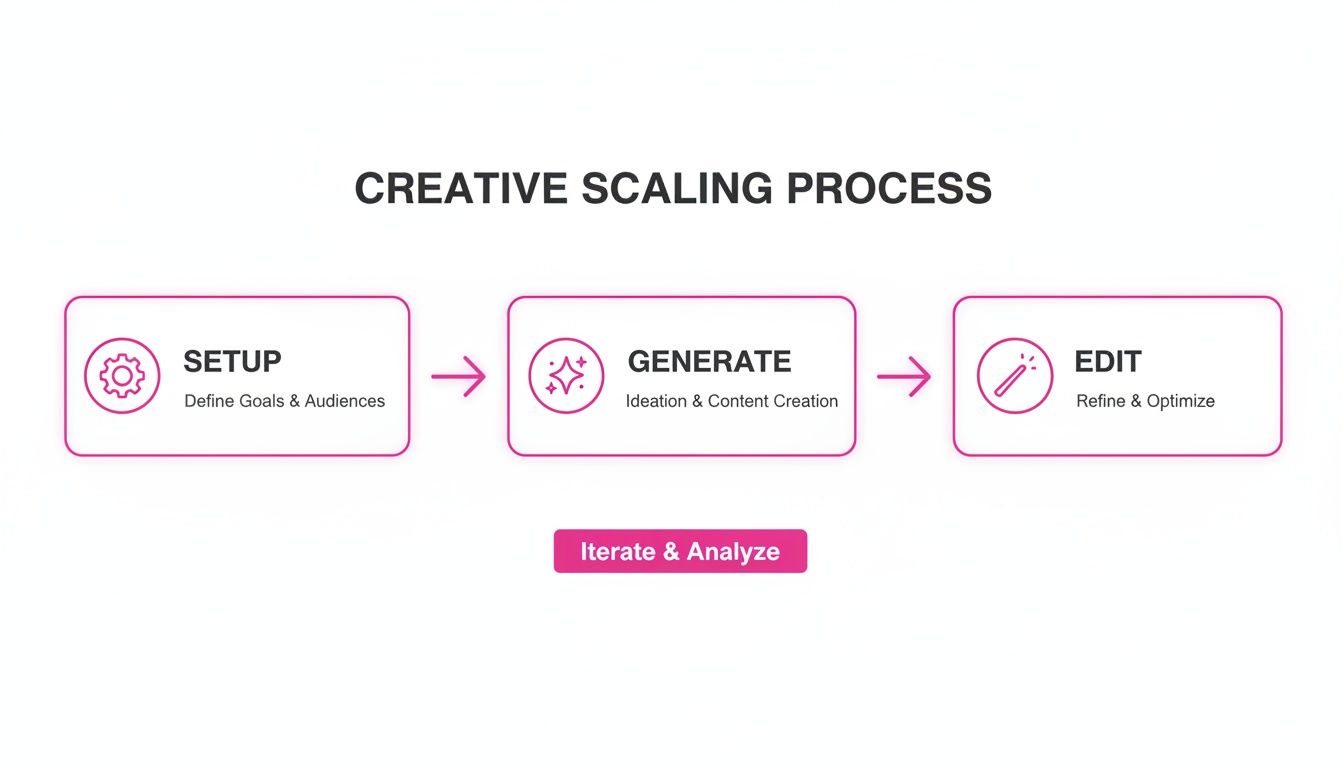
It all comes down to batching. Batch generation and batch editing are your best friends for keeping things fast and consistent.
The goal here is to stop thinking about one-off images and start thinking in campaigns and collections. That’s how you make your comic book assets look cohesive and professional, no matter where they show up.
Elevate Your Social Media and Ad Campaigns
In the world of marketing, the comic book style is a bona fide scroll-stopper. Those bold lines and punchy colors are impossible to ignore, which makes them perfect for social media carousels and ad creative that needs to grab eyeballs. Fast.
Picture this: you're launching a new product feature. Instead of a boring announcement, you create a ten-part Instagram carousel telling a mini-story about it. Using bulk generation, you can churn out all ten panels—with the same character and art style—in just a few minutes. It turns a simple update into a narrative that gets people swiping.
A few tips I've learned from running campaigns:
- Master Your Ratios: Don’t just generate squares. Use a vertical 4:5 ratio for Instagram and Facebook feeds to take up more screen space. For Stories, you absolutely need a 9:16 ratio.
- Leave Room for Copy: When you’re writing your prompts, think about the final design. Ask for compositions with negative space so you can easily drop in text or a call-to-action later.
- A/B Test Your Style: Don't just test copy; test the visuals. Generate the same scene but with different color palettes. Maybe one is bright and heroic, and the other is dark and gritty. See what your audience actually responds to.
Create Engaging Coloring Pages and Educational Content
The clean linework you get with a comic book style is practically begging to be turned into coloring pages. This is a brilliant, low-effort way to create a downloadable for your audience—perfect for teachers, parents, or anyone looking to offer something fun and interactive.
It’s surprisingly simple. Once your images are generated, just run them through a batch editing tool to strip out all the color, leaving only the black outlines. Save them as high-resolution PDFs, and you’re ready to go. You’ve just created a whole new product with barely any extra work.
Don't underestimate the power of print. Even with digital everything, non-digital comics still pulled in 70% of global revenue, hitting USD 12.14 billion in 2024. People still love tangible, interactive content like coloring books.
And once you’ve got a library of assets, you can start thinking bigger. Research the best platforms for webtoon creators and see where your new style could fit.
Develop Memorable Branding and Product Assets
This goes way beyond a few social posts. The comic book style can become a central piece of your entire brand identity. Since you can generate tons of variations so quickly, it’s ideal for creating a brand mascot or a set of spot illustrations for your website.
Think about a tech startup. They could create a friendly robot mascot in a comic style to walk users through the onboarding flow. By generating that mascot in dozens of different poses—waving, pointing, thinking—they build a huge library of on-brand assets to sprinkle across their website, emails, and pitch decks. It’s worlds faster and cheaper than commissioning every single illustration from scratch.
The same idea works for product mockups. You can generate stylized characters and place them next to your products for dynamic lifestyle shots without booking a single photoshoot. This is a game-changer for e-commerce brands trying to stand out from the sea of boring, white-background product photos. Your AI-generated library becomes a flexible, powerful toolkit for building a brand that people actually remember.
Common Questions About AI Comic Book Art
As you dive deeper into creating AI art, you're going to hit a few common roadblocks. It's one thing to generate a single amazing image, but building a consistent set of assets? That's a whole different ballgame.
Here are some straightforward answers to the questions I see pop up all the time from creators working in the comic book style.
How Can I Keep a Character Consistent Across Images?
This is probably the single biggest headache in AI art. You finally create a character you love, but getting them to show up the same way in a different scene feels like playing the lottery. The secret isn't luck; it's an ultra-specific, repeatable prompt.
Your best bet is to build a detailed "character sheet" prompt that you can just copy and paste for every new image. This locks in the core features that should never change.
- Nail Down the Unchanging Traits: Always, always include hair color and style, eye color, specific clothing ("a worn leather jacket with a silver phoenix emblem on the back"), and any unique identifiers like scars or tattoos. Be ridiculously specific.
- Use Seed Numbers: Some AI models let you use the same seed number from a previous generation. Think of this as telling the AI to use the same starting block of random noise, which often results in images that are stylistically and structurally very similar.
- Lean on Image-to-Image: For the most control, generate a perfect character portrait first. Then, use that image as a direct reference or guide for all the other shots. This gives the AI a powerful visual anchor to work from.
This layered approach—a detailed text prompt plus a reference image—is the most reliable method I've found for consistent characters. It cuts way down on the guesswork and helps the AI really understand who it's supposed to be drawing.
Can AI Generate Clear Text in Speech Bubbles?
The short answer: nope. Not reliably, anyway.
AI image generators are absolute wizards with visuals, but they fall apart when it comes to legible, coherent text. You'll usually get a mess of garbled letters or nonsensical words that look like some kind of alien script.
Trying to force the AI to handle text is a battle you won't win. The professional workflow is a simple two-step process:
- Generate your artwork without any text, but be sure to leave empty space in the composition for your speech bubbles or narration boxes.
- Import the finished image into a simple design tool like Canva, Adobe Express, or Photoshop to add the text and bubbles yourself.
This gives you total control over the font, size, placement, and—most importantly—clarity of your dialogue.
What Are the Best Practices for Fixing AI Hands?
Ah, the infamous AI hands. It’s a running joke for a reason. AI models often get confused by anatomy, spitting out hands with six fingers, bizarre proportions, or joints that bend the wrong way. The tech is getting better, but it's still a thing.
Here are a few tricks I use to deal with it:
- Prompt for Clever Poses: The easiest fix is to just sidestep the problem. Prompt for poses where the hands aren't the star of the show. Think "hands in pockets," "holding a coffee mug," or "arms crossed." A clenched fist is also way easier for an AI to draw than an open palm.
- Use Inpainting Tools: If you absolutely need visible hands, use an inpainting or "edit mask" feature. This lets you draw a box around just the messed-up hand and tell the AI to regenerate only that part. It might take a few tries, but it’s so much faster than re-rolling the entire image.
- Regenerate and Hope for the Best: Honestly, sometimes just running the exact same prompt a few more times will fix it. The tiny, random variations in the generation process can often solve the issue with zero extra effort.
How Do I Blend AI Art With My Existing Brand Designs?
Dropping a brand-new visual style into your established brand needs a bit of thought. You want the comic book style art to feel like a natural part of your world, not something bolted on. The trick is to guide the AI with your brand's visual language right from the start.
First, feed your brand's core color palette directly into the prompt. Something like, "using a brand palette of deep navy blue, electric orange, and off-white." You can also specify a style that matches your brand's vibe, whether that's "minimalist and clean comic line art" or "bold, energetic pop art."
And finally, make sure you generate your assets with transparent backgrounds. This is a critical step. It lets you easily layer the characters or objects onto your existing marketing materials, website templates, and social media posts for a seamless, professional look.
Ready to stop generating images one by one and start producing entire campaigns effortlessly? At Bulk Image Generation, we turn your creative ideas into hundreds of high-quality visuals in seconds. Generate your first batch of comic book style images today and see how easy it is to scale your workflow.
