Can ChatGPT Make Images? can chat gpt make images - A Quick Guide

Ryan Bennett • February 6, 2026
Ever wondered can chat gpt make images? Learn how AI creates visuals with ChatGPT and DALL-E 3, quick tips, and when pro tools boost scale.
Yes, ChatGPT can absolutely make images. If you have a Plus, Team, or Enterprise subscription, it comes with OpenAI's DALL·E 3 model built right in, ready to turn your text descriptions into unique, high-quality visuals.
Your Words Become Pixels: How ChatGPT Creates Images
Think of ChatGPT less like a simple chatbot and more like a creative partner. When you ask it to create an image, you're not just feeding a command into a machine. You're having a conversation with an AI that gets context, nuance, and even artistic intent. That’s the secret sauce that makes the whole process feel so natural.
The magic happens behind the scenes, where two powerful AI models work in tandem. ChatGPT acts as the "creative director," taking your conversational request—something like "a futuristic city skyline at sunset"—and thoughtfully refining it into a much more detailed and optimized prompt.
This new, supercharged prompt is then handed off to DALL·E 3, the "master artist" of the duo, which specializes in turning rich text descriptions into stunning visuals.
The DALL-E 3 Connection
At its heart, DALL·E 3 is a text-to-image diffusion model. It's a bit like starting with a canvas full of random digital noise—think of old-school TV static. Guided by the detailed instructions it gets from ChatGPT, DALL·E 3 slowly but surely refines that noise, step by step, until a clear and detailed image emerges that perfectly matches the description.
The best part? You don't need to learn any complex "prompt engineering" jargon. The whole thing feels like a simple conversation, letting you focus on bringing your idea to life instead of getting bogged down in the technical details. You just ask for what you want, and the AI handles the rest.
For a quick overview of how it works, check out this handy table.
ChatGPT Image Generation at a Glance
| Aspect | Details |
|---|---|
| Requirement | A paid ChatGPT Plus, Team, or Enterprise account. |
| Underlying Model | OpenAI's DALL·E 3 is integrated directly. |
| Process | You type a description in natural language. ChatGPT refines it into a detailed prompt for DALL·E 3. |
| User Experience | Conversational and intuitive. No special commands are needed. |
| Output | High-quality, unique images based on your text input. |
This seamless integration empowers you to ask for exactly what you envision and watch it materialize on your screen. It’s a powerful, intuitive way to create visuals without ever leaving your chat window.
The AI Magic Behind ChatGPT's Visuals
So, how does ChatGPT conjure up images from nothing more than a few words? It’s not exactly magic, but it is a clever partnership. Think of ChatGPT as a creative director—it takes your request, figures out what you really want, and then passes detailed instructions to its artistic partner, DALL·E 3, which is OpenAI’s powerhouse text-to-image model.
This integration is what turns ChatGPT from a text-only chatbot into a full-blown multimedia creator. It’s the bridge that connects your words to the pixels on the screen. The best part? You don't have to worry about the technical stuff; all the complex work happens behind the scenes.
From Noise to Masterpiece
The engine driving DALL·E 3 is a fascinating piece of tech called a diffusion model. Imagine a sculptor who starts not with a block of marble, but with a solid cube of static—pure digital noise. That's how a diffusion model begins.
Guided by the detailed prompt from ChatGPT, the AI starts chipping away at this static. It’s a process of refinement, turning random pixels into a coherent image, layer by layer. This continues until that chaotic canvas has been sculpted into the exact visual you asked for, whether it’s a photorealistic cityscape or a funky cartoon character.
Key Takeaway: The conversational approach is a game-changer. Instead of learning complicated commands or "prompt engineering," you can just talk to the AI. Describe your vision, and let it translate your idea into a prompt that DALL·E 3 understands perfectly.
Why ChatGPT Excels at Image Generation
This tag team between ChatGPT and DALL·E 3 is what makes the whole system so powerful. When the DALL·E 3 integration landed in late 2023, ChatGPT’s image capabilities really took off, moving it far beyond simple text chats.
Users in the OpenAI community quickly noticed that for the same prompt—say, a 3D cartoon character—ChatGPT often produced far more accurate and detailed results than using the DALL·E API directly. This comes down to ChatGPT’s knack for interpreting everyday language and automatically optimizing the prompt to get the best possible image.
The result is a tool that lets anyone, regardless of technical skill, create high-quality visuals. It completely closes the gap between an idea and a finished picture, opening the door for marketers, artists, and creators to produce unique content without breaking a sweat.
Of course, DALL·E 3 isn't the only model out there. To get a feel for the broader landscape, you can check out the capabilities of the Nano Banana 2 AI image generator. Understanding different systems helps you appreciate just how fast this field is moving. You can also explore our article on AI image generation trends for 2025 to see what’s coming next.
Creating Your First Image: A Step-By-Step Guide
Ready to turn your ideas into actual images? Making pictures with ChatGPT is surprisingly conversational. If you have a Plus, Team, or Enterprise subscription, you've already got everything you need to get started. The real skill isn't about learning complex commands, but about getting good at describing what you see in your head.
The whole process kicks off right inside the chat window you're already used to. No need to juggle different apps or find some other tool—the image generation is built right in. Let's walk through the exact steps to bring your first idea to life.
Starting The Creative Process
Going from a blank chat box to a finished image is way simpler than you might think. It really just boils down to starting a new chat and having a clear idea of what you want to create.
- Open a New Chat: Always start a fresh conversation in ChatGPT. This makes sure there's no leftover context from previous chats that could confuse your request. It gives you a clean slate.
- Write Your Prompt: This is where the magic happens. Describe the image you want with as much detail as you can muster. Think like you're a movie director setting up a scene—who's the subject, what are they doing, and what's the environment like?
- Specify the Style: This is a big one. Don't forget to tell it what artistic style you're going for. Do you want it to look like a real photograph or more like a painting? Use keywords like "photorealistic," "watercolor," "3D render," "anime style," or even "pixel art."
- Send Your Message: Just hit enter and let ChatGPT do its thing. It'll take a moment to process your request and cook up the visual.
This diagram breaks down the basic flow, from your typed-out prompt to the final AI-generated picture.
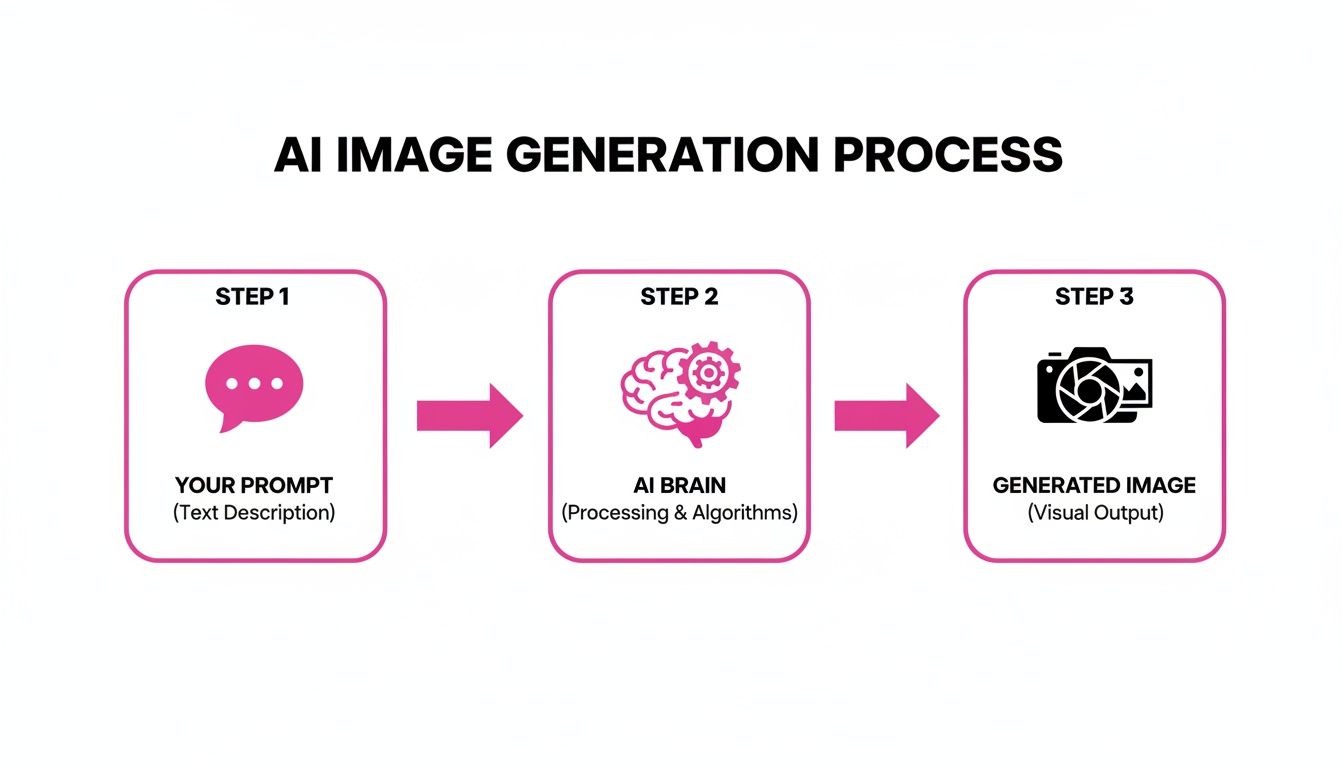
As you can see, the AI is essentially a translator, turning your everyday language into a visual reality.
From Simple Ideas to Detailed Scenes
Here's the bottom line: the quality of your image is almost entirely dependent on the quality of your prompt. A simple request gets you a simple result. But a rich, detailed description? That can produce something incredible.
Let’s look at a quick comparison:
- Simple Prompt: "a dog"
- Advanced Prompt: "A golden retriever puppy with floppy ears, playfully chasing a red ball across a sun-drenched grassy field, action shot, photorealistic."
The advanced prompt gives the AI specific instructions on the breed, the action, the setting, and the style. The result is a much more dynamic and compelling image. If you ever get stuck trying to come up with these kinds of descriptions, a free AI image prompt generator can be a huge help for inspiration.
Pro Tip: Don't be afraid to just try things. Mix and match styles, throw in specific lighting cues like "golden hour," or ask for a certain camera view like a "low-angle shot." The more specific you are, the closer the AI will get to what you're imagining.
Once your image appears, the conversation doesn't have to stop. You can ask for tweaks. For example, you could follow up with, "Okay, now make the ball blue," or "Can you change the background to a sandy beach?" This back-and-forth makes the whole thing feel more like a collaboration between you and the AI, letting you fine-tune the output until it's just right.
Putting AI Images to Work in the Real World
Alright, so you get how ChatGPT can conjure up images. Now for the fun part: putting those visuals to work. The ability to generate custom graphics on the fly is way more than a cool party trick; it's a legitimate tool that saves time, sparks creativity, and solves real problems for tons of professionals.
Whether you're in marketing or product design, the applications are immediate and honestly, pretty impactful.
This tech gives people the power to create one-of-a-kind visuals that, until recently, would have meant hiring a graphic designer or shelling out for pricey stock photo subscriptions.
For Marketers and Content Creators
In the breakneck pace of digital marketing, you need to be fast and original. That's where this comes in. ChatGPT lets marketers spin up visuals in seconds that perfectly match their brand's vibe and campaign goals.
- Social Media Graphics: Need a killer image for an Instagram post, like, right now? You can get it in seconds. Prompt Example: "A flat-lay photo of a steaming coffee mug, a notebook, and glasses on a rustic wooden table, minimalist style, with warm morning light."
- Blog Post Headers: Forget boring stock photos. Create a unique header that actually reflects what your article is about. Prompt Example: "A vibrant, abstract digital art illustration representing the concept of data connectivity and neural networks, in shades of blue and purple."
- Ad Visuals: You can quickly mock up different ad concepts to A/B test without bugging a designer for ten different versions.
And it goes beyond just general images. Niche tools are popping up for very specific tasks, like an AI meme generator that lets you tap into viral trends instantly.
For Business Owners and Entrepreneurs
If you're a business owner, think of ChatGPT as your personal visualization and branding assistant. It’s perfect for rapidly prototyping ideas, letting you see your vision come to life before you sink a ton of money into it.
Key Application: Business owners can use AI-generated images to quickly create website branding elements, product mockups, and even logos. This accelerates the initial design phase, allowing for more experimentation at a fraction of the cost.
Imagine mocking up a new product design without needing a 3D artist. Or what about creating a full suite of branding assets for a new venture in a single afternoon? It's completely possible now.
- Product Mockups: Get a feel for how a new product will look in the real world. Prompt Example: "A photorealistic mockup of a sleek, matte black water bottle with a minimalist white logo, sitting on a clean white background."
- Website Concepts: Visualize different layouts or hero images for your site before a single line of code is written. Prompt Example: "A clean and modern website hero image for a sustainable clothing brand, showing diverse models in a natural, sunlit environment."
The ease of use has been a game-changer. From educators creating coloring pages to marketers running campaigns, over 70,000 brands have already used ChatGPT for unique graphics. But there are still walls you'll hit. If you need to generate 100 professional-quality images in 20 seconds, you'll need a specialized platform built for volume, which can automate style, composition, and edits, often halving post-production time.
Understanding the Limits of ChatGPT Image Generation
ChatGPT's ability to create images on the fly feels almost like magic, but it’s not the right tool for every job. Once you get past the initial "wow" factor, you start to see the cracks, especially if you need visuals for professional projects. For creators who depend on consistent, high-volume output, some of these drawbacks are serious roadblocks.
One of the biggest headaches is stylistic consistency. Imagine you need five images of a cartoon fox for a children's book. You might get five completely different-looking foxes back—one might be fluffy and cute, another sharp and angular. Even with super-detailed prompts, getting a perfectly uniform style across a dozen images for a brand campaign or a character sheet is a massive challenge.
Navigating Content Policies and Unpredictability
Like any major AI platform, OpenAI has strict content policies. These rules are there for a good reason, blocking the creation of harmful images involving violence, hate speech, or public figures. But sometimes, an innocent prompt can accidentally trigger a filter, shutting down your creative flow.
Then there’s the sheer unpredictability of it all. AI doesn’t "understand" a fox the way we do; it just recognizes patterns from the billions of images it was trained on. This can lead to some truly bizarre results—a person with three hands, a dog with six legs, or text that looks like a forgotten alien language. While these glitches can be funny, they add extra time for fixing and re-rolling the dice.
The Biggest Hurdle for Professionals: ChatGPT's conversational, one-at-a-time design is perfect for casual fun. But for professional work that requires scale, this very design becomes its greatest weakness.
Simply put, the platform isn't built for bulk production. What if you need 200 unique product images for an e-commerce store? Or a full month's worth of social media graphics? Generating them one by one in a chat window is painfully slow and inefficient.
- No Batch Processing: You can't just ask for 50 variations of an image and get them all back at once.
- Manual Refinement: Each image has to be prompted, generated, and potentially tweaked individually.
- Time Sink: A task that a specialized tool could knock out in minutes might take hours in ChatGPT.
At the end of the day, ChatGPT is a fantastic partner for brainstorming, creating a quick one-off image, or just playing around. But when you're up against a deadline and need dozens of high-quality, consistent images, it just can't keep up. That’s where you need to look at more specialized solutions designed to bridge the gap between a single cool idea and a large-scale visual campaign.
When You Need to Scale Beyond Single Images
ChatGPT is a fantastic tool for sparking an idea or whipping up a single, striking image on the fly. But what happens when "just one" isn't enough?
If you're a marketer prepping a social media campaign or a creator building out a library of branded assets, generating images one by one becomes a serious bottleneck. This is where a conversational tool's limits become crystal clear and the need for a real production solution comes into play.
When you absolutely need volume, speed, and consistency, you have to move beyond a tool designed for one-off requests. Trying to generate dozens of images in ChatGPT means tediously repeating prompts, manually trying to get the style to match, and just hoping the AI cooperates. For any professional workflow, that process is both slow and frustratingly unreliable.
Moving From Exploration to Production
Making the leap from creative exploration to high-volume production requires a totally different mindset and a different set of tools. Dedicated platforms are built from the ground up to solve the exact scaling challenges that general-purpose tools like ChatGPT simply aren't designed to handle.
Think about it: a single social media campaign might need over 100 visual variations for A/B testing across different platforms and audiences. Using a dedicated service like Bulk Image Generation, you can crank out up to 100 images in under 20 seconds from just one natural language description—no more tweaking individual prompts. Built-in batch editors can then cut post-production work like background removal or resizing by 50%, a huge time-saver for any busy team. To see how this works in practice, check out the workflow of a bulk social media image generator.
These specialized tools are the next logical step when you find yourself asking, "can ChatGPT make images at the scale my business actually needs?" While ChatGPT is brilliant for that initial creative spark, bulk generators provide the industrial-strength engine required for consistent, high-volume output without compromising on quality. It's no surprise that ChatGPT user trends show a shift toward these kinds of specialized solutions for demanding, professional tasks.
Common Questions About AI Image Generation
Getting into AI image creation always sparks a few questions, usually about cost, ownership, and what the tech can actually do. Here are some straightforward answers to the things people ask most when they're figuring out if ChatGPT can make images for them.
Is Generating Images With ChatGPT Free?
Nope, creating images is a premium feature. You'll need a paid subscription to ChatGPT Plus, Team, or Enterprise to get access to the built-in DALL·E 3 model.
The standard, free version of ChatGPT is strictly for text-based chats and can't produce any visuals. This approach keeps the more powerful, resource-heavy features available for paying members.
Who Owns The Rights to Images I Create?
You do. According to OpenAI's terms of service, you own the rights to the images you generate with your subscription.
This means you’re free to use them for pretty much anything, from marketing materials and social media posts to website graphics. Just make sure you're following their content policy.
Key Insight: Owning your creations is a huge plus. It gives you total creative and commercial control over your AI-generated assets, letting you skip the licensing fees you’d pay for traditional stock photos.
Can ChatGPT Edit An Image I Upload?
Yes, and this feature has gotten a lot more capable with models like GPT-4o. You can upload an image and ask ChatGPT to describe it, analyze it, or even create a completely new image inspired by it.
While it's not quite a pixel-by-pixel editor like Photoshop, you can definitely guide it to make stylistic or contextual changes based on your original picture.
How Do I Get Consistent Images for My Brand?
Getting perfectly consistent visuals across multiple images can be a bit of a challenge in ChatGPT. The best trick is to write an incredibly detailed prompt and then reuse that exact same prompt every single time. You have to be specific about the style, color palette, and character details.
But let's be honest, if you need dozens of cohesive images for a professional campaign, doing this manually is a grind. For maintaining a solid brand identity at scale, specialized tools are a much better bet.
For professionals who need to move beyond one-off creations and generate consistent visuals in high volumes, Bulk Image Generation is the perfect fit. You can create up to 100 on-brand images in seconds, streamlining your entire creative workflow. Visit https://bulkimagegeneration.com to see how it works.
