Bulk Image Editing Services Explained and Compared

Ryan Bennett • October 15, 2026
Learn what bulk image editing services include, pricing models, and how to choose vendors vs AI for faster workflows.
It's late, the product launch is tomorrow, and the catalog folder still contains hundreds of untouched images. Some need clean backgrounds, others need color correction, resizing, or careful work around hair, glass, and fabric. Your designer is switching between campaign work and repetitive production edits, while a social manager is waiting for properly formatted assets.
That bottleneck is exactly where bulk image editing services enter the picture. They turn a collection of one-off edits into a repeatable production workflow. The better question isn't whether you should outsource. It's whether a vendor, an in-house AI batch process, or a hybrid workflow will produce the lowest total cost per approved, ready-to-publish image without weakening your brand standards.
When Hundreds of Images Need Editing Fast
A seasonal catalog rarely arrives in neat, identical pieces. One product may be photographed against a nearly white background, another under warmer lighting, and a third with a small reflection that becomes obvious only after the image is placed beside the rest of the range. Educators face a similar problem when they prepare printable activity assets, while social teams may need a coordinated group of campaign images in several aspect ratios.
At small volume, you can open each file, make the adjustment, export it, and move on. At larger volume, that approach creates three problems: editing time expands, visual decisions drift, and small mistakes repeat. A slightly different crop across a catalog can make a collection feel unplanned. A compression setting that works for photographs may damage a logo or a diagram.
Bulk workflows exist to solve the repetition, not to remove judgment. An editor or AI tool applies defined treatments across a set, then routes unusual files for closer attention. You still need to decide what “finished” means, which output formats each channel needs, and how much human review is appropriate.
Start with the bottleneck
Ask what is slowing production:
- Repetitive corrections: Background removal, resizing, and basic enhancement are good candidates for presets or AI batch processing.
- Complex visual work: Hair, fur, transparent products, detailed retouching, and ghost-mannequin composites usually benefit from skilled human review.
- Inconsistent source files: Uneven lighting, mixed dimensions, and unclear filenames can create more work than the edit itself.
- Risky delivery: A corrupt file, missing output, or wrong format can interrupt an entire upload process. Teams handling large sets should also plan for handling corrupt files in batch processing.
A useful starting point is to organize the incoming material before editing begins. Guidance on bulk image upload workflows can help teams think about file grouping, naming, and batch preparation rather than treating upload as an afterthought.
You may need a vendor when the work is specialized or deadlines are fixed. You may prefer in-house AI when the edits are repetitive and your team needs immediate control. Many organizations land on a hybrid model, using automation for routine transformations and people for exceptions, approvals, and brand-sensitive finishing.
What Bulk Image Editing Services Really Do
A catalog team receives hundreds of product files, each with different crops, backgrounds, and lighting. A bulk editing service turns that uneven folder into a controlled production line. It first identifies shared requirements, creates a repeatable treatment, applies it across the set, and then checks exceptions instead of forcing every image through identical settings.
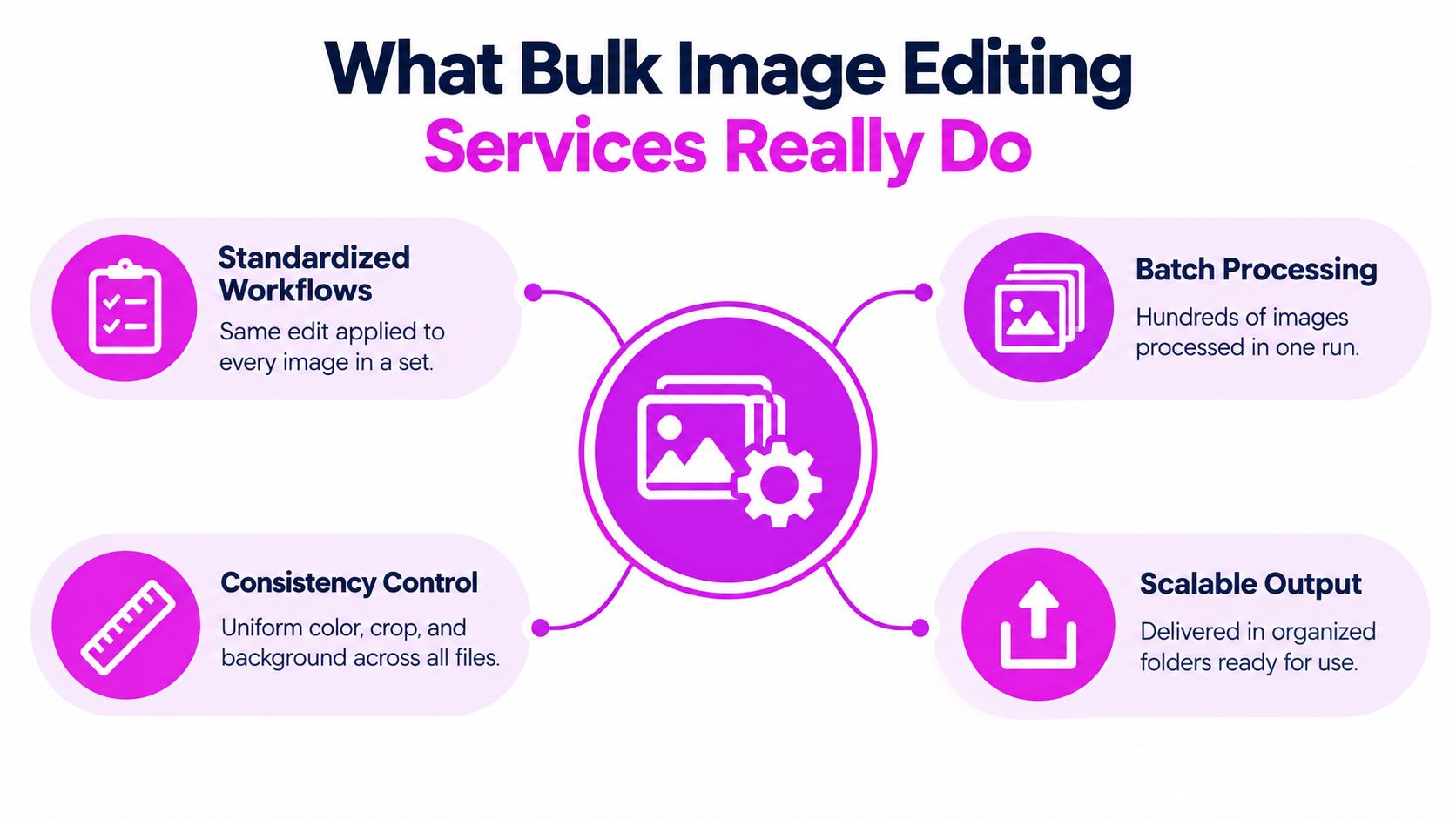
From one image to a controlled batch
Work begins with one approved example. The team defines its background, crop, shadow, color treatment, dimensions, file type, and naming convention. That file becomes the visual reference, much like a test print used to calibrate an entire production run.
The workflow then separates tasks into two groups:
- Repeatable operations, including resizing, standard cropping, format conversion, and a consistent background treatment.
- Judgment-heavy operations, including masking loose hair, correcting reflections, rebuilding missing edges, and deciding how much retouching still looks natural.
Presets, scripts, and AI tools can handle much of the first group. The second needs an exception path with human review. A service should flag images that differ from the approved pattern rather than hide their problems under a shared setting.
Why layers and reusable treatments matter
Modern batch editing depends on changes that can be revised without rebuilding every file. Adobe traces Photoshop's origins to image-processing tools Thomas Knoll developed in 1987, followed by the commercial release of Photoshop 1.0 on February 19, 1990. The first release ran on Apple Macintosh computers and sold for $895. Later versions introduced layers, adjustment layers, the History panel, and Layer Effects, as described in Photoshop's evolution. Layers and adjustment layers let a bulk treatment be revised once and reapplied to thousands of files.
A non-destructive workflow keeps the original image intact and separates adjustments from source pixels. If a brand changes its background color, requests a different crop, or needs another export, the editor can update the treatment instead of starting from the source files again.
A modern bulk image editor may combine folder rules, metadata, presets, AI processing, and human review. The result should be an organized, traceable set with clear outputs, not merely a folder of altered pictures. That structure helps teams compare vendor quotes with in-house AI batch editing, including the hidden QA work required before delivery.
Most Requested Bulk Editing Offerings
The right service depends on the visual problem, not the file count. A clean product shot of a box needs different treatment from a photograph of a wool coat, a glass bottle, or a model wearing a garment.
Background and edge work
Background removal isolates a product from its original setting. It's useful for marketplace listings, catalog grids, and transparent assets. Clipping paths provide a more controlled outline for hard-edged subjects such as packaging, furniture, books, and electronics.
For difficult edges, image masking preserves details that a simple path may cut away. Hair, fur, lace, smoke, sheer fabric, and glass all need a different approach because their boundaries are soft, translucent, or irregular.
Industry benchmarks place basic background removal at approximately $0.25 to $1.00 per image, clipping paths at about $0.30 to $5.00, and masking for subjects such as hair, fur, or glass at roughly $0.99 to $5.99 per image. These ranges come from published ecommerce image-editing benchmarks, and they illustrate why a quote must describe complexity rather than only image quantity.
Apparel and product finishing
Ghost-mannequin editing removes the visible mannequin while preserving the garment's shape. It's common for apparel catalogs where shoppers need to see how a shirt, jacket, or dress is constructed without seeing the studio equipment.
Retouching can remove dust, scratches, distracting marks, or unwanted reflections. The brief should say whether the goal is clean commercial presentation or heavy transformation. A jewelry collection may need careful reflection control, while a classroom illustration may only need consistent color and cropping.
Channel preparation
Color matching brings images from different shoots closer to a shared visual standard. Resizing and cropping prepare the same source for product pages, social posts, email campaigns, print worksheets, or advertising placements. These tasks sound simple, but uncontrolled resizing can make labels unreadable, clip a product edge, or change the balance of a composition.
A strong request groups the work clearly:
- Edit type: Background removal, masking, ghost mannequin, color correction, retouching, or resizing.
- Reference: A finished example that shows the expected look.
- Output: Dimensions, file format, color profile, transparency behavior, and naming rules.
- Exceptions: Images that need manual review because of reflections, transparency, unusual framing, or damaged source material.
This structure gives a vendor or internal operator enough information to quote the workload instead of guessing from a folder count.
How Bulk Editing Pricing Actually Works
A per-image price is only useful when the images require roughly the same work. A batch containing simple white-background product photos and detailed fabric masking shouldn't be evaluated as one uniform job.
Vendors may separate work by edit type, complexity, delivery speed, output format, or revision policy. Volume pricing can reduce the unit rate, but a lower rate doesn't automatically mean a lower project cost if the results require repeated corrections.
What changes the quote
| Cost factor | Basic batch example | Complex batch example |
|---|---|---|
| Background treatment | Clean subject with a clear edge | Transparent, reflective, or irregular subject |
| Retouching | Dust removal and light cleanup | Reconstruction, reflection control, or detailed restoration |
| Output preparation | One fixed size and format | Multiple channel-specific derivatives |
| Review needs | Routine automated or visual check | Human review of edge cases and brand-sensitive files |
| Revisions | Small corrections within the original brief | Rework caused by changing requirements or unclear references |
Published comparisons describe basic corrections at roughly $0.20 to $0.50 per image and advanced retouching at around $5 to $15 or more, depending on the work. The same guidance emphasizes separating labor for background removal, masking, color matching, object removal, resizing, and retouching, while disclosing revision limits, rejected-image handling, rush fees, and file-preparation requirements. See this bulk editing vendor comparison framework when building a request for proposals.
Calculate the approved-image cost
Don't divide the invoice by the number of files sent. Divide the full production cost by the number of images that pass review and are ready for the intended channel. Include:
- The editing fee.
- Preparation and upload time.
- Internal review time.
- Revision handling.
- Rejected or unusable outputs.
- Rush charges.
- Additional exports or layered files.
A quote should also state the minimum order, delivery schedule, accepted source formats, storage or deletion policy, and ownership of the final files. If you're comparing a vendor with an internal workflow, place labor and software costs beside the available pricing information for Bulk Image Generation, then test both approaches with the same representative files.
Practical rule: The cheapest rate is a poor deal if inconsistent outputs create rework, delay a launch, or cause a marketplace rejection.
Outsourced Vendors Versus In House AI Batch Editing
The choice becomes clearer when you compare the work rather than the labels. An outsourced vendor supplies production capacity and human judgment. An in-house AI workflow supplies immediate access, repeatability, and direct control over routine operations.
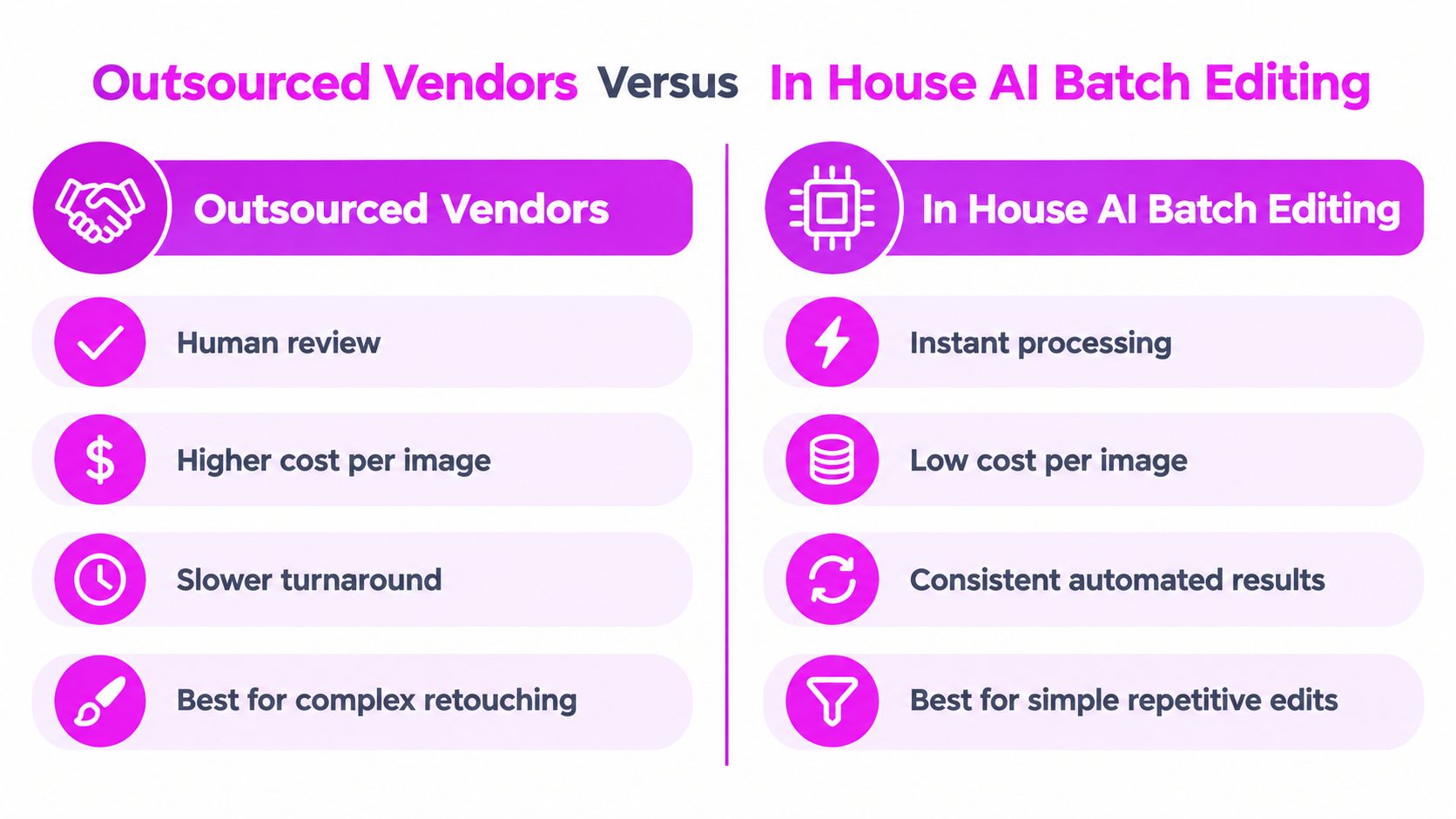
For a recurring set of social assets, an internal tool may handle background removal, resizing, and enhancement without waiting for a handoff. Bulk Image Generation, for example, provides batch image editing features including background removal, face swapping, resizing, and enhancement across image sets. That can suit a marketing team that wants to prepare several variations while keeping the review loop inside its own workspace.
Where vendors fit
Outsourcing tends to make sense when the work includes:
- Complex masking around hair, fur, lace, or transparent materials.
- Detailed retouching where a human must interpret the intended finish.
- Ghost-mannequin composites and other multi-step constructions.
- A predictable service level during a launch or seasonal catalog update.
- Work that your team lacks the skills or capacity to supervise internally.
The tradeoff is less immediate control and a greater need for a precise brief. You'll need to share references, approve a sample, define revisions, and establish how exceptions are reported.
Where in-house AI fits
AI batch editing is a strong candidate when the images have a stable structure and the desired changes are repetitive. It can help a small business prepare a social campaign, an educator reformat a collection of learning assets, or an agency produce channel-specific derivatives from approved masters.
The risk is systematic error. If the model or preset handles a particular product edge incorrectly, the same mistake may appear across the whole batch. A human-in-the-loop process should identify low-confidence outputs and send them for review. Practical HITL workflow integration tips can help teams define when automation stops and human judgment begins.
For many teams, the sensible arrangement is mixed. Automate predictable operations, retain a pristine master, and send difficult or brand-critical images to a specialist. The decision should follow the shape of the work, not a blanket preference for either vendors or AI.
Keeping Quality Consistent Across Thousands of Images
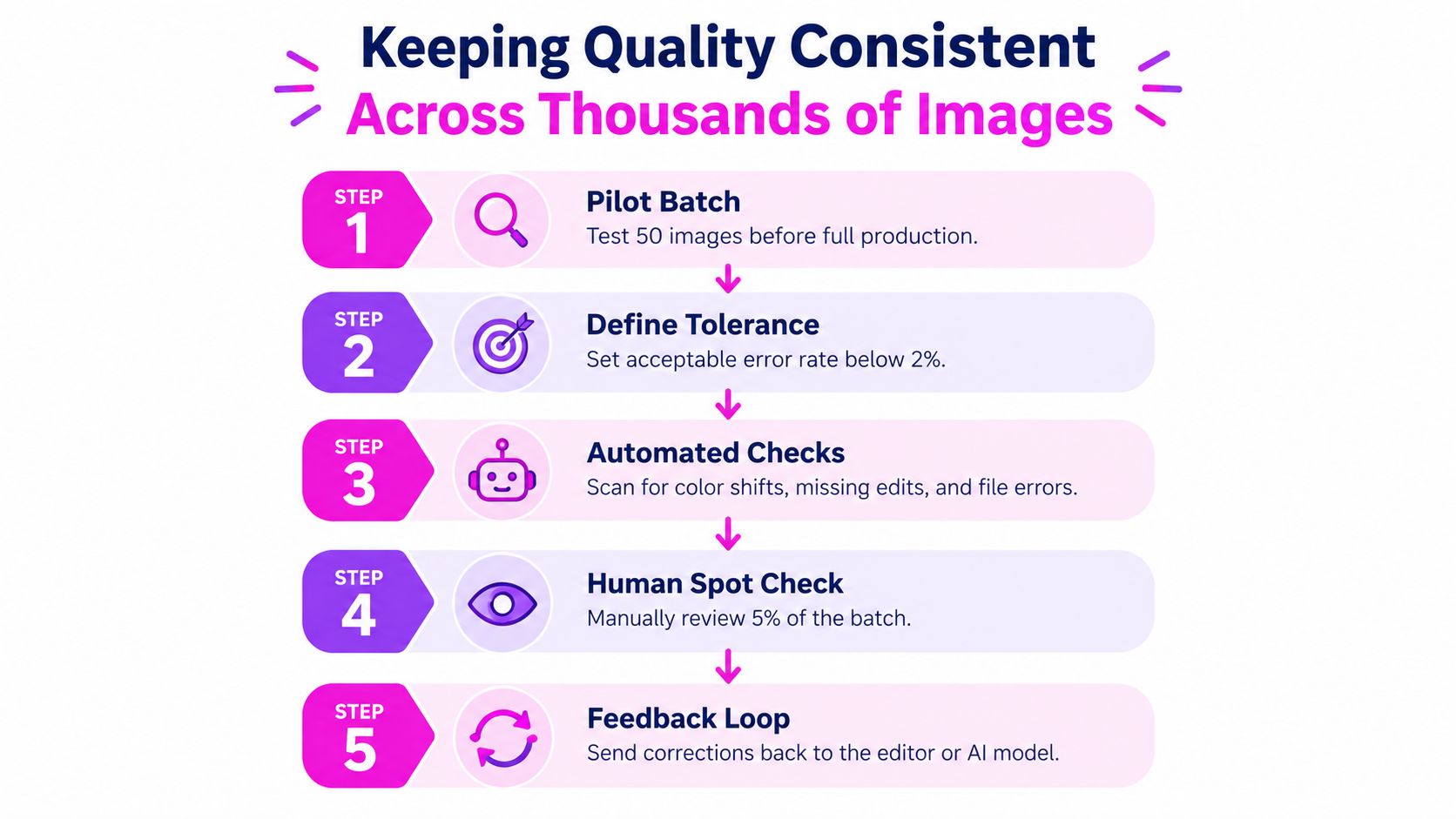
A batch can fail in a consistent way. That's what makes quality assurance necessary. An automated workflow may process every file efficiently while also applying the same bad crop, color shift, missing background, or transparency error repeatedly.
Use a pilot before full production
Begin with a representative pilot batch. Include routine files and difficult examples, not only the easiest images. Check the pilot against the style guide, then record specific acceptance criteria for crop, color, shadow, edge quality, output size, transparency, and filenames.
After approval, automate checks for dimensions, expected background behavior, missing files, file errors, and naming patterns. Group exception reports by SKU, folder, editor, or processing rule so the person responsible can find patterns instead of hunting through the entire delivery.
Human review should focus on edge cases and batch-level patterns. A reviewer doesn't need to inspect every routine file if automated validation is reliable, but they do need to sample enough outputs to detect repeated defects before publication.
Protect detail during export
Keep a lossless master and perform geometric edits from that source. JPEG is lossy, so repeated decoding and re-encoding can introduce blocking, ringing, and damage around text or sharp edges. Generate delivery derivatives once, using format-specific settings rather than one universal compression rule.
Use lossless PNG or TIFF when transparency, line detail, or small typography matters. Use JPEG or another modern web format for photographic outputs only after checking visual quality, dimensions, color profile, alpha behavior, and file size. Downscaling should use a high-quality resampling method, while sharpening should remain controlled so product contours don't develop halos.
Accessibility belongs in the same pipeline. W3C guidance requires meaningful non-text images to have an equivalent text alternative, while decorative images should use an empty alternative. Images containing essential words need those words preserved in the alternative text, as explained in the W3C guidance on image alternatives.
For marketplace workflows, a separate requirements checklist is useful. Teams preparing listings can compare their export and presentation rules with these product image requirements for Amazon before releasing a complete catalog.
Automation improves throughput, but focused human review protects the pattern the machine repeats.
Your Decision Checklist Before You Order
Start with the job, not the provider. Write down how many source images you have, which edits each group needs, where the finished files will appear, and which images are likely to require special treatment.
Prepare a usable brief
Your brief should include:
- Source details: File formats, folder structure, naming system, and whether layered masters must be preserved.
- Visual references: Approved examples plus clear “do not” examples.
- Edit categories: Background removal, masking, retouching, color work, resizing, or compositing.
- Delivery rules: Dimensions, format, color profile, transparency, compression, and destination folders.
- Review process: Who approves the pilot, how corrections are submitted, and what counts as acceptance.
Then divide the batch by complexity. A group of clean product photographs may suit an AI workflow, while reflective packaging, transparent objects, apparel composites, or hero campaign images may deserve human finishing.
Compare the real alternatives
Ask each vendor to quote the same categories separately. Request revision limits, rejected-image handling, rush fees, minimums, file-preparation requirements, and the definition of a completed image. For an internal workflow, count the time your team spends preparing files, reviewing outputs, correcting failures, and producing final exports.
Run a pilot before committing to full production. Check whether the outputs are consistent across the set, whether the files meet channel requirements, and whether the review process catches repeated errors. Then calculate the cost per approved image, not merely the advertised cost per file.
Finally, include accessibility in the handoff. Meaningful images need useful text alternatives, decorative images need an explicit empty alternative, and text embedded in an image must be represented when that wording carries meaning. This protects the usability of catalogs, campaigns, educational resources, and product pages.
Bulk Image Generation can help teams generate and process image sets with batch background removal, resizing, face swapping, and enhancement, while more complex retouching can remain with a specialist editor. Test a representative set and compare the approved-image cost by visiting Bulk Image Generation.
