A Complete Guide to AI Image Creation Tools

Ryan Bennett • December 20, 2025
Discover how AI image creation tools transform ideas into visuals. This guide covers how they work, choosing the right tool, and scaling content production.
Think of an AI image creation tool like having a world-class artist on call, ready to instantly bring any idea you have to life. These platforms work by turning your written descriptions into completely unique, high-quality visuals. You don't need fancy software or years of design training—just your imagination.
What Are AI Image Creation Tools?
At its heart, an AI image creation tool is a program that uses artificial intelligence to generate brand-new images from simple text. It helps to first understand what is AI generated content more broadly, since these visual tools are just one exciting piece of that puzzle.
All you have to do is type out a description of what you want to see. This description is called a prompt. The AI takes your words, interprets your vision, and creates a picture from scratch. Suddenly, marketers, educators, and small business owners can skip the technical hurdles of design and focus purely on the creative idea itself.
The Magic Behind the Curtain
The technology powering these tools—often based on something called diffusion models—sounds complex, but it’s pretty intuitive when you think about it. Imagine the AI starts with a blank canvas filled with nothing but random static, like an old TV screen with no signal.
From there, it slowly and carefully refines that static, step-by-step, gradually sculpting it into an image that perfectly matches your prompt. It’s a lot like a sculptor who starts with a rough block of marble and chips away until a clear, detailed figure emerges. This is possible because the AI has been trained on billions of image-and-text pairings from across the internet, giving it a massive visual vocabulary.
These tools aren't just for artists anymore. They represent a fundamental shift in how we create visual content, allowing anyone to produce stunning visuals for marketing campaigns, classroom materials, or personal projects with just a few keystrokes.
Why This Matters for Content Creators
For anyone who constantly needs fresh visuals, this is a game-changer. Instead of scrolling through endless stock photo libraries or hiring a designer for every little graphic, you can generate exactly what you need, the moment you need it.
This incredible speed and accessibility are driving a massive wave of adoption. The AI image generator market has seen explosive growth, jumping from a valuation of USD 418.5 million to a projected USD 2,633.2 million by 2035. This isn't just a niche trend; it shows how quickly industries are embracing these tools to change how they create. You can find more details on this growth in the AI image generator market report on MetaTechInsights.com.
To give you a clearer picture of what these tools can do, here’s a quick rundown of their core functions.
Core Capabilities of Modern AI Image Tools
| Capability | What It Does | Common Use Case |
|---|---|---|
| Text-to-Image Generation | Creates an image from a detailed text description. | Generating a blog post hero image or a social media graphic. |
| Image-to-Image Editing | Modifies an existing image based on text instructions. | Changing the color of a product or adding an object to a photo. |
| Inpainting & Outpainting | Fills in a missing part of an image or extends its borders. | Removing an unwanted person from a photo or widening a landscape. |
| Style Transfer | Applies the artistic style of one image to another. | Making a photograph look like a painting by Van Gogh. |
| Upscaling | Increases the resolution of an image without losing quality. | Preparing a low-resolution graphic for high-quality printing. |
These features combine to give you a powerful creative toolkit, turning what used to be complex editing tasks into simple, prompt-driven actions.
How AI Turns Your Words Into Pictures
Ever wonder how AI image creation tools can look at a simple sentence and spit out a detailed, vibrant picture? It’s not quite magic, but it’s close. A better way to think about it is like briefing a master chef who happens to have an infinite pantry. Your text prompt is the recipe, the AI is the chef, and its training data is a pantry stocked with every ingredient imaginable.
The whole thing kicks off the second you hit "enter" on your prompt. The AI chef reads your recipe to figure out exactly what you’re asking for. It uses a sophisticated part of its brain—a Natural Language Processing (NLP) model—to decode the meaning behind your words. It’s looking for objects, styles, colors, and how everything is supposed to fit together.
So, a prompt like "a majestic lion wearing a crown sitting on a throne in a jungle" isn't just a jumble of words to the AI. It instantly breaks it down into core concepts: lion, crown, throne, and jungle. Crucially, it also understands the relationships—the lion is wearing the crown and sitting on the throne.
From Concepts to Ingredients
Once the AI gets what you want, it starts rummaging through its pantry—a massive dataset with billions of images and their text descriptions. This digital pantry doesn't hold complete photos like an album. Instead, it’s packed with abstract visual concepts and patterns it has learned from all that data.
It finds the essence of "lion-ness," the glint of a "crown," the grandeur of a "throne," and the lush vibe of a "jungle." The AI gathers up these conceptual ingredients, ready to start cooking. This is the key step where your text ideas get linked to actual visual elements.
This simple (yet powerful) flow from your idea to the final image is easy to visualize.
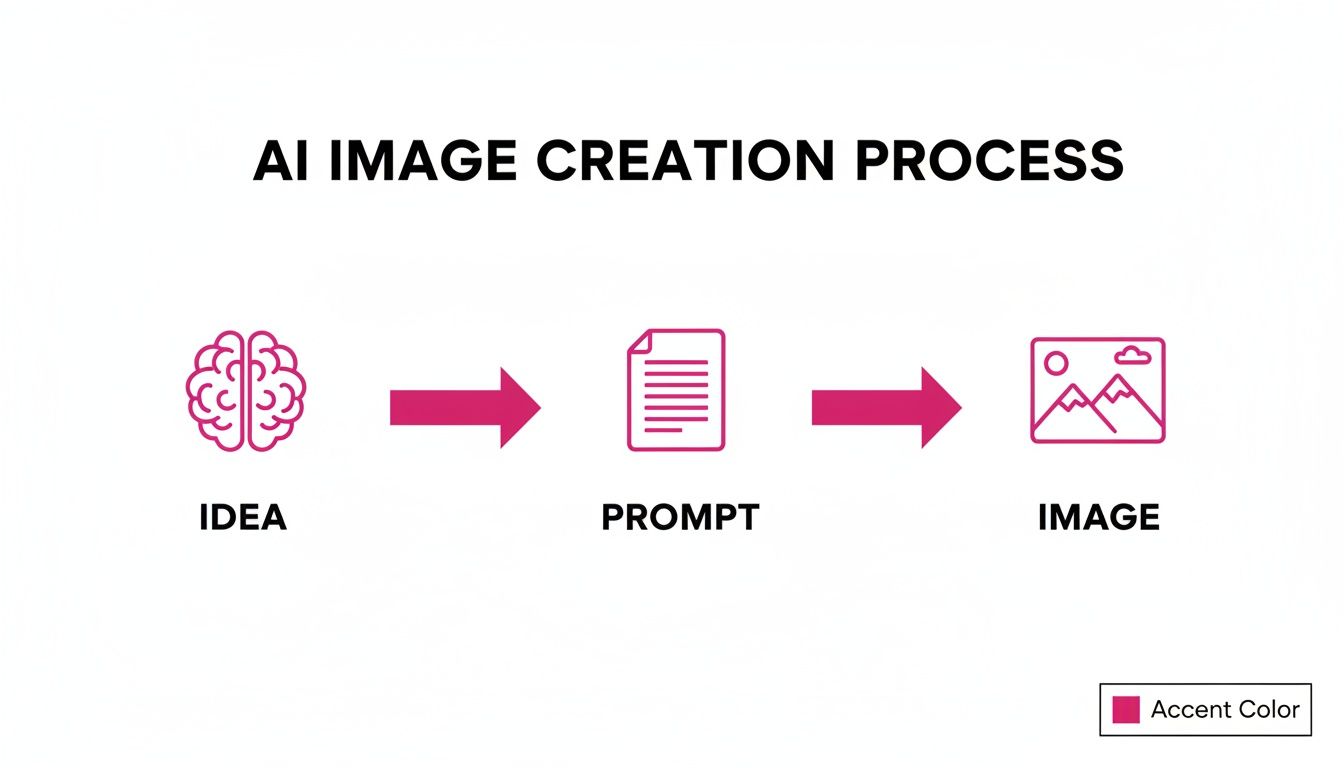
As you can see, a clear prompt is the bridge connecting a creative thought to a real visual output.
Crafting the Image from Digital Noise
This is where the real artistry begins, using a clever technique called a diffusion model. The AI doesn't start with a blank canvas. Instead, imagine it begins with a screen full of random static or digital noise, like an old TV with no signal. Total chaos.
From there, the AI starts a careful, step-by-step process of refinement. Guided by the concepts it pulled from your prompt, it begins nudging the pixels in the noise, slowly coaxing shapes and patterns into existence. With each step, it subtracts a little randomness and adds a little structure, constantly checking its work against your "recipe."
It’s like a sculptor who starts with a rough block of marble. With each pass, the image gets clearer and more defined as the AI chips away the noise to reveal the picture hidden within.
This process repeats itself over and over, often between 20 to 100 times depending on the tool you're using. With each step, the hazy, abstract form of a lion on a throne sharpens. Colors pop, textures appear, and the details emerge until the final, coherent image is fully baked.
Understanding this process makes it so much easier to write good prompts. When you know the AI is basically piecing together concepts from a giant library, you realize just how important it is to be specific and clear. Crafting the perfect prompt is an art, and using a dedicated tool can make all the difference. To get a head start, you can play around with a free AI image prompt generator to help structure your ideas. That foundation is everything when it comes to guiding the AI chef to create exactly the dish you had in mind.
Choosing the Right AI Image Tool for Your Needs
Picking the right AI image tool can feel like you’re staring at a giant wall of options, all promising amazing things. It’s easy to get overwhelmed. But here’s the secret: you’re not looking for the “best” tool on the market. You’re looking for the tool that’s best for you.
The perfect platform for a marketer who needs a hundred ad variations is going to be completely different from what an educator needs for classroom visuals. So, before you even look at a feature list, ask yourself one simple question: “What am I actually trying to create?” Are you a small business owner who needs product photos that pop? A social media manager trying to nail a consistent vibe? Your end goal is the best filter you have.
Evaluate What You Genuinely Need
Before you dive into reviews and comparisons, take a moment to map out your must-haves. This simple checklist will become your compass, helping you cut through the noise and focus on what actually matters for your work. Knowing what you need from the get-go makes the whole process a lot less painful.
Think about these key factors:
- Ease of Use: Are you looking for a simple, plug-and-play interface, or are you a tinkerer who loves digging into advanced settings? Some tools are built for speed and simplicity, while others offer a professional-grade dashboard.
- Stylistic Range: Does the tool have a distinct personality? Some are masters of photorealism, while others shine with cartoons, fantasy art, or clean corporate graphics. Make sure its artistic specialty aligns with your vision.
- Output Quality and Resolution: Are you creating images for a blog post, or do you need print-quality files for a billboard? Always check the maximum resolution and file types so you’re not stuck with a low-res image when you need a big one.
- Commercial Licensing: This one is a big deal for anyone using images for business. You have to double-check the terms of service to make sure you have the legal right to use your creations commercially.
- Pricing Model: Do you prefer a predictable monthly subscription, a pay-as-you-go model that bills based on usage, or a one-time fee? Your budget and how often you plan to use the tool will point you in the right direction.
Matching the Tool to the Job
Different jobs demand different tools. It’s just common sense. Let’s break down how a few different professionals might approach this decision.
For Marketers and Branding Agencies: Your world revolves around brand consistency and creating campaigns at scale. You need an AI that can reliably churn out images that all feel like they came from the same creative director. Look for features that let you lock in a specific style, use reference images, or save prompts as templates.
For Educators and Content Creators: You’re all about clarity and engagement. Your goal is to make complex ideas simple and exciting, whether for a lesson plan, a YouTube thumbnail, or a blog post. A tool with a broad artistic range is your best friend here, letting you jump from historical diagrams to fun, illustrated characters. As you shop around, taking a look at the top AI content generation tools can give you a good sense of the landscape and help you find a platform that fits.
For Entrepreneurs and Small Businesses: You need versatility and value. One day you’re mocking up a product photo, the next you’re designing a social media ad. An all-arounder that delivers solid quality across different styles without breaking the bank is probably your best bet.
The right tool doesn’t just make images; it becomes a creative partner. It should speed up your work without making you compromise on your vision, feeling less like software and more like an extension of your own creativity.
The explosion in the AI image generator market is proof that more and more people are finding these tools indispensable. Market forecasts predict the industry will grow from USD 299.3 million to a staggering USD 917.4 million by 2030. This isn't just hype; it's a reflection of professionals finding highly specific solutions for their unique problems. You can read more about these market projections on Fortune Business Insights.
With so much growth and variety, there’s almost certainly a tool out there that feels like it was made just for you. Start with your own needs, and you’ll find it.
Practical Use Cases Across Industries
The theory is cool, but the real magic happens when you see how these tools perform in the wild. AI image generators aren't just a neat party trick; professionals in all sorts of fields are already using them to solve real problems, slash production times, and create visuals that were once completely out of reach.
And this isn't some niche trend. The scale is staggering. On any given day, people are generating around 34 million images with AI. That explosion has led to over 15 billion images since these tools first hit the scene—a number that took traditional photography nearly 150 years to reach. You can dig into the rapid growth of AI image generation on DigitalSilk.com.
So, let's get specific and see how different industries are actually putting this tech to work.
Supercharging Marketing and Social Media
If you're in marketing, you know the relentless pressure for fresh, high-quality visuals. It's a constant grind. AI image tools tackle this head-on, making content creation faster, cheaper, and way more flexible.
Take A/B testing ad creatives, for instance. Instead of waiting hours for a designer to mock up a few variations, a marketer can now spit out dozens of unique images in minutes. This means you can test different backgrounds, color schemes, or concepts on the fly to see what actually connects with your audience.
- Social Media Campaigns: Need a week's worth of visuals that all feel connected? You can generate illustrations, product shots, and lifestyle images in a consistent style, giving your feed a polished, professional edge.
- Blog and Content Visuals: Say goodbye to the same old generic stock photos everyone else is using. Create custom hero images and spot illustrations that perfectly match your content, making it more engaging and unique.
- Email Marketing: We all know visual emails get more clicks. AI can generate unique banners and product shots to make every newsletter feel fresh instead of recycled.
Sample Prompt for Marketing: "Product shot of a sleek, futuristic smartwatch on a minimalist white background. Soft, natural lighting from the side, highlighting the metallic finish. 8K, photorealistic, commercial photography style."
Transforming Education and Learning
Educators are quickly realizing that the right visual can make a lesson click. AI image tools act like an infinite, on-demand library of illustrations tailored perfectly to what's being taught in the classroom.
A history teacher could bring a lesson to life by generating a vivid, historically-informed depiction of ancient Rome or a scientifically accurate illustration of a dinosaur that a standard textbook might lack. These visuals help students connect with the material in a much more tangible way.
For younger kids, teachers can create custom characters for story time or even generate unique coloring pages tied to the day's lesson. The power to create the exact image for a specific learning goal is a massive asset. Many of the tips in our guide to AI images for small businesses can be easily adapted for classroom use.
Sample Prompt for Education: "Children's book illustration of a friendly cartoon astronaut waving from the moon, with the Earth visible in the starry sky. Simple shapes, bright primary colors, whimsical and cheerful style."
Revolutionizing E-commerce and Retail
For any online store, great product photography is everything. But it's also expensive and a huge time sink. AI image tools are completely changing the game, letting sellers create professional-grade product visuals without ever booking a photo shoot.
One of the biggest game-changers is generating lifestyle photos. If you sell coffee mugs, you can instantly place your product in dozens of different scenes—a cozy living room, a sleek office, a rustic café—all from your laptop. This helps customers imagine the product in their own lives, which is a huge step toward making a sale.
Creating product mockups has also become ridiculously simple. An apparel brand can showcase a new t-shirt design on models of different genders, body types, and ethnicities, creating a more inclusive and realistic shopping experience.
- Product Mockups: Generate images of your product in different settings or worn by various models.
- Background Swapping: Instantly drop your product onto a clean white background or into a scenic environment.
- Seasonal Campaigns: Quickly create themed product shots for holidays like Christmas or Valentine's Day without a new shoot.
This tech levels the playing field, empowering smaller e-commerce shops to build a polished, attractive storefront that can compete with the big brands, but for a fraction of the cost.
Sample Prompt for E-commerce: "Lifestyle photo of a handcrafted leather backpack sitting on a wooden bench in an autumn forest. Warm afternoon sunlight, fallen leaves on the ground. Crisp focus on the backpack's texture. Photorealistic, high-end catalog style."
Solving Content Bottlenecks with Bulk Generation
Making one great AI image is cool, but modern content doesn’t need just one. It needs a constant stream of visuals, and that’s where things get tricky. For marketers running multiple campaigns, teachers developing course materials, or e-commerce stores launching new products, the real headache isn't just quality—it's quantity. Trying to generate hundreds of images one by one is a surefire way to hit a creative wall and drain your resources.
This is exactly where bulk image generation steps in. Forget typing out individual prompts. This feature lets you create hundreds, or even thousands, of unique images from a single, dynamic template. It’s the difference between building a car by hand and firing up the assembly line. Both get the job done, but only one operates at the speed business actually requires.
By linking a simple spreadsheet (like a CSV file) to an AI image tool, you can put your entire visual workflow on autopilot. Your role shifts from being a hands-on artist for every single image to a creative director who oversees the entire operation from a high level.
The Power of Scalable Visuals
The most obvious win here is the massive boost in efficiency. A task that might take a design team days—like creating visuals for an entire social media calendar—can now be wrapped up in minutes. That frees up an enormous amount of time for the work that really matters: planning campaigns, analyzing results, and dreaming up the next big idea.
But it’s not just about saving time. Bulk generation unlocks a level of personalization and consistency that's almost impossible to achieve by hand.
- Flawless Brand Consistency: Ever notice how visuals in a big campaign can have tiny, unintentional differences? With a single template driving everything, every image perfectly follows your brand’s style, color palette, and composition. No more "close enough."
- Hyper-Personalized Marketing: Imagine creating unique visuals for every audience segment. You can generate product mockups with different customer names, ad creative for specific cities, or social posts featuring a long list of unique quotes—all from one file.
- Rapid A/B Testing: Need to test which ad performs best? Generate dozens of variations with different backgrounds, calls to action, or product angles in minutes. This lets you find out what your audience loves without the manual grunt work.
For content teams, bulk generation is the key to breaking free from the constant cycle of one-off design requests. It turns your visual content strategy from a reactive, time-consuming task into a proactive, scalable system that can keep pace with your goals.
Manual Creation vs. Bulk AI Generation
When you put the old way of doing things side-by-side with a bulk approach, the difference is night and day. The table below breaks down just how dramatic the improvements are.
| Aspect | Manual Image Creation | Bulk AI Image Generation |
|---|---|---|
| Time Investment | Hours or days per campaign | Minutes for hundreds of images |
| Consistency | Difficult to maintain across visuals | Guaranteed via a single template |
| Scalability | Extremely limited and costly | Nearly infinite with minimal effort |
| Personalization | Impractical for large audiences | Simple to implement with data |
| Error Rate | High potential for human error | Minimal once the template is set |
It’s clear that for any project requiring more than just a handful of images, the bulk method offers a smarter, faster, and more reliable workflow.
How to Get Started with Bulk Generation
Making the switch to a bulk workflow is surprisingly simple. It really just comes down to two things: a well-organized data source and a flexible AI template.
First, you need your data. This is usually just a spreadsheet (a CSV file is perfect) where each row represents a new image you want to create. Each column holds a piece of variable information, like a product name, a headline, or a customer testimonial. A clean and tidy spreadsheet is the foundation for a smooth process.
Next, you create your master prompt or template inside the AI tool. Instead of a static prompt, you use dynamic placeholders that match the columns in your spreadsheet. For instance, your template might look like this: "Product photo of a {{ProductName}} on a marble countertop, with {{BackgroundColor}}."
The AI then reads your spreadsheet row by row, plugging the specific data into the placeholders to generate a unique image for every single entry. It’s that easy.
For social media managers, this approach is a total game-changer. You can check out a dedicated bulk social media image generator to see this in action. Imagine creating all your posts for the next month in a single afternoon. By embracing bulk generation, you're not just making images faster—you're building a smarter, more scalable content machine.
Where Do We Go From Here?
The explosion of AI image creation tools isn't just another tech trend; it's a fundamental shift in how we think about visual creativity. These platforms are completely changing the game for creative professionals. The job is no longer about the grueling, time-consuming hours spent executing a design. Instead, it’s about becoming a creative director—the conductor of an AI orchestra, guiding the tools to bring a bigger vision to life.
This levels the playing field in a big way. Suddenly, anyone with an idea can translate it into a compelling visual, regardless of their Photoshop skills. Small businesses and solo creators can now produce visuals that just a few years ago would have required a full design team and a hefty budget.
The Next Creative Frontier
And this is just the beginning. The innovation isn't slowing down. The next wave of generative AI is already taking shape, and it’s pointing toward some incredible possibilities:
- Text-to-Video: Imagine typing out a description of a short scene and watching an AI generate it as a video, complete with movement and mood. This is going to change everything for video marketing and social media storytelling.
- AI-Powered 3D Models: The ability to generate complex 3D assets from a simple text prompt will rapidly speed up development for games, virtual reality experiences, and product mockups.
- Immersive Digital Worlds: As AI gets more integrated into AR and VR, we'll see digital worlds that can generate and personalize visuals in real-time, creating truly unique experiences for every user.
Don't think of these advancements as a threat to human creativity. Think of them as a massive extension of it. When you embrace AI image tools, you're partnering with an incredibly fast and capable assistant. It handles the manual labor, freeing you up to focus on the one thing that truly matters—the idea.
The journey into this new visual world starts with the practical steps and workflows you’ve learned here. The future is visual, and with AI, you’re now the architect.
Got Questions About AI Image Tools? We've Got Answers
Jumping into the world of AI image creation can feel like exploring a new frontier. The tech is moving at lightning speed, and it's totally normal to have a few questions. Let's tackle some of the most common ones so you can start creating with confidence.
Can I Use the Images I Make for My Business?
This is the big one for most businesses, and the short answer is: usually, yes. But the details matter. Most of the major AI image platforms, particularly the paid ones, give you a pretty broad commercial license for whatever you create. That means you're generally free to use them for marketing, on products, or in ads.
The key is to always, always check the terms of service for the specific tool you're using. Some free or beta platforms might have strings attached, so don't just assume you have the rights. Your ownership is usually linked to the creative prompt you came up with, not the final image in the traditional copyright sense.
So, Is the Art I Create With an AI Actually Copyrightable?
Here's where things get a bit fuzzy, as the legal world is still catching up. Right now, in places like the United States, works created entirely by an AI without significant human input can't be copyrighted. The U.S. Copyright Office has been clear that just writing a text prompt doesn't quite clear the bar for "human authorship."
What this means is that while you can use the images commercially based on the tool's license, you probably can't register a copyright for the image itself. You can stop others from stealing your prompt, but you can’t claim exclusive ownership over the final pixels in the same way you could with a photo you took yourself.
How Do I Get the Same Character or Style Over and Over?
Ah, the consistency challenge. This is something everyone runs into, especially when trying to create a consistent character for a brand or story. Getting that same face or vibe across multiple images takes a bit more finesse than a simple one-off prompt.
Here are a few tricks the pros use:
- Use Seed Numbers: Many tools let you specify a "seed" number. Think of it as the unique starting point for the AI's creative process. If you use the same seed number with a nearly identical prompt, you can get results that are surprisingly consistent.
- Bring Your Own Reference: Some of the more advanced platforms allow you to upload a reference image of a character or a style you like. This gives the AI a powerful visual guide to follow, making it much easier to maintain a specific look and feel.
- Get Hyper-Specific in Your Prompts: Don't just ask for "a man." Describe him down to the last detail. Try something like, "a man with short, wavy brown hair, bright blue eyes, and a small, faded scar on his left cheek." The more unique details you feed the AI, the better it can lock onto your vision.
