What Are Prompts: what are prompts for stunning AI images

Ryan Bennett • January 1, 2026
Discover what are prompts and how simple instructions shape AI image generation for striking visuals. Learn practical prompts that drive results.
At its core, an AI prompt is just a set of instructions. Think of it like ordering coffee—the more specific you are about the beans, the milk, and the extra shot, the more likely you are to get exactly what you wanted. Mastering what are prompts is the first real step in turning a vague idea into a stunning image.
The Role of Prompts in AI
Imagine you’re a director hiring an artist for a movie poster. You wouldn't just say, "paint me something nice." You’d hand them a detailed creative brief—the subject, the mood, the style, and the specific elements you need to see.
An AI prompt is that exact same creative brief, but for your AI partner.
The more descriptive and detailed your instructions are, the better the AI can interpret your vision and nail the final image. Vague requests get you generic, unpredictable results. A well-crafted prompt, on the other hand, acts as a precise roadmap for the AI to follow.
From Simple Idea to Detailed Instruction
Let's see how this works in practice. A simple idea might be "a futuristic city." That's not a bad start, but it leaves way too much to the AI's imagination. A powerful prompt builds on that simple foundation with layers of detail:
- Subject: A bustling futuristic city skyline at dusk.
- Style: In the style of cyberpunk art, with neon signs and flying vehicles.
- Mood: A feeling of awe and technological marvel, not dystopian.
- Details: Add reflections on wet streets from recent rain.
This is the kind of detail that separates a generic, forgettable image from a piece of art that perfectly captures what was in your head.
To really get this right, it helps to understand the different parts that make up a strong prompt. Each component gives the AI a specific piece of the puzzle, guiding it closer to your intended outcome.
The Building Blocks of a Powerful Prompt
This table breaks down the essential components of an effective AI prompt, helping you understand how to structure your instructions for better, more predictable results.
| Component | What It Does | Simple Example |
|---|---|---|
| Subject | Defines the main focus of the image. What is it? Who is in it? | "A golden retriever" |
| Action/Setting | Describes what the subject is doing and where they are. | "...playing fetch in a sunny park." |
| Style | Dictates the artistic look and feel. | "...in the style of a Pixar animation." |
| Details & Mood | Adds specifics like lighting, color, and atmosphere. | "...with warm, golden hour lighting and a joyful mood." |
| Technical Specs | Controls composition, angle, and image quality. | "Close-up shot, 8k resolution, highly detailed." |
By combining these building blocks, you move from simple requests to complex, targeted instructions. This structure is the key to getting consistent, high-quality results every time.
A prompt is the bridge between human creativity and machine execution. It's not about knowing how to code or being an artist; it’s about learning how to communicate your ideas with clarity and precision to a powerful new creative tool.
This communication is a skill, and it's one you get better at with practice. As you learn to articulate your vision through better prompts, you gain incredible control over the AI's output. You stop being a passive user and become an active collaborator, guiding the technology to produce exactly what you need. This guide will show you how.
Exploring the Different Kinds of AI Prompts
Not all prompts are created equal. If you think prompting is just typing a single line of text, you're only scratching the surface. As you get deeper into what AI can do, you’ll discover different kinds of prompts, each designed to guide the AI in a specific way.
Sure, a simple instruction like "a photorealistic image of a red sports car on a coastal highway at sunset" is a solid start. It's a direct command, and most image generators handle it well. But to really take control, you need to understand the more advanced, conversational formats.
System, User, and Assistant Prompts Explained
Imagine you're briefing a creative assistant for a big project. You wouldn't just bark orders; you'd set the scene first. This is exactly how System, User, and Assistant prompts work together.
- The System Prompt: This is the big-picture direction. It’s where you define the AI's persona or core instructions. Think of it as telling your assistant, "You are a world-class photographer specializing in dramatic automotive shots. Your style is cinematic and moody." This instruction sets the tone for everything that follows.
- The User Prompt: This is your specific, in-the-moment request. Following the setup, you’d simply say, "Generate a shot of a vintage convertible." The AI now knows how to approach this task based on the persona you gave it.
- The Assistant Response: This is the AI's output. It doesn't just generate a random car; it generates an image filtered through the lens of a "world-class photographer," delivering a result that matches the cinematic style you defined.
This layered approach is how you get consistent, high-quality results, especially when you need to make multiple requests that all feel like they came from the same creative vision.
This whole idea is built on a hierarchy. A great prompt isn't just one command but a layered set of instructions, from the main idea down to the nitty-gritty details.
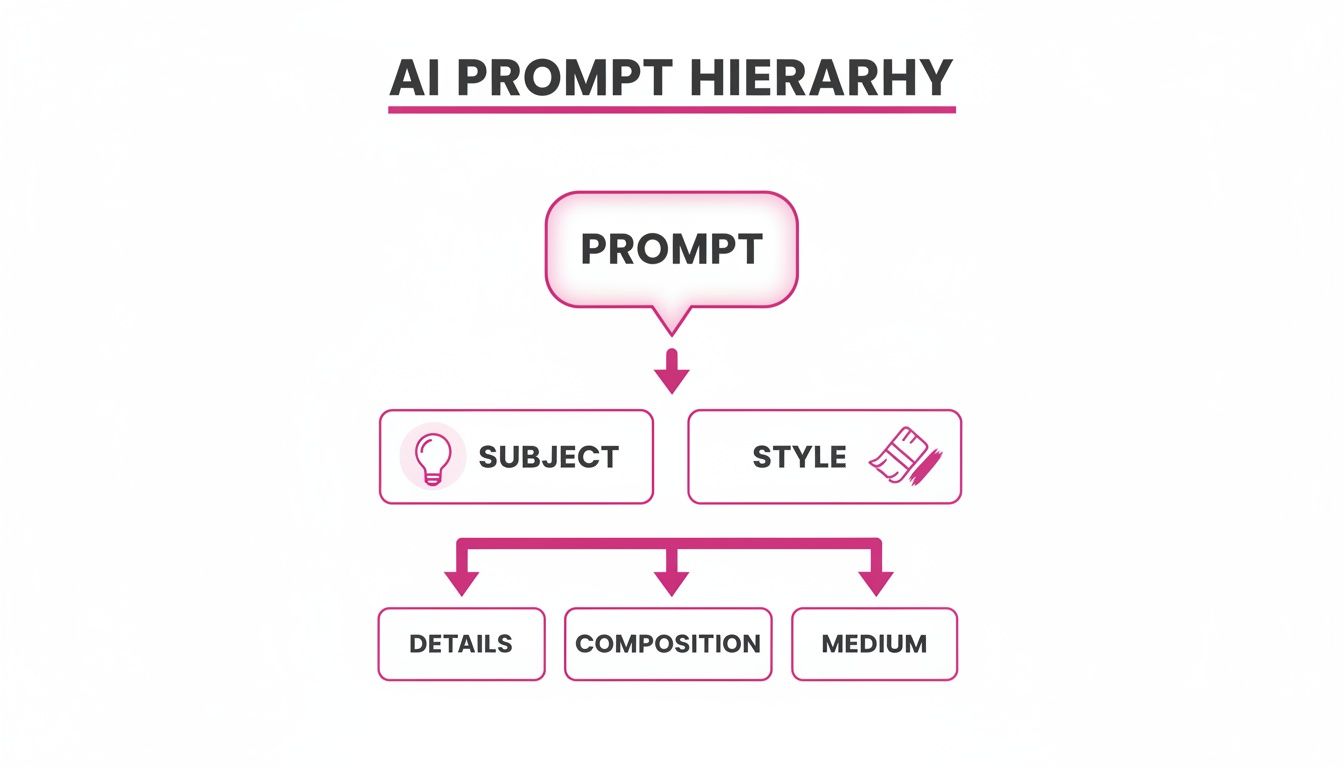
As the image shows, a powerful prompt branches out into specifics like subject, style, and composition. This same logic applies to other creative AI, too. For instance, the best text to video AI generator free tools are becoming incredibly popular, and they rely on these very same principles to turn words into compelling video.
The Innovation of Image-to-Prompt
Now, let's flip the script. The image-to-prompt feature is one of the most exciting developments because it completely reverses the usual workflow. Instead of writing text to get an image, you feed the AI an image to get a detailed text prompt.
It's like reverse-engineering a masterpiece. You can take a visual you love and ask the AI to deconstruct it, telling you exactly what instructions would be needed to create something with a similar vibe.
This is a game-changer. Ever see a style you wanted to replicate but didn't know how to describe it? Just upload a reference photo. The AI analyzes everything—the subject, the lighting, the color palette, even the camera angle—and translates it all into a descriptive prompt.
You can then take that AI-generated prompt and use it as a starting point. Tweak a few words, change the subject, and you can create something totally new while keeping the aesthetic you were inspired by.
How Prompts Guide AI Image Generation
 Connecting your words to a finished AI image can feel a bit like magic, but it’s actually a pretty logical process of translation. When you write a prompt, you're essentially commissioning a master artist—in this case, the AI—who deconstructs your every word to build a picture from a blank digital canvas.
Think about abstract concepts like "ethereal" or "dystopian." The AI doesn’t just guess what you mean; it’s been trained on millions of images tagged with these very terms. It learns to associate "ethereal" with soft lighting, pastel colors, and translucent effects. In the same way, the word "dystopian" triggers its visual library of dark, gritty textures, industrial decay, and oppressive atmospheres.
Your prompt is the blueprint. The AI follows it piece by piece, turning each instruction into a visual element.
Turning Words Into Visuals
This translation process is incredibly detailed. The AI model breaks down what you’ve written, assigning specific visual properties to each part of your prompt. It’s like a methodical assembly line where your ideas become pixels.
Here’s how a simple phrase gets broken down:
- "Golden hour lighting" tells the AI to use a warm, low-angle light source that casts long shadows and creates a soft, yellow-orange glow.
- "In the style of a vintage photograph" instructs it to add film grain, slightly desaturate the colors, and maybe layer in a subtle sepia tone.
- "Wide-angle shot" sets the camera's focal length, immediately creating a sense of scale and depth in the final composition.
Each word adds a new layer of instruction, guiding the AI from a general idea to a highly specific visual. This is how you learn what are prompts and how to use them to direct the AI with real precision.
A prompt isn't just a request; it's a set of rules and parameters the AI must follow. The better you articulate these rules, the more control you have over the final image, turning the AI from a generator into a true creative collaborator.
From Simple Language to Optimized Instructions
What’s fascinating is what happens behind the scenes. Many of the best platforms do the heavy lifting for you. You might give it a simple goal in plain English, but the system translates it into a much more technical, optimized prompt that the underlying AI model can interpret perfectly.
This is where the real power lies. You don’t have to be a tech wizard to get professional-grade results. You describe your vision, and the technology refines it into an expert-level command. It's this efficiency that’s fueling a massive new industry.
In fact, the global AI prompt marketplace, where people share and sell effective prompts, was valued at USD 1,406.0 million in 2024 and is expected to rocket to USD 10,992.4 million by 2033, according to Grandview Research. That surge shows just how valuable well-crafted instructions have become.
This kind of automated optimization is a key feature of powerful tools. For instance, our own platform offers a powerful AI image generator that simplifies this entire process. It lets you focus on your creative goals instead of getting bogged down in complex technical details. It's all about making this technology accessible and effective for everyone, no matter their prompting experience.
Common Prompting Mistakes to Avoid
Ever feel like you and the AI are speaking different languages? You have a crystal-clear idea in your head, but the image that pops out is... not quite it. You're not alone. That gap between a brilliant concept and a perfect picture is usually filled with a few common prompting slip-ups.
Figuring out these pitfalls is the first real step to getting the results you actually want.
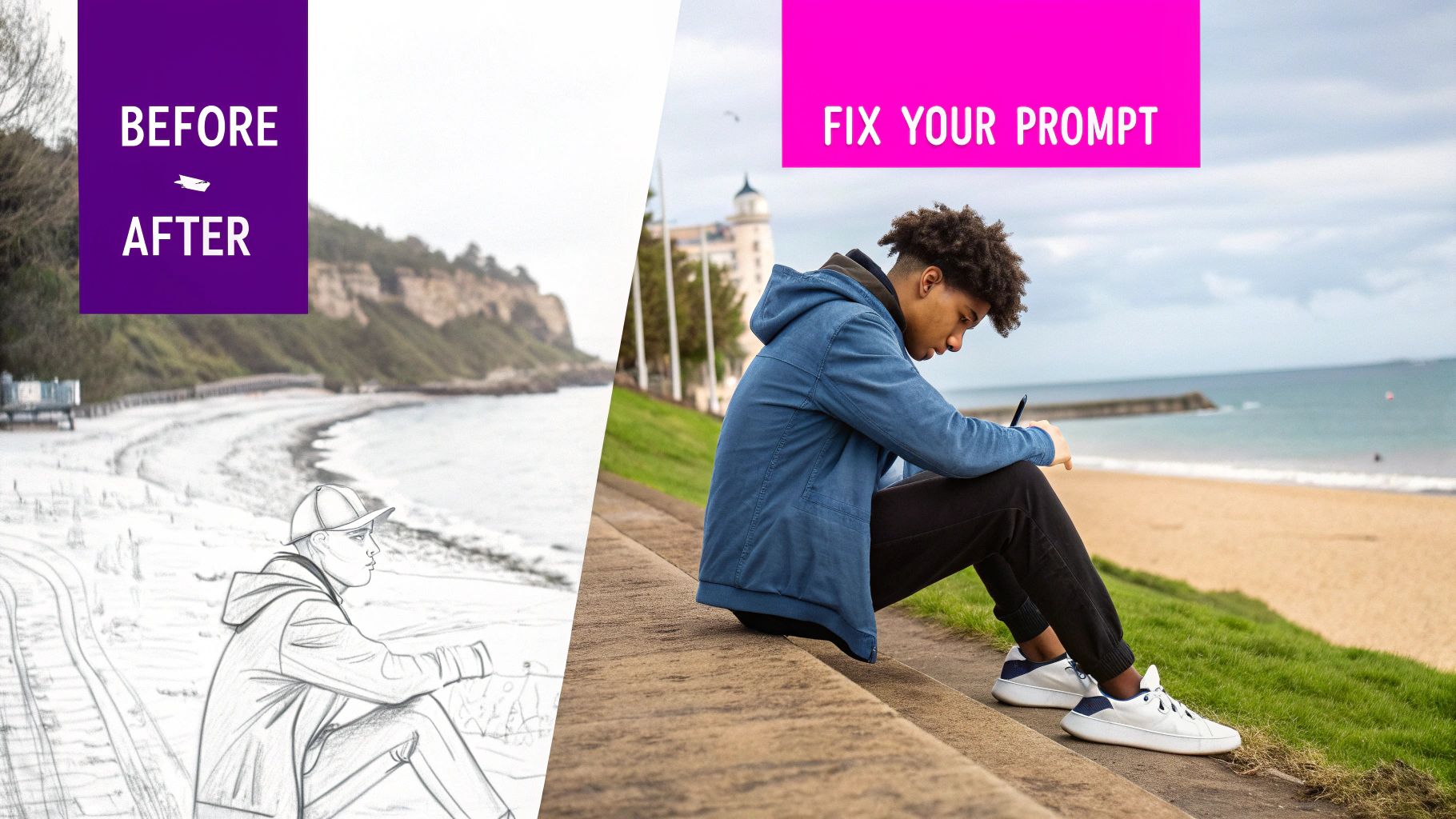
Often, the problem isn't the AI model itself—it's the clarity of your instructions. A few small tweaks can turn a weak, frustrating prompt into a powerhouse, giving you the control to guide the AI with precision.
The Problem of Vague Instructions
This is easily the most frequent mistake. A prompt like "a dog" is a lottery ticket. You're giving the AI a blank check to create something generic because it has zero context. It doesn't know the breed, the setting, the mood, or the artistic style you're picturing.
- Weak Prompt:
a dog - Stronger Prompt:
A happy golden retriever puppy, sitting in a field of wildflowers during a sunny afternoon, cinematic lighting, photorealistic.
See the difference? Adding a few details immediately gives the AI specific directions. You're not just asking for a subject; you're building a whole scene. This is fundamental to understanding what are prompts and tapping into their true potential.
Avoiding Contradictory and Overloaded Prompts
Another classic mistake is sending mixed signals. If you ask for "a happy, sad dog" or "a minimalist, cluttered room," you're going to confuse the model. It will try its best to mash those conflicting ideas together, and the result is usually a bizarre image that captures neither concept well.
The same goes for cramming too many complex ideas into one prompt. It just dilutes the final image.
Giving the AI too many conflicting instructions is like asking a musician to play a classical symphony and a heavy metal solo at the exact same time. The result is usually noise, not harmony.
Stick to one clear, primary vision. If you have several big ideas you want to combine, it's often better to generate them in separate prompts and merge them later, or just simplify your request down to the most critical elements.
From Good to Great: A Before-and-After Example
Let's look at just how much a few refinements can change the game.
- Before:
A spaceship in space.- It's not wrong, but it's boring. You're leaving everything up to the AI, which will probably spit out the most generic spaceship imaginable against a plain black background.
- After:
A sleek, silver exploration spaceship with glowing blue engines, drifting silently past the rings of Saturn. The scene is illuminated by distant starlight, creating long shadows across the ship's hull. Epic scale, 8k resolution, cinematic.
The revised prompt doesn't just name a subject; it paints a picture. We've specified the ship's look, the exact setting, the lighting, and the overall mood. By sidestepping these common mistakes, you stop being a button-pusher and start becoming an art director for your AI.
Ready-to-Use Prompt Templates for Your Business
Knowing the theory is one thing, but actually using prompts to create real value for your business is a whole different ballgame. To help you make that leap, I’ve put together a few structured, copy-and-paste templates for some of the most common business needs.
Think of these less like rigid rules and more like proven recipes. You can follow them exactly or swap out ingredients—like your product, brand colors, or the specific mood you're after—to cook up something that’s uniquely yours. They handle the structure, so you can focus on the creative side of things.
Prompts for Engaging Social Media Visuals
On social media, attention is everything. Generic stock photos are easy to scroll past, but a custom visual can stop a user dead in their tracks. Use this template to create vibrant, on-brand images that will make your next campaign pop.
- Template:
Vibrant flat lay photo of [Your Product/Service Concept] surrounded by [Related Thematic Items], arranged on a [Background Surface/Color]. Top-down view, bright and airy lighting, shot on a professional DSLR camera. The color palette should be dominated by [Your Brand Color #1] and [Your Brand Color #2]. - Example:
Vibrant flat lay photo of a new vegan protein bar surrounded by fresh berries, almonds, and a sprig of mint, arranged on a rustic wooden table. Top-down view, bright and airy lighting, shot on a professional DSLR camera. The color palette should be dominated by deep green and earthy brown.
This structured approach is the core of prompt engineering—the art of giving the AI precise instructions to get exactly what you want. It’s a skill that’s becoming incredibly valuable. In fact, the global market for prompt engineering was valued at a staggering USD 380.12 billion in 2024 and is projected to hit USD 6,533.87 billion by 2034. You can dig into the numbers in this in-depth market research on prompt engineering.
Simple vs Engineered Prompts: A Visual Comparison
Curious about how much of a difference a little extra detail makes? This table breaks it down. See how small tweaks in a prompt's structure and specificity can dramatically lift the quality of the final image, turning something generic into a professional, on-brand asset.
| Goal | Simple Prompt | Engineered Prompt | Expected Outcome Difference |
|---|---|---|---|
| Create a social media graphic for a coffee brand | A cup of coffee | Top-down photo of a ceramic mug filled with black coffee, latte art in the shape of a heart, on a dark wooden table next to a half-open book. Morning sunlight streams from a window on the left. Soft shadows. Color palette is warm and inviting. | The simple prompt gives you a generic coffee cup. The engineered prompt delivers a complete, atmospheric scene with specific lighting, composition, and mood—perfect for a brand's Instagram feed. |
| Generate a product shot for an e-commerce store | A blue running shoe | Professional product photography of a single navy blue running shoe, side profile, on a pure white background (hex #FFFFFF). Studio lighting, sharp focus on the texture of the mesh fabric. No shadows. 8K resolution. | The simple prompt might give you a cartoonish or poorly lit shoe. The engineered prompt produces a clean, high-resolution product shot ready for an Amazon or Shopify listing, ensuring consistency. |
| Illustrate a blog post about productivity | Illustration for a blog about work | Minimalist vector illustration for a blog post about digital productivity. Features abstract shapes and a single, clear icon representing a checklist. Uses a limited color palette of navy blue, soft gray, and white. Clean lines, modern and sophisticated feel. | The first prompt is too vague and could result in anything. The engineered prompt creates a specific, stylish illustration that matches a modern brand's aesthetic and clearly communicates the blog's topic. |
As you can see, the devil really is in the details. A well-engineered prompt is the difference between a random AI image and a strategic business asset.
Prompts for E-commerce Product Shots
For any online store, clean and appealing product photography isn't just nice to have—it's essential. This template helps you generate professional lifestyle shots that put your product in an ideal, aspirational setting, helping customers imagine it in their own lives.
- Template:
High-end lifestyle product photography of [Your Product] being used in a [Relevant Scene]. The model should reflect [Target Audience Demographic]. Soft, natural window lighting, clean and minimalist aesthetic. The focus is sharp on the product, with a gently blurred background. Color grading should feel [Warm/Cool] and inviting. - Example:
High-end lifestyle product photography of a ceramic coffee mug being held by a person in their early 30s, sitting in a cozy, sunlit reading nook. Soft, natural window lighting, clean and minimalist aesthetic. The focus is sharp on the mug, with a gently blurred background. Color grading should feel warm and inviting.
The whole point of a business prompt is to build consistency and efficiency. When you use a template, you’re ensuring that all your visuals—from your website to your social media—share a cohesive brand identity.
Prompts for Unique Blog Post Illustrations
We’ve all been there—scrolling endlessly for the perfect featured image for a blog post. It can be a massive time sink. This template lets you create custom illustrations that perfectly match your content's tone and topic, making your articles far more memorable.
Need a little more inspiration? Check out our guide on the 25 best prompt ideas for an AI image generator.
- Template:
Minimalist vector illustration for a blog post about [Blog Post Topic]. Features abstract shapes and a single, clear icon representing [Key Concept]. Uses a limited color palette of [Brand Color #1], [Brand Color #2], and white. Clean lines, modern and sophisticated feel. - Example:
Minimalist vector illustration for a blog post about digital productivity. Features abstract shapes and a single, clear icon representing a checklist. Uses a limited color palette of navy blue, soft gray, and white. Clean lines, modern and sophisticated feel.
Supercharge Your Workflow with Prompting Tools
Ready to work smarter, not harder? If you've ever tried to get the perfect image out of an AI, you know that manually crafting the right prompt for every single variation can be a massive time sink. It’s tedious work.
Fortunately, you don't have to go it alone. A whole ecosystem of tools now exists to speed up your workflow and act as a creative co-pilot. Prompt generators and image-to-prompt converters are your best friends here, helping you smash through creative blocks, discover new artistic styles, and turn fuzzy ideas into instructions an AI can actually understand. The goal is efficiency, especially when you need to create a lot of visuals at once.
Automate Your Prompting Process
Instead of staring at a blank text box, these tools give you a structured way to build complex, effective prompts. This is a game-changer for business use cases where consistency is non-negotiable.
For example, our free AI image prompt generator can spin up hundreds of unique variations from a single core idea, saving you countless hours of brainstorming and typing. You can find it and other resources on our free tools page.
For businesses that need to get moving fast, specialized AI Post Generator tools offer ready-to-use prompt templates designed for all sorts of different content needs.
The demand for these kinds of efficiency tools is exploding. In 2024, North America owned a 33% revenue share of the AI prompt marketplace, a sector that's expected to hit USD 7.92 billion by 2032. It's clear that automating the prompt process isn't just a niche trick—it's becoming a standard part of the creative toolkit.
By automating the most repetitive parts of the creative process, you free yourself up to focus on strategy and high-level ideas rather than getting bogged down in the technical details of individual prompts. This is how you truly scale your creative output.
Frequently Asked Questions About AI Prompts
Jumping into the world of AI image generation is exciting, but it's totally normal to have a few questions pop up along the way. Let's clear up some of the most common ones so you can start creating with confidence.
Do I Need Artistic Skills to Write Good Prompts?
Absolutely not. Think of it this way: prompting is less like being a painter and more like being an art director. Your job isn't to hold the brush, but to clearly communicate your vision.
If you can describe what you want to see in detail, you have all the skill you need to write a fantastic prompt. It's a communication skill, not a traditional artistic one.
How Long Should a Good Prompt Be?
This is a classic "it depends" situation. There's no magic word count. A short, punchy prompt can work wonders for a simple concept. But for a complex scene with lots of specific details, a longer, more descriptive prompt will give you the control you need.
Key Takeaway: The ideal length is dictated by the complexity of the image you're imagining. A great strategy is to start simple and then layer in more detail as you dial in your idea.
Can I Use the Same Prompt on Different AI Models?
You can, but you almost certainly won't get the same results. Each AI model—whether it's Flux 1.1, DALL-E, or Midjourney—interprets language and style in its own unique way.
It’s like giving the same recipe to two different chefs. You'll get a similar dish, but each will have its own distinct flavor. For the best results, it's always a good idea to tweak your prompts a bit to play to the strengths of the specific tool you're using.
Where Can I Find Inspiration for New Prompts?
Once you start looking, you'll see inspiration everywhere!
- Break down visuals you love. Look closely at photographs, paintings, and even scenes from movies. What makes them work?
- Reverse-engineer with tools. Use image-to-prompt tools to see how an AI might describe a visual you find compelling.
- Tap into the community. Explore online galleries and prompt marketplaces to see what other creators are making and how they're doing it.
By paying attention to the world around you and plugging into the creative community, you'll build a bottomless well of ideas to adapt for your own projects.
Ready to stop prompting one by one and start creating at scale? Bulk Image Generation lets you generate up to 100 unique, professional-quality images in under 20 seconds from a single idea. Explore our powerful tools and start your first batch today.
