Mastering Small Business Graphic Design

Ryan Bennett • September 21, 2025
Unlock powerful small business graphic design strategies. Learn to build a strong brand identity and leverage AI tools to create stunning visuals on a budget.
When people talk about small business graphic design, they're talking about more than just a logo. They're talking about the entire visual story you tell the world. It’s the practice of creating a cohesive look and feel that communicates your brand’s message, builds a recognizable identity, and ultimately, wins over customers.
This visual experience spans everything from your website and social media profiles to the packaging on your products.
Why Your Visual Brand Is Your Secret Weapon
Let's be real: the market is crowded. Your visual brand is often the very first handshake a potential customer has with your business. Before they read a single word about what you do, they’ve already formed a gut feeling based on your design.
That judgment happens in a split second, and it can be the difference between someone sticking around to learn more or bouncing immediately.
Good small business graphic design turns that fleeting moment into a genuine opportunity. Think of it as your silent salesperson, working around the clock to signal professionalism, quality, and personality. A strong visual identity isn’t just about looking pretty; it’s about forging an emotional connection with your audience.
The True Impact of Cohesive Design
Think about the brands you recognize instantly. It's no accident. Their consistent use of specific colors, fonts, and imagery creates a memorable, reliable presence you can spot from a mile away. That's the power of a cohesive visual strategy.
When every single touchpoint—from your Instagram grid to your business card—feels connected, you start building real brand equity and customer loyalty. For a small business, that consistency is non-negotiable if you want to cut through the noise.
Of course, this visual story doesn't just live online. To make a powerful first impression in the physical world, you should also explore creative small business sign ideas that grab attention and clearly communicate who you are.
Your brand isn't what you say it is. It's what your customers feel it is. Great graphic design ensures they feel exactly what you intend—professional, trustworthy, and unique.
At the end of the day, investing in your visual brand is investing in the future of your business. It's a strategic asset that gets tangible results. It helps you:
- Capture Attention: A unique, polished look makes you impossible to ignore.
- Build Trust: Professional design is a signal that you're a serious, reliable business.
- Communicate Value: You can visually express the quality and benefits of your offerings without saying a word.
- Drive Growth: A memorable brand doesn't just attract customers—it keeps them coming back.
Building a Brand Identity That Connects
Before you ever touch an AI image generator, the real work of small business graphic design begins. It all starts with defining your brand's core identity—its personality, its values, and the exact feeling you want people to have when they see your stuff.
Without this groundwork, your visuals will feel random and disconnected, failing to grab the attention of the people you actually want as customers.
Think of your brand as a person. Is it edgy and innovative, like a new tech startup? Or is it warm and rustic, like that cozy neighborhood coffee shop everyone loves? Nailing this down is the first step, and it informs every single design choice you'll make later on.
There's a reason the global graphic design market is valued at over $60 billion. Smart businesses know this stuff works. In fact, companies that invest in a solid, design-driven strategy are 69% more likely to crush their goals. You can dig into more stats about the state of the graphic design industry on ddiy.co.
Pinpoint Your Brand Personality
So, what is a brand personality? It's the human-like character you want your business to project. It’s what makes your audience feel like they get you. A great way to start is by picking three to five adjectives that perfectly describe your brand.
Let’s say you run a boutique selling handmade jewelry. Your words might be:
- Elegant: This signals high quality and a refined, classic taste.
- Artisanal: This highlights the unique, handcrafted nature of your products.
- Trustworthy: This builds confidence in your materials and craftsmanship.
These words become your north star. Every time you're choosing a font or a color, you can ask yourself, "Does this feel elegant? Does it feel artisanal?" This simple check keeps your visuals consistent and true to your identity.
Translate Identity into Visuals
Once you've got your brand personality locked down, it's time to turn those abstract ideas into tangible visuals. This is where you build a simple brand style guide—a rulebook that ensures every graphic you create looks like it came from the same place.
A brand style guide isn't a creative prison; it's your key to freedom and efficiency. It’s the single source of truth that ensures everything you produce looks intentional, professional, and uniquely you.
This guide doesn't need to be some massive, complicated document. Just start with these three core pieces.
- Color Palette: Pick 2-3 primary colors and 2-3 secondary colors that match your brand's mood. A financial consultant might go for deep blues and grays to look stable and serious. A kid's toy store, on the other hand, would probably use bright, playful yellows and reds.
- Typography: Choose one clear, easy-to-read font for your headlines and another for your body text. A clean sans-serif font like Montserrat can give off a modern vibe, while a classic serif font like Lora feels more traditional and established.
- Logo Usage: Set some ground rules for how your logo should appear. Define how much empty space to leave around it and make sure you have versions that work on both light and dark backgrounds.
Pulling all of this into a dedicated brand kit is a massive time-saver. You can learn exactly how to build one and use it to its full potential in our guide on brand kit-based image generation. Getting this organized upfront makes creating consistent graphics way faster, especially when you start using AI tools for bulk creation.
Using AI to Create Graphics at Scale
Think of AI as your new design superpower. These tools aren't some far-off, futuristic concept anymore—they're practical, on-demand solutions that can pump out high-quality graphics in huge volumes. Forget the steep learning curve of traditional software. This is all about getting your time back and letting your creativity run wild.
Your role shifts from painstakingly pushing pixels to becoming a creative director. You're the one providing the clear, clever instructions. A small e-commerce shop can spin up professional product mockups in minutes. A consultant can generate a whole month’s worth of unique social media posts in a single afternoon. It’s a game-changer.
This shift is reshaping graphic design for small businesses, putting powerful creative tools in everyone's hands. It's now easier than ever to adopt modern aesthetics like bold minimalism or even handcrafted styles. For a deeper dive, you can learn more about these graphic design industry trends on kentleyinsights.com.
From Prompt to Polished Graphic
The heart of AI image generation lies in the text prompt. This is your creative brief to the AI, and the quality of your instructions directly shapes the final image.
A lazy prompt like "a picture of a coffee cup" will get you exactly that—something generic and uninspired.
But a well-crafted prompt tells a story: "A steaming ceramic coffee mug with a delicate latte art heart, sitting on a rustic wooden table, soft morning light from a window on the left, top-down view." See the difference? That level of detail gives the AI the guidance it needs to create something genuinely compelling and on-brand.
If you're just starting, getting the hang of prompts can feel like a guessing game. A great way to learn is by playing around with a tool built for it. We've got a fantastic free AI image prompt generator that shows you how tiny tweaks in your wording can lead to wildly different visuals.
This infographic breaks down how AI can fast-track the creation of assets like social graphics.
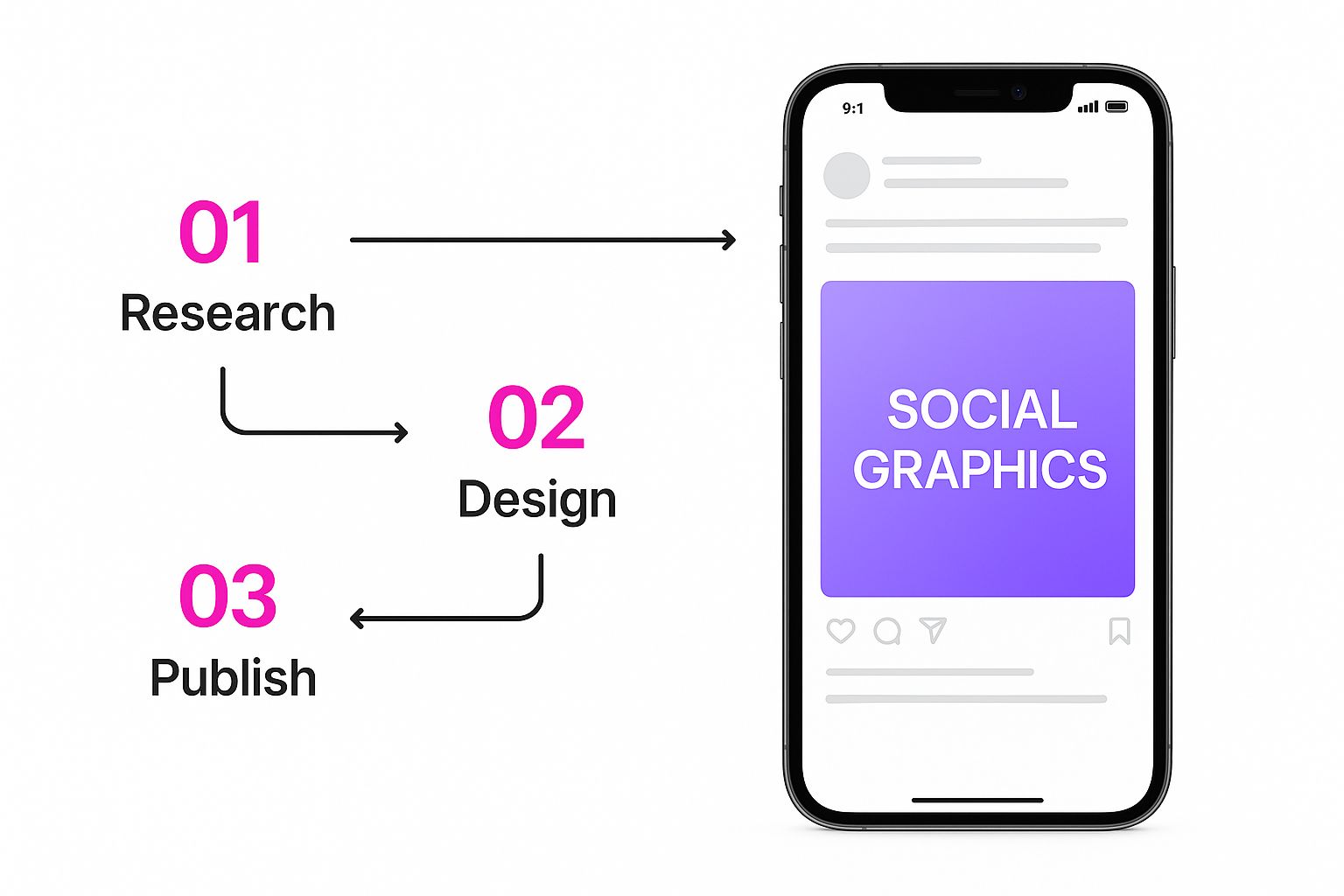
As you can see, a single creative idea can be instantly adapted for different platforms, keeping your brand consistent without all the manual labor.
But the magic doesn't stop once you have a base image you like. AI is also your assistant for refining and multiplying your designs. This is where you really start to scale your small business graphic design.
- Background Removal: Instantly pull your product out of its original background and drop it onto a clean color or into a new scene entirely.
- Object Replacement: Need to swap an item in the image? You can do it without having to regenerate the whole thing from scratch.
- Style Variations: Take one great image and ask the AI to remake it in different styles—photorealistic, illustrative, or even cartoonish.
- Aspect Ratio Changes: Effortlessly turn a square social media post into a vertical story or a widescreen banner ad.
Choosing The Right AI Design Tool For Your Business
Here’s the thing: not all AI tools are built the same. Different platforms are good at different things, so finding the one that fits your workflow and budget is key.
Think of these tools like a workshop. You wouldn't use a hammer to cut wood. Similarly, choosing the right AI platform for the job—whether it's logo creation, social media posts, or product photos—is key to getting professional results efficiently.
To narrow it down, start by thinking about what you'll be creating most. Are you looking to generate completely original art from text prompts, or do you need something that can edit your existing photos and automatically apply your brand colors and fonts?
The right tool depends entirely on your goals. To help you navigate the options, here's a quick comparison of the most common types of AI design tools available.
Choosing The Right AI Design Tool For Your Business
| Tool Type | Ideal Use Case | Common Pricing Model |
|---|---|---|
| Text-to-Image Generators | Creating completely original images, concept art, and unique social media visuals from text descriptions. | Subscription-based, often with credits for image generations. |
| AI-Powered Design Platforms | Building branded assets using templates, applying brand kits, and making quick edits for campaigns. | Freemium or tiered subscriptions based on features and team size. |
| Specialized AI Editors | Performing specific tasks like upscaling low-resolution images, removing backgrounds, or colorizing photos. | Pay-per-use or subscription with a focus on specific features. |
Ultimately, a Text-to-Image Generator is perfect for pure creativity, while an AI-Powered Design Platform is better for maintaining brand consistency across many assets. Specialized editors are fantastic for tackling one-off, specific tasks with precision.
Good AI Art Still Needs Good Design Principles
Having a powerful AI image generator at your fingertips is a massive advantage, but it's not the whole story. What really separates a decent image from a truly professional one is understanding the "why" behind good design. The fundamentals of graphic design are timeless—they’re the rules of the road for guiding a viewer’s eye and making your message stick.
Think of it this way: AI is your incredibly talented intern, but you’re still the art director. Knowing these core principles allows you to give better instructions and refine the final output with an expert’s touch. This is the secret sauce that makes your key message pop and builds immediate trust with your audience.
Guiding the Eye with Visual Hierarchy
At its heart, visual hierarchy is just about arranging things to show what’s most important. You can't have every part of your design screaming for attention at the same time. You need to create a clear path for the viewer's eye to follow, starting with the single most critical piece of information.
Take a graphic for a flash sale. The "50% Off" headline should be the first thing anyone sees—big, bold, and unavoidable. The product itself would be next, followed by smaller details like the sale dates or your website. It’s a simple but powerful way to make sure your main point lands in seconds.
Effective small business graphic design isn't about making everything loud; it's about making the right thing loud. By establishing a clear hierarchy, you control the narrative and make your message impossible to miss.
Creating Balance and Focus
Next up is making sure your designs feel stable and intentional. This isn't about complex art theory; it's about a few practical concepts that work together to create a clean, polished look.
-
Balance: This is all about making sure your design doesn’t feel like it’s about to tip over. Symmetrical balance is the classic approach, mirroring elements on either side of a central line for a formal, stable feel. Asymmetrical balance is a bit more modern and dynamic, using different elements with varying "visual weights" to achieve a sense of equilibrium.
-
Contrast: This is how you make things stand out. It’s the bright call-to-action button on a dark background, the huge headline next to tiny text, or a sleek, modern font paired with something more traditional. High contrast is a magnet for the eye and keeps your design from feeling flat.
-
Negative Space: Don't be afraid of empty space! Also called white space, it’s the area around your text and images. It’s not wasted—it's an active design element that gives everything room to breathe. Jamming too much into one graphic just creates visual noise. Used well, negative space makes a design feel clean, sophisticated, and way easier to understand.
Smart Budgeting for Your Design Needs
Every small business owner I know lives and dies by their budget. When it comes to small business graphic design, figuring out where to put your money is the difference between seeing a real return and just… spending. Let's walk through the options so you can make a smart call that actually fits your goals and your bank account.
The right answer usually depends on what you're trying to do. It makes perfect sense to DIY a quick social media post. But your company logo? That's the face of your brand, and a professional investment there pays off for years. The real trick is finding that sweet spot between hands-on creation and knowing when to call in the experts.
Comparing Your Design Options
For most small businesses, your design needs will fall into one of three buckets. Each one has its place, and they're all suited for different stages of growth.
- Do-It-Yourself (DIY): This is your bread and butter for daily content. Think social media updates, simple flyers, or internal docs. Using a tool like a bulk social media image generator can be a game-changer here, letting you crank out a ton of consistent graphics without spending weeks learning complex software.
- Hiring a Freelancer: This is the perfect middle ground for high-impact, one-off projects. Need a killer logo, a landing page that converts, or some custom packaging? A good freelancer brings expertise that's non-negotiable for these kinds of assets.
- Partnering with an Agency: This is for businesses ready to seriously scale up. An agency takes over your entire visual strategy—branding, web design, ongoing marketing campaigns. It's a comprehensive (and more expensive) solution for when you're ready to go big.
The data backs this up. About 50% of small businesses keep design in-house to control costs, while around 21% bring in freelancers for those specialized jobs. Only a tiny 7% go all-in with a full-service agency, which tells you that budget-friendly approaches are definitely the go-to. You can dig into more of these graphic design cost statistics on colorlib.com if you're curious.
Don't think of design as just another expense. It's a direct investment in your brand's credibility. A cheap-looking logo can make your business feel amateur, but a well-crafted one builds trust and value the second someone sees it.
Making Every Dollar Count
No matter which route you take, there are always ways to stretch your budget without sacrificing quality. Resourcefulness is a small business owner's superpower, and that definitely applies to creating your visuals.
One of the smartest moves you can make is tapping into the best stock photo sites for high-quality, affordable images. These platforms give you access to professional photography for a tiny fraction of what a custom photoshoot would cost, instantly building your library of visual assets.
Another fantastic strategy is to create a set of versatile design templates for things you do all the time. A solid template for your weekly promo or your blog headers keeps your brand looking consistent and saves you from reinventing the wheel every single time. This frees up your professional design budget for those foundational assets that will serve you for years to come.
Graphic Design Questions We Hear All the Time
Even with the best AI tools, jumping into graphic design for your small business can bring up a lot of questions. It's easy to feel a bit lost. So, let's clear up some of the most common things we get asked by entrepreneurs who are right where you are now.
Think of this as your personal cheat sheet. We're cutting straight to the practical answers you can use today.
What Are the Top Three Graphics I Absolutely Need for My New Business?
When you're starting out, it's all about impact. Don't try to boil the ocean by creating a dozen different things. Instead, nail these three foundational pieces to look professional from the get-go.
-
A Professional Logo: This is the face of your company. It’s your visual handshake. A great logo is simple, easy to remember, and looks good everywhere—on your website, your social media, your products, you name it.
-
A Basic Brand Style Guide: No need for a 100-page manifesto. Just a simple one-pager will do. Define your primary and secondary colors (grab those hex codes), pick your fonts for headlines and body text, and set a few ground rules for using your logo. This is the secret to looking consistent.
-
Branded Social Media Templates: For many people, your social media is their first impression of you. Create a handful of reusable templates for your posts, stories, and profile banners. It’s a huge time-saver and makes your feed look cohesive and intentional, not like a random collage.
Getting these three elements right is like pouring the foundation for a house. Every flyer, web banner, or ad you create later will be stronger and more on-brand because you did this work upfront.
Can I Really Just Use AI to Make My Logo?
That's the million-dollar question, and the answer isn't a simple yes or no. AI is an amazing brainstorming partner. You can spin up dozens of concepts and explore different styles in minutes—something that used to take days. For a founder on a shoestring budget, it’s a fantastic way to get the ball rolling.
But here's the thing: a truly solid logo needs more than just a cool design. It needs strategy. It has to be unique enough to stand on its own, legally defensible (you don't want any trademark trouble), and tied directly to your brand's story. That's a level of critical thinking AI just can't do yet.
A popular middle ground? Use AI for the initial flood of ideas, then hire a freelance designer to take your favorite concept and turn it into a polished, professional, and scalable vector file.
How Much Should I Actually Budget for Design in My First Year?
Figuring out a design budget can feel like throwing a dart in the dark. The smartest way to approach it is to think about impact. The biggest mistake new business owners make is budgeting $0, which almost always leads to a brand that looks amateur and struggles to build trust.
Here's a more practical way to break it down for your first year:
-
Essential Investment (High Priority): Your logo and website. These are your core brand assets and the foundation of your online presence. This is where you should plan to invest the most, whether that's hiring a pro or buying premium tools and templates.
-
Ongoing Content (Moderate Priority): Think social media graphics, blog images, and newsletters. This is the perfect place to use budget-friendly AI tools and templates. The goal here is consistent, high-volume output without blowing your budget.
-
Marketing Materials (As Needed): Things like business cards, brochures, or product packaging. Budget for these on a project-by-project basis. Get them professionally designed when you have a specific opportunity or need.
At the end of the day, your small business graphic design budget isn't an expense—it's an investment in how the world sees you.
Ready to take control of your visual content and produce stunning images at scale? With Bulk Image Generation, you can create hundreds of on-brand graphics in seconds, not hours.
Stop wrestling with complicated software and start creating. Explore our powerful AI tools and see how easy it can be.
