Prompt from Image: The Complete How-To Guide 2026

Ryan Bennett • October 2, 2026
Prompt from Image. Learn to extract high-quality prompts from any image using proven workflows. Covers tools, techniques, and practical examples
A striking reference image can trigger an immediate question: what prompt would recreate this look? You upload the image to an AI tool, receive a polished paragraph, and expect the generated result to match. Then the subject changes, the lighting drifts, the composition collapses, or the target model interprets the same words in an entirely different way.
That happens because a raw caption isn't a production-ready prompt. Captioning describes what appears in an image. Prompting must control what an image generator should preserve, prioritize, reinterpret, and exclude. The difference matters for marketers, designers, educators, and anyone building repeatable visual workflows.
Understanding the Prompt from Image Workflow
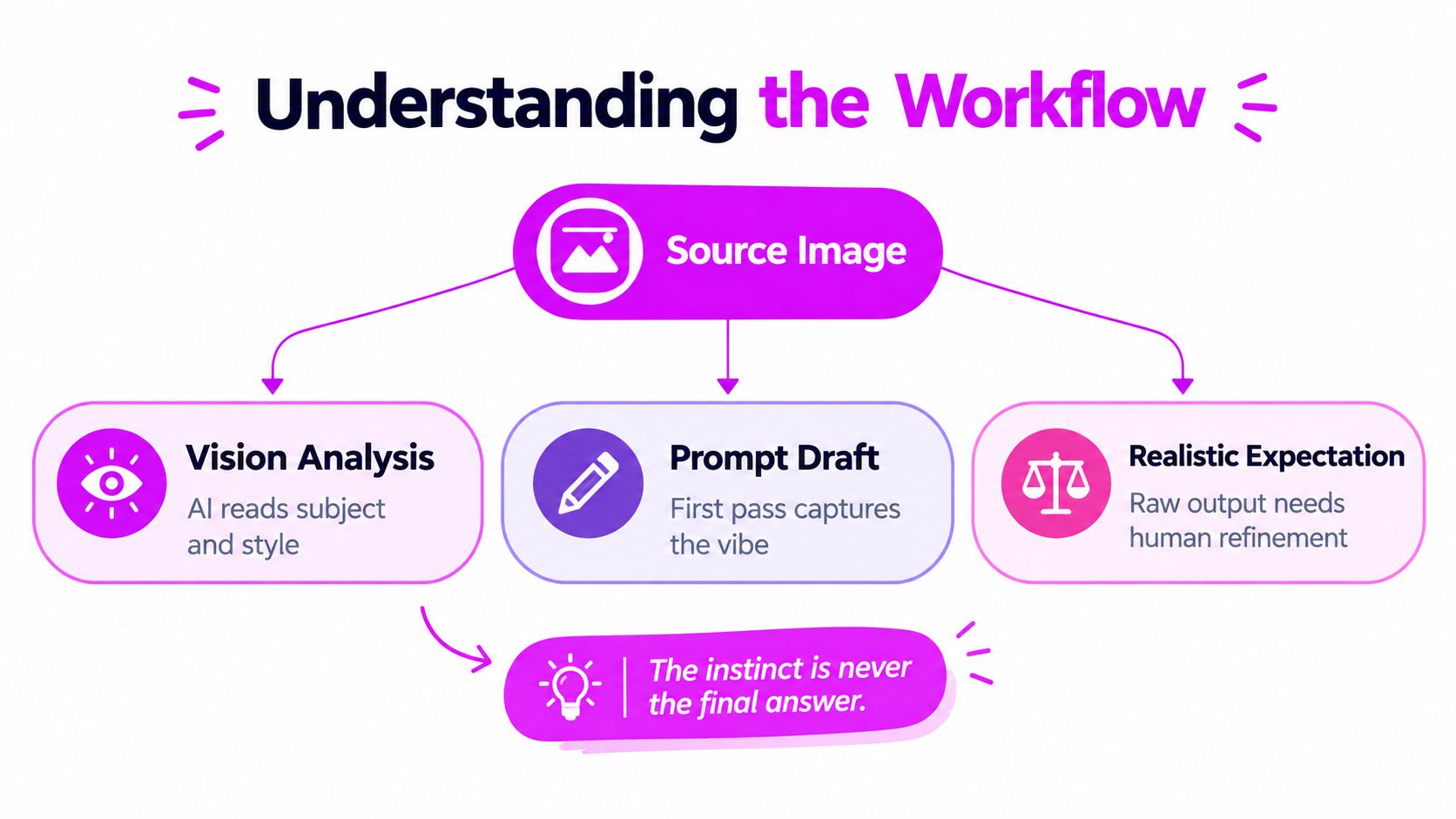
The most common mistake is treating the first generated caption as the final answer. A caption might identify a woman, a desk, soft light, and a laptop. It may still omit the visual decisions that made the reference useful, such as the camera angle, subject placement, negative space, hierarchy, material treatment, or relationship between foreground and background.
A reliable prompt from image workflow separates observation from instruction. First, record what is visibly present. Then organize those observations into a creative brief. Only after that should you adapt the language to the image model you plan to use.
Why captions and prompts behave differently
Image captioning developed from template-based and retrieval-based approaches around 2010–2014 into deep-learning encoder-decoder systems during 2014–2015, as summarized in research on the evolution of image captioning. The Show and Tell milestone paired CNN image features with RNN text generation, while later attention-based systems helped models focus on specific image regions as they generated words. By 2018, CNN-RNN pipelines, attention methods, and region-aware architectures had established much of the technical foundation used by modern image-to-prompt systems.
Those systems are good at describing visible content, but generation requires a different type of control. “A ceramic bottle on a beige table” identifies the subject. “Centered premium product photograph, warm beige background, restrained shadows, clear space around the bottle, front-facing composition” gives a generator priorities.
Practical rule: Treat the first caption as an inventory of evidence, not as the finished creative direction.
A useful structure has five layers:
- Subject: What must appear, and which object or person receives attention?
- Composition: Where are the elements positioned, and how much negative space is available?
- Visual treatment: What lighting, color relationships, materials, camera feel, or illustration qualities are visible?
- Context: What setting supports the subject without competing with it?
- Generation controls: What should the target model preserve, simplify, avoid, or format for a particular channel?
This distinction is also useful when teams are assessing broader AI workflows. For a practical overview of how generative systems fit into business processes, Rite NRG's AI business guide provides helpful context before you build a visual pipeline around them.
The instinct is never the final answer. A production prompt should make the image's intent controllable, not merely make the image sound readable.
Choosing the Right Tools for Image to Prompt Conversion
A reference image can produce a fluent caption and still fail in production. A one-off coloring-page reference may need only a fast, editable description. A product campaign needs consistent structure, accurate handling of visible text, and instructions adapted to the destination model. A large content library adds repeatability, naming conventions, export options, and enough review capacity to catch weak outputs.
Tool selection should follow that workflow. Adobe Firefly fits teams that already manage image analysis inside a broader creative process. Google's image tools can suit teams working within that ecosystem. Open-source pipelines provide greater control over processing and automation, but they require technical setup and a defined review layer. Dedicated batch platforms reduce repetitive handling when many references pass through the same stages.
The key test is whether the tool helps turn observation into a usable, model-specific prompt. Compare description density, model adaptation, and downstream integration. A long caption that cannot be edited for the target generator may perform worse than a shorter draft with clear controls for composition, style, exclusions, and output format.
A practical comparison
The table is a decision aid, not a universal ranking. Batch support and adaptation depend on the implementation, connected model, export options, and amount of human review.
| Tool | Best For | Batch Support | Model Adaptation |
|---|---|---|---|
| Adobe Firefly | Creative teams working from visual references | Better suited to managed creative workflows than improvised bulk processing | Useful as a starting point, followed by manual adaptation |
| Google image tools | Teams already working within Google's AI environment | Depends on the connected workflow and automation layer | Adaptation varies by destination model |
| Open-source captioning pipeline | Technical teams needing control over processing | Strong potential for automation and bulk extraction | High flexibility, but the team must design prompt formatting |
| Dedicated image-to-prompt platform | Fast one-off analysis and structured drafts | Suitable for repeatable workflows when export and naming are available | Usually requires a separate refinement step |
| Human-reviewed workflow | Brand-sensitive campaigns and high-risk assets | Slower, but easier to validate at important checkpoints | Strongest option for model-specific and brand-specific decisions |
Caption quality needs more than a single fluent-text score. Evaluation research describes reference-based measures such as BLEU, METEOR, ROUGE-L, CIDEr, and SPICE, alongside newer reference-free CLIP-based scoring approaches that compare image and text alignment. The research on image caption evaluation supports testing several evaluation signals instead of treating one metric as the final verdict.
In production, generate a dense visual description, convert it into several prompt candidates, and compare the resulting images with the source. Use a semantic measure where available, then apply a human checklist for subject accuracy, layout, lighting, text, and brand details. A caption can match the visible objects while missing the original intent. That gap often becomes obvious only after testing the prompt in more than one image model.
Match the tool to the workflow
For a hobbyist, an editable draft with minimal setup may be enough. A social media manager may need consistent aspect-ratio instructions and exportable prompt records. A product team needs reliable preservation of product attributes, plus a practical way to test alternative backgrounds and compositions.
Model adaptation should be part of the selection process. Some systems respond well to natural-language descriptions, while others need ordered controls, parameter fields, negative prompts, or style-specific syntax. A reverse-engineered prompt that reproduces the reference in one system may produce a different subject emphasis, camera angle, or visual treatment elsewhere. Test the target model before standardizing the format.
Metadata supports the adjacent organization work. For searchable marketplace assets, AI tag creation for Etsy POD can help organize descriptive language. Keep tagging separate from visual reconstruction. Tags support discovery, while prompts control generation.
Step-by-Step Workflow for Extracting Production-Ready Prompts
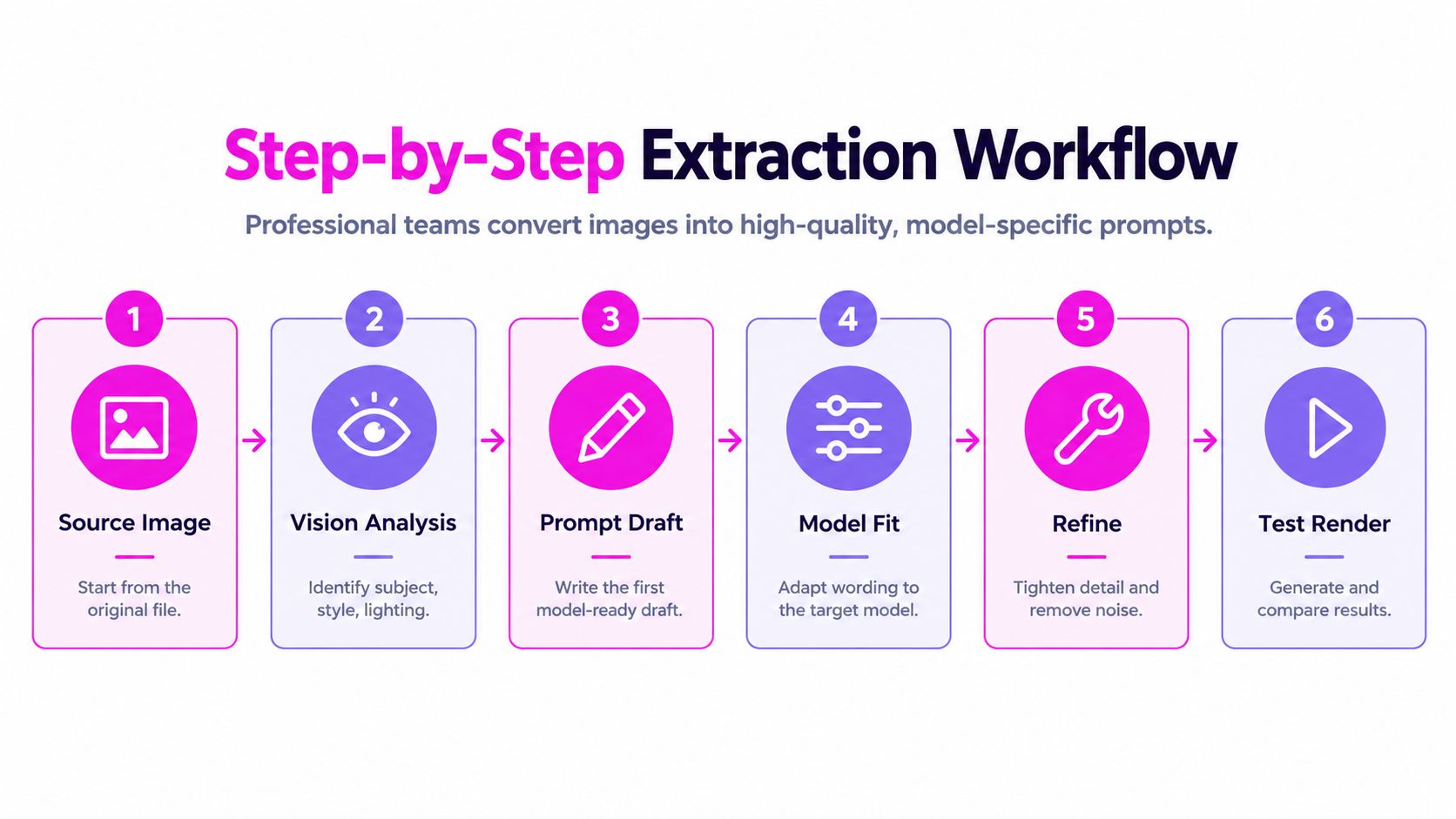
A production workflow starts with the original file, not a compressed screenshot or a social post saved from a feed. Check whether the reference contains visible text, important edges, transparent objects, or subtle lighting that compression may have weakened.
Start with a factual visual inventory
Suppose the reference is a premium product photograph showing a dark glass bottle on a pale stone surface. The first draft should record the bottle shape, label position, surface, background, light direction, visible reflections, camera angle, and empty space. Don't add “luxurious,” “exclusive,” or “high-end” just because the image feels polished. Those words are interpretations, and the model may translate them into unsupported materials, colors, or props.
Next, organize the inventory into a hierarchy:
- Non-negotiable elements: The bottle, its orientation, the label area, and the overall product prominence.
- Structural elements: Camera height, framing, surface position, background separation, and shadow direction.
- Transferable style elements: Soft studio light, restrained palette, tactile stone texture, and controlled reflections.
- Optional details: Small botanical accents, atmospheric haze, or decorative objects.
- Exclusions: Clutter, dramatic color shifts, unreadable label text, and unrelated props.
This hierarchy prevents a generator from giving equal weight to every phrase. The reference's intent usually depends on a small number of structural decisions, not a long list of adjectives.
Adapt the draft to the target model
A prompt written for one image system may not transfer cleanly to another. Some systems respond well to natural language and explicit priorities. Others interpret short visual tags, aspect-ratio instructions, or negative constraints more predictably. Write the core description once, then create a model-specific version instead of copying the same paragraph everywhere.
For broader guidance on organizing instructions, prompt engineering best practices can complement this image-focused workflow. The key is still to test the result inside the target model rather than assuming that a well-written sentence will behave consistently across systems.
A batch workflow can make comparison easier. Store the source image, extracted inventory, model-specific prompt, output filename, and review decision together. The guide to writing a picture prompt is useful when the visual brief needs to become a repeatable generation instruction rather than a descriptive paragraph.
Score coverage and precision separately
A prompt can mention many visual details and still be unreliable. Recent evaluation frameworks separate coverage, how much relevant visual content the prompt mentions, from precision, how many of those claims are correct, as explained in research on coverage and factual precision in caption evaluation.
Use that distinction during review:
- Coverage check: Did the prompt capture the main subject, placement, setting, lighting, and event or use context?
- Precision check: Did it invent a color, object, texture, count, or spatial relationship?
- Generation check: Does the target model preserve the image's intent when it renders the prompt?
- Decision check: Which details should remain fixed, and which can vary for the campaign?
Generate multiple candidates, compare them with the source, and remove unsupported adjectives. A human should review edge cases because semantic similarity scores can overlook a visually important error. Refinement is complete when the prompt gives the generator useful control, not when it becomes longer.
Common Pitfalls in Image to Prompt Extraction
A prompt can describe an image accurately and still fail in production. It may list the laptop, desk, documents, and coffee cup, yet miss the framing, visual hierarchy, or tension that makes the scene useful. The gap between a raw caption and a working generation prompt is where many image-to-prompt workflows break.

Literal wording can hide semantic failure
Teams often judge an extraction by how closely its wording resembles the reference. That test rewards fluent description, not reliable visual control. Caption evaluation research has examined many competing metrics because string similarity alone cannot capture every important image relationship, as discussed in the survey of image caption evaluation methods.
Check for these failure patterns:
- The prompt names objects but not relationships: It mentions a cup and notebook but omits that the notebook sits behind the cup in the lower-right foreground.
- The prompt adds attractive fiction: It introduces velvet, gold, cinematic haze, or a specific color without evidence in the source.
- The prompt flattens hierarchy: It gives a minor decorative object the same weight as the central product.
- The prompt confuses location: It places a subject beside an object that was behind it or visible through a reflection.
- The prompt copies mood words: It says “premium” or “editorial” without specifying the lighting, framing, and arrangement that create that impression.
Use one practical test: could a different image satisfy every sentence in the prompt? If yes, the extraction is probably too generic. A production-ready prompt must identify relationships and priorities, then translate them into instructions the target model can follow.
Automatic scores are only one signal
Image and text representations do not align perfectly. A candidate can score well against the source while shifting the focal point, changing an object count, or breaking a spatial relationship. A differently worded prompt can also produce the correct structure.
Reverse prompt recovery remains approximate rather than exact. A 2025 user study found a gap between similarity metrics and human judgment, as summarized in research on reverse-engineered prompts. The practical question is not whether extracted text resembles the image. It is whether the chosen model can render the same intent from that text.
Test the prompt in the model and aspect ratio used for production. Compare the render with the source, then revise unsupported adjectives and vague mood labels. Keep details that control composition, subject placement, lighting, and purpose. Remove details that merely make the sentence sound polished.
Review the render, not just the sentence. A fluent caption is not automatically a reliable production prompt.
Legal and Ethical Considerations for Prompt Extraction
Prompt extraction doesn't recover authorship. It produces an approximation of visible characteristics and converts them into instructions that may help a user create a related image. Adobe explains that an image-to-prompt workflow can't retrieve the exact original prompt, which weakens the assumption that extraction functions as a faithful copy mechanism, as described in Adobe's image-to-prompt guidance.
That distinction is useful, but it doesn't remove risk. A generated prompt can still be used to pursue close visual imitation, reproduce recognizable branding, or rebuild an image that someone else owns. The legal and policy question depends on the source, the intended use, the degree of similarity, and the rules of the platform or client involved.
Use extraction as a brief, not a copying shortcut
A safer production pattern starts with the reference as an analysis aid. Extract the subject, composition, lighting, and design logic, then replace distinctive creative decisions with original choices. Change the setting, palette, props, layout, character details, or campaign purpose where appropriate. Avoid inserting a living artist's name as a shortcut for style imitation, particularly when the output will be sold or used in advertising.
For commercial work, keep a record of where the reference came from and why the team used it. Confirm that you have permission to analyze and reuse the image when the source isn't yours. Review trademarks, logos, recognizable characters, private individuals, and client-confidential material before sending an image to an external tool.
- Reference ownership: Record whether the team created, licensed, commissioned, or merely found the image.
- Transformation intent: Decide whether the prompt supports an original brief or aims for close replication.
- Output review: Check the generated work for recognizable protected elements and confusing similarity.
- Platform rules: Read the image tool's current terms and commercial-use conditions.
- Client approval: Get explicit sign-off when a reference materially influences a campaign.
A commercial-use checklist such as commercial license requirements for AI images can help teams document these decisions. It shouldn't replace legal advice, but it can stop a rushed workflow from treating every extracted prompt as automatically safe.
The strongest ethical position is practical: use reverse engineering to create a controllable brief for compliant remixing, not to claim access to another creator's original process. Similarity is a production variable, not proof of authorship or permission.
Building Your Prompt from Image Production System
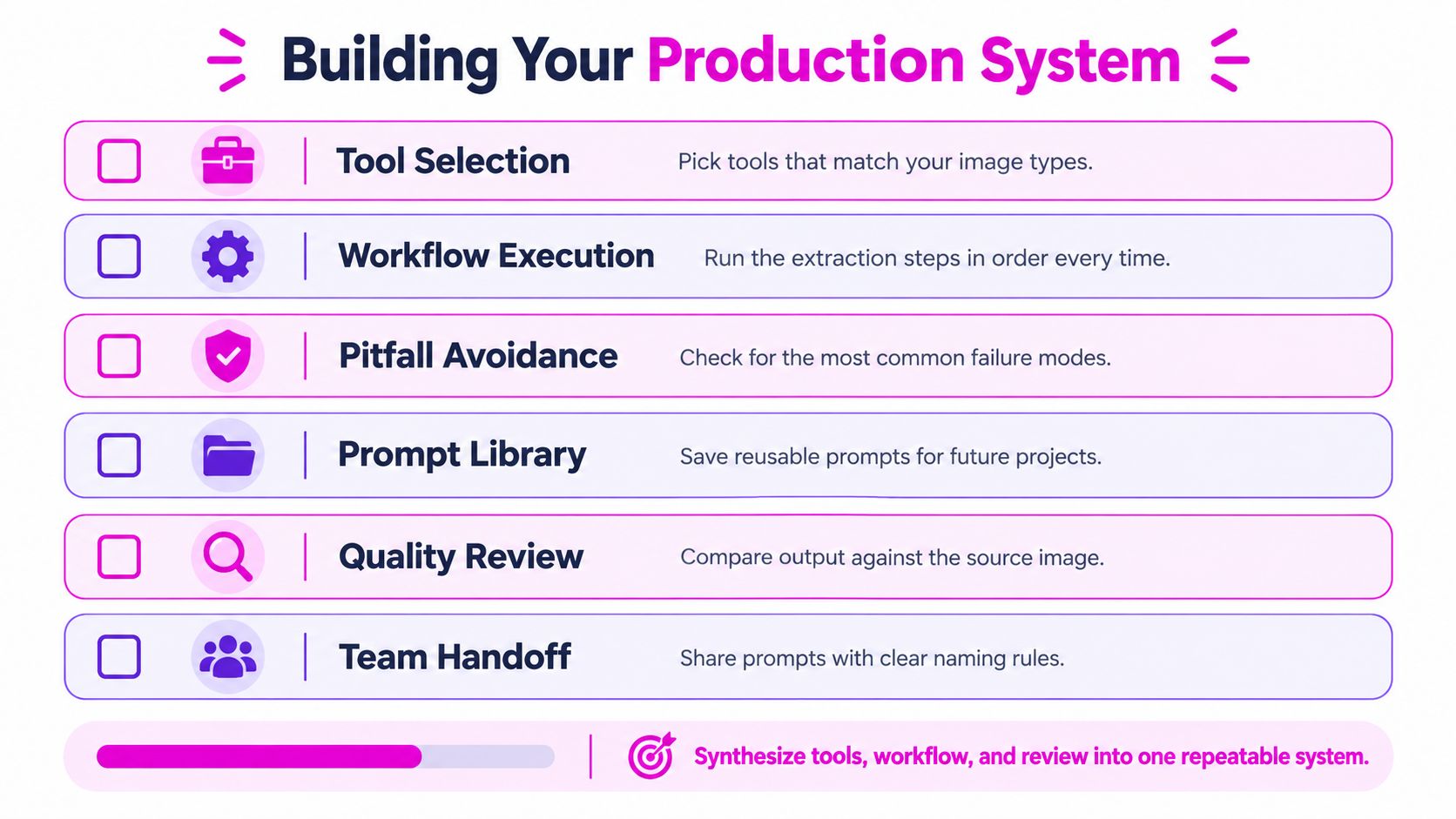
A team can extract a polished caption from a reference image and still produce the wrong result. The caption describes visible objects, while a production-ready prompt must preserve intent, define priorities, and account for how the target model interprets wording. A repeatable system records that difference instead of treating the first reverse-engineered prompt as finished.
Build the workflow around decisions
A solo creator can keep the process lightweight. Save the source image, raw caption, structured brief, target model, adapted prompt, and final render in one project folder. A marketing team should also record prompt versions, owners, approval status, usage rights, and the reason a render passed review.
For campaigns with many references, use a consistent record:
asset name | source permission | visual inventory | target model | prompt version | output status | reviewer note
The visual inventory should separate observable details from inferred intent. Record the subject, composition, lighting, palette, camera perspective, depth, and negative constraints. Then identify which elements must remain stable and which can change for the new use case.
Prompt quality depends on destination. Wording that supports a product hero image may fail for a social carousel, coloring page, or lifestyle scene. Store successful adaptations with the model, channel, and use case. A prompt that reproduces the original in one system may lose composition or styling in another, so test the intended model rather than assuming cross-model equivalence.
Create a feedback loop
Review every test render using the same questions:
- Preservation: Did the output retain the subject and main composition?
- Control: Did the model follow the requested lighting, palette, and spatial relationships?
- Noise: Which details were invented, omitted, or overemphasized?
- Adaptation: Which wording needs to change for this model?
- Reuse: Is the revised prompt specific enough to save as a template?
Batch creation helps teams compare controlled variations. Bulk Image Generation offers image-to-prompt conversion alongside bulk generation and batch editing, including resizing, background removal, face swaps, and enhancement. Use those functions after validating the prompt. They do not replace visual review.
Connect the prompt record to aspect-ratio decisions, file naming, editing status, and final approval when assets serve multiple channels. The image generation API guide is useful for connecting prompt-led production with an application or automated content process.
The system works when another person can run the prompt in its intended model, compare the result with the reference, and explain why it passed or failed. Start with three reference images, adapt each structured brief, and compare the renders using a human checklist. When the process is ready to scale, visit Bulk Image Generation to generate variations in bulk and manage the editing steps that follow.