On Demand Graphics: What They Are and How to Scale Them

Ryan Bennett • October 9, 2026
Learn what on demand graphics are, where they shine, and how AI bulk image generation produces platform-ready visuals in seconds.
Your inbox says the launch is tomorrow. The creative team has three approved concepts, the social manager needs platform-specific sizes, and someone just asked for “a few more variations” before noon. That's the moment on demand graphics stops being a buzzword and starts being a production problem.
The useful way to think about it is simple. You're not asking a tool to make one pretty image. You're running a system that takes a brief, produces a batch of visuals, edits them for use, checks them against real standards, and ships them into the right channels only when they're needed.
What On Demand Graphics Actually Mean
The phrase on demand graphics usually makes people think of a single prompt, one image, and done. That's too small. In practice, it looks more like a creative queue: a campaign brief comes in, variants get generated, the team reviews them, the weak ones get fixed, and the finished assets go out to the places that need them.
A social media manager feels this most acutely. A product launch lands in the morning, and by lunch the team needs story cards, feed posts, ad sizes, teaser banners, and maybe a few language or color variants for different audience segments. Traditional studio workflows can do the job, but they're built for deliberate cycles, not for a steady stream of channel-specific requests.
Practical rule: if the same idea needs to appear in multiple formats, sizes, or versions, you're already in on-demand territory.
The market history behind this matters. Print-on-demand created the commercial model for making products only after an order exists, which reduced inventory pressure and made customized output practical at scale. That same logic carries into graphics, where digital assets can move from a file to a fulfilled product or campaign piece without a mass-production mindset, and the research on print-on-demand shows how established that workflow has become in commercial use (Mordor Intelligence on the print-on-demand market). The same research also shows how much of that demand sits in business workflows, not just hobbyist use.
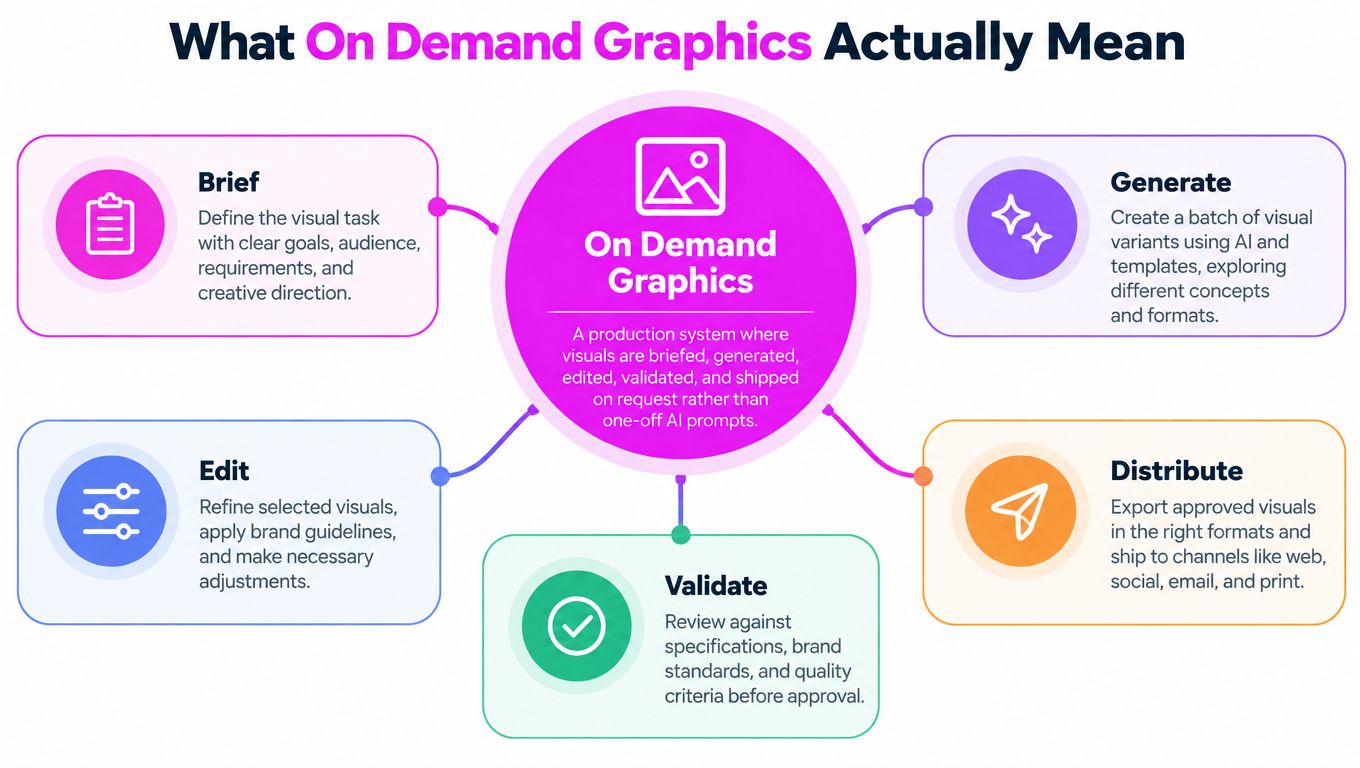
For a clean language map of creative production terms, the Data Hunters Agency breakdown is a handy companion, especially if you're trying to separate briefs, assets, variants, and deliverables in a team workflow.
The reason this model keeps growing is straightforward. Marketers rely heavily on visual assets, image-based posts can outperform plain text in engagement, and brands need to keep a consistent look across channels while publishing constantly (social media graphics research summary). That pressure doesn't just create demand for more images. It creates demand for a repeatable system that can produce the right images on schedule.
The Five-Stage On Demand Graphics Pipeline
A campaign manager opens a request for six launch images, then needs square posts, vertical stories, and a web crop by the end of the day. A production pipeline keeps that request from becoming a pile of unrelated files. Each stage gives Bulk Image Generation a defined job, from the first instruction to the final handoff.
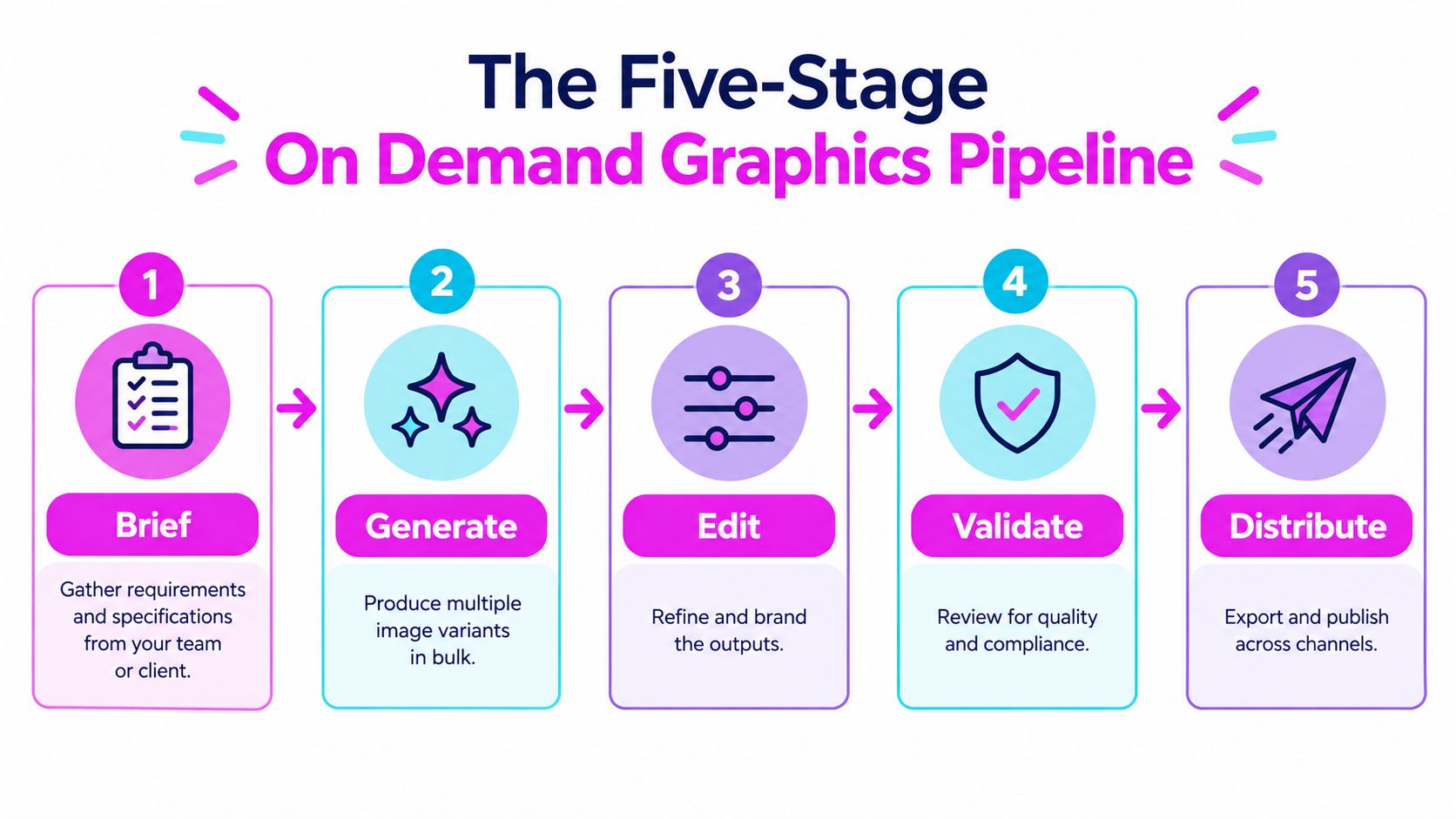
The brief sets the target. “Make launch graphics for the new product” leaves too many decisions open. “Create six social assets for the skincare launch in square and vertical formats, using calm colors, product-forward compositions, and space for copy” gives the batch clear boundaries. A well-written brief can become a reusable template, allowing the next launch to begin with fewer decisions.
The generate stage produces the first batch. Bulk Image Generation can create multiple variations from one description or a structured prompt set, so the team reviews options instead of commissioning every image from scratch. Ad concepts and product mockups belong here. Volume matters at this point, while polish comes later.
The edit stage turns raw outputs into channel-ready assets. Background removal, resizing, face swaps, and enhancement are post-production tasks, but they work best as defined batch operations. Each adjustment should connect to a requirement, such as a platform format, a product presentation rule, or a brand guideline.
The validate stage catches problems before publication. Reviewers check resolution, text readability, composition, and brand alignment. They also confirm that the image still communicates the intended product or message. A quick render that fails review creates rework, even if it was produced quickly.
The distribute stage packages approved assets for use. One core visual may need a feed post, story version, web hero crop, and ad unit. Export settings and aspect ratios therefore matter as much as the original concept. With those requirements defined early, distribution becomes a packaging task rather than a redesign.
A pipeline only works when each stage has a clear owner. If everyone “sort of” owns validation, nobody owns quality.
The stages answer five practical questions: brief, what are we making? Generate, what options can we produce? Edit, what fits the brand and channel? Validate, is the asset ready? Distribute, where does the approved version go? Clear answers let the system move quickly without treating speed as a substitute for review.
Where On Demand Graphics Show Up in Real Work
The clearest way to understand the system is to group it by job, not by industry. A marketer, a teacher, and a small business owner may all be using the same production logic, even if the end asset looks completely different.
Selling
When the job is to sell, on-demand graphics usually support product photography, ad variants, e-commerce images, and campaign visuals. A brand may need multiple versions of the same product shot with different backgrounds, copy placements, or seasonal cues. In that case, the longest part of the pipeline is usually edit, because the asset has to feel commercial and on-brand rather than generic.
Teaching
When the job is to teach, the visuals need to clarify. Think explainer graphics, classroom worksheets, step-by-step tutorials, and chart-like assets that translate a concept into something people can scan quickly. Here the slowest stage is often validate, because readability and accessibility matter more than visual flash.
Inspiring
Mood boards, pitch decks, brand campaigns, and concept boards belong here. These visuals don't always need to explain, but they do need to create a strong tone fast. The bottleneck tends to sit in the brief, because the team has to define style, feeling, and audience assumptions before generation can help.
Entertaining
Coloring pages, game assets, social meme formats, and short-form visual hooks fit this bucket. The work moves quickly, but volume can create inconsistency if no one watches the output. In this category, generate often feels fast, while validate protects you from releasing a batch that looks uneven or off-brand.
Print-on-demand is a useful commercial anchor for this thinking. The category helped normalize making graphics and products only when there's a real request, and the market research shows a large commercial base with apparel as a major use case and direct-to-garment printing as a leading technology path (Mordor Intelligence on the print-on-demand market). That history matters because it shows the same logic works across merchandise, branding, home décor, and promotional assets.
A modern workspace for all of this often looks modest, not glamorous.

How Bulk Image Generation Fits the Pipeline
A campaign request can arrive with dozens of required formats, products, or creative directions. Tool choice matters less than whether the system supports each production stage. Bulk Image Generation fits mainly into generate and edit, turning an approved brief into many working assets for review and distribution.
The process starts with a structured input, such as a natural-language description or a list of prompts. Using Flux 1.1 and OpenAI's GPT-Image-1, the platform can render up to 100 unique visuals in under 20 seconds. That speed does not replace the brief. It lets a team convert one approved direction into a batch of initial assets instead of creating every variation manually. The AI product image generator guide provides useful context for treating product imagery as a workflow, not only as prompt writing.
Generation creates the raw material. The batch editor prepares it for delivery through background removal, face swaps, resizing, and enhancement. This is the production equivalent of trimming, labeling, and packing items after they leave an assembly line. Repeated cleanup becomes easier to handle without moving assets between unrelated tools.
Supporting tools can strengthen the handoff between stages. Aspect ratio calculators help set dimensions before rendering, since a square ad and a vertical story need different compositions rather than one file with a new crop. Prompt generators for Flux 1.1, MidJourney, and DALL·E can help turn a brief into usable instructions. Image-to-prompt converters can also examine a style reference and support a new batch based on its visual direction.
The human team still owns the decisions around the system. A generator does not define the campaign goal, approve brand tone, select the channel mix, or determine whether an asset is legally safe to ship. Those decisions belong in the brief and validation stages. The platform supplies production capacity, while people set the rules and approve the output.
For API-driven workflows, the image generation API trends overview offers relevant context on how image creation can fit a repeatable, connected system. The important shift is operational: brief the work, render the batch, edit the usable variants, validate them, and distribute only what passes review.
Quality Checks That Protect a Fast Pipeline
Speed only helps when the output survives review. A fast batch that fails contrast, looks blurry at larger sizes, or breaks brand rules creates more work than it saves. Validation is not a final polish step, it's the gate that keeps a production line usable.
Accessibility comes first
WCAG-based guidance calls for a minimum contrast ratio of 4.5:1 for normal-sized text, 3:1 for large text, and 3:1 between meaningful graphical objects or interface components and adjacent colors, with color supported by labels, patterns, icons, or annotations (MDN on WCAG color contrast). That matters in bulk production because text may land over photos, gradients, or textured backgrounds that look fine at thumbnail size and fail on real screens.
Practical rule: if color carries meaning, add a second signal before the asset leaves validation.
The easiest workflow move is to automate a contrast check after rendering and flag anything below the relevant threshold. If the asset uses color to communicate status, category, or hierarchy, add a label or icon before approval. That keeps accessibility from becoming a late-stage correction.
Resolution has to survive scaling
The next check is clarity at the size people will see. Accessible image guidance recommends using sharp, high-quality assets and testing layouts at up to 200% browser zoom without losing structure or readability (WMU image accessibility guidance). In production terms, that means generating from a source that's comfortably above the smallest intended placement, then exporting channel-specific versions from that source instead of endlessly enlarging a compressed file.
A good habit is simple. Preview every batch at normal size and at zoomed size, then reject anything where typography, edges, or data graphics turn muddy. For charts and infographics, keep a textual or tabular fallback ready, because resizing the image doesn't automatically make the information accessible.
Brand consistency is the last filter
Brands break when batches drift. A reliable visual system keeps typography, spacing, palette, and composition rules stable even while the subject matter changes. If you need a parallel discipline to borrow from, the visual regression testing overview is a useful mental model because it treats visual changes as something to detect, not just notice by eye.
The internal quality assurance best practices guide fits naturally here too, especially if you're building review steps for repeated batch output.
A simple checklist helps:
- Contrast: confirm text and meaningful graphics clear the required ratio.
- Resolution: preview at normal size and at 200% zoom.
- Brand: compare the batch against the approved palette, typography, and layout rules.
- Fallbacks: attach alt text or a text version when the visual carries information.
Ownership, Rights, and the Questions Most Guides Skip
A lot of teams move fast until the first rights question lands in their inbox. Then the workflow becomes very visible. The problem isn't just whether an image looks good, it's whether the business can defend how it was made and where it can be used.
The U.S. Copyright Office has said that AI outputs may receive protection when a human determines sufficiently expressive elements, such as through creative selection, arrangement, or modification, and a recent survey of 31 designers, marketers, and related professionals found that 94% expressed concern about using AI-generated images for client work without clear copyright guidance (U.S. Copyright Office news release). The practical lesson is that prompt entry alone is not enough. You want an evidence trail that shows human input: approved references, edits, compositing decisions, version history, and the licenses attached to source assets.
Copyright is not the only right that matters
Copyright, trademark clearance, publicity rights, and client warranties are different questions. A team can have a usable copyright position and still run into trouble if a logo, a face, or a brand-like element creates confusion elsewhere. That's why a campaign file should include clear notes on what was reviewed and what was excluded before approval.
Sustainability needs a full-system view
On-demand production reduces overproduction only when you look at the whole system, not just the fact that no inventory sits on a shelf. Recent coverage reports that 49% of consumers are willing to pay more for sustainable print-on-demand products, while shipping delays and sizing inconsistencies remain documented customer-satisfaction problems that affect the actual impact of on-demand production (Accio coverage on print-on-demand design trends). That means a smart sustainability claim has to consider render iterations, return risk, shipping distance, packaging, and material choice.
If the process creates more rework than the old method, the environmental story gets weaker fast.
The internal commercial license requirements guide is relevant here if you need a quick checklist for what should be documented before a graphic is treated as campaign-ready.
A simple decision rule works well. If legal ownership is unclear, slow the batch down. If the visual includes people, brands, or protected style signals, review rights before distribution. If you're making sustainability claims, measure the full workflow instead of leaning on the phrase “no inventory.”
Getting Started and Knowing When Not To
A small campaign can expose the entire workflow before it creates a large cleanup job. Choose one channel, set its aspect ratio, write a brief, generate a test batch in Bulk Image Generation, validate the results, and scale only after the review standard holds. The sequence connects the brief, render, validation, and distribution stages instead of treating each asset as a separate prompt.
Start with a brief that names the audience, message, visual references, exclusions, and required formats. If the outputs vary too widely, narrow the style range, strengthen the references, or reduce the batch size. Rerunning a smaller set is faster than correcting a full campaign built on unclear instructions.
Some assignments should stay outside the model-driven workflow. On demand graphics fit poorly when one hero image is the entire deliverable, when a highly specific photographic style must match exactly, or when legal review must happen before any draft exists. A slower custom production route gives those projects tighter control.
A handful of assets may be manageable with free tools during an early test. As channel variations increase, a structured batch process becomes more useful because the team can keep inputs, versions, checks, and approved outputs together. Bulk Image Generation can support that process by handling batch creation and editing, while the team still owns the brief and approval decisions.
Sustainability claims also require a wider check. On-demand production can reduce overproduction, but shipping delays, sizing inconsistency, returns, packaging, delivery distance, and material choices affect the final outcome. Judge the complete delivery chain, not only how quickly the graphics were rendered.
Stop or slow the workflow when ownership is unclear, the visual includes protected brands or recognizable people, or the project cannot support a clear review record. Visit Bulk Image Generation to examine how its batch tools can fit into a repeatable on-demand graphics process.
