
Image AI Editor: Fast Workflows for Marketers

Ryan Bennett • September 28, 2026
Discover how an image AI editor accelerates visual production. Learn batch workflows, background removal, and bulk generation for marketing and e-commerce.
At 2 a.m., a campaign can have a strong hero image and still be nowhere near ready. The social team needs alternate crops, the store needs clean product shots, the ad platform needs a different format, and someone is still removing backgrounds one file at a time. The creative bottleneck isn't always ideation. More often, it's the final stretch between one approved image and the many usable assets a campaign actually requires.
An image AI editor is most valuable in that final stretch. It can turn natural-language instructions into repeatable operations, process image batches, and handle tasks such as background removal, resizing, enhancement, and controlled variations. The key is to treat it as production infrastructure, not a magic button for making one impressive image.
The Production Bottleneck in Visual Content
A single generated image is easy to celebrate because the result is visible immediately. A campaign delivery folder is harder to manage. It may contain product images for a storefront, vertical creative for short-form video, square posts, display assets, localized versions, and internal review files. Each variation introduces another opportunity for inconsistent cropping, missing backgrounds, mismatched lighting, or an incorrect product detail.
Traditional production handles this work through a chain of specialist tools. A designer opens the source file, isolates the subject, adjusts the canvas, checks the crop, exports a format, and repeats the process. If the brief changes late, the team often retraces those steps across every asset. The work is predictable, but it consumes attention that could go toward concept development, art direction, or final quality review.
The last mile is where campaigns slow down
The problem becomes especially visible when a team generates images one at a time. Prompt writing, generation, selection, masking, retouching, resizing, naming, and export all happen in sequence. A marketer might have ten approved concepts, yet still face hours of manual preparation before those concepts can enter a publishing calendar.
Batch editing changes the unit of work. Instead of asking an editor to finish one image before starting the next, the team defines a controlled operation and applies it across a set. A platform such as Bulk Image Generation, which uses Flux 1.1 and integrates with OpenAI's GPT-Image-1, combines bulk generation with post-production functions including background removal, face swaps, resizing, and enhancement.
Practical rule: Automate the repetitive transformation, not the approval decision.
That distinction matters. The editor can remove a background from a group of product photos or prepare multiple aspect ratios, but a person still needs to confirm that the subject remains accurate and the asset fits the brand. The value isn't eliminating creative judgment. It's removing the mechanical steps that prevent creative teams from applying that judgment where it matters.
How Semantic Editing Replaces Pixel Manipulation
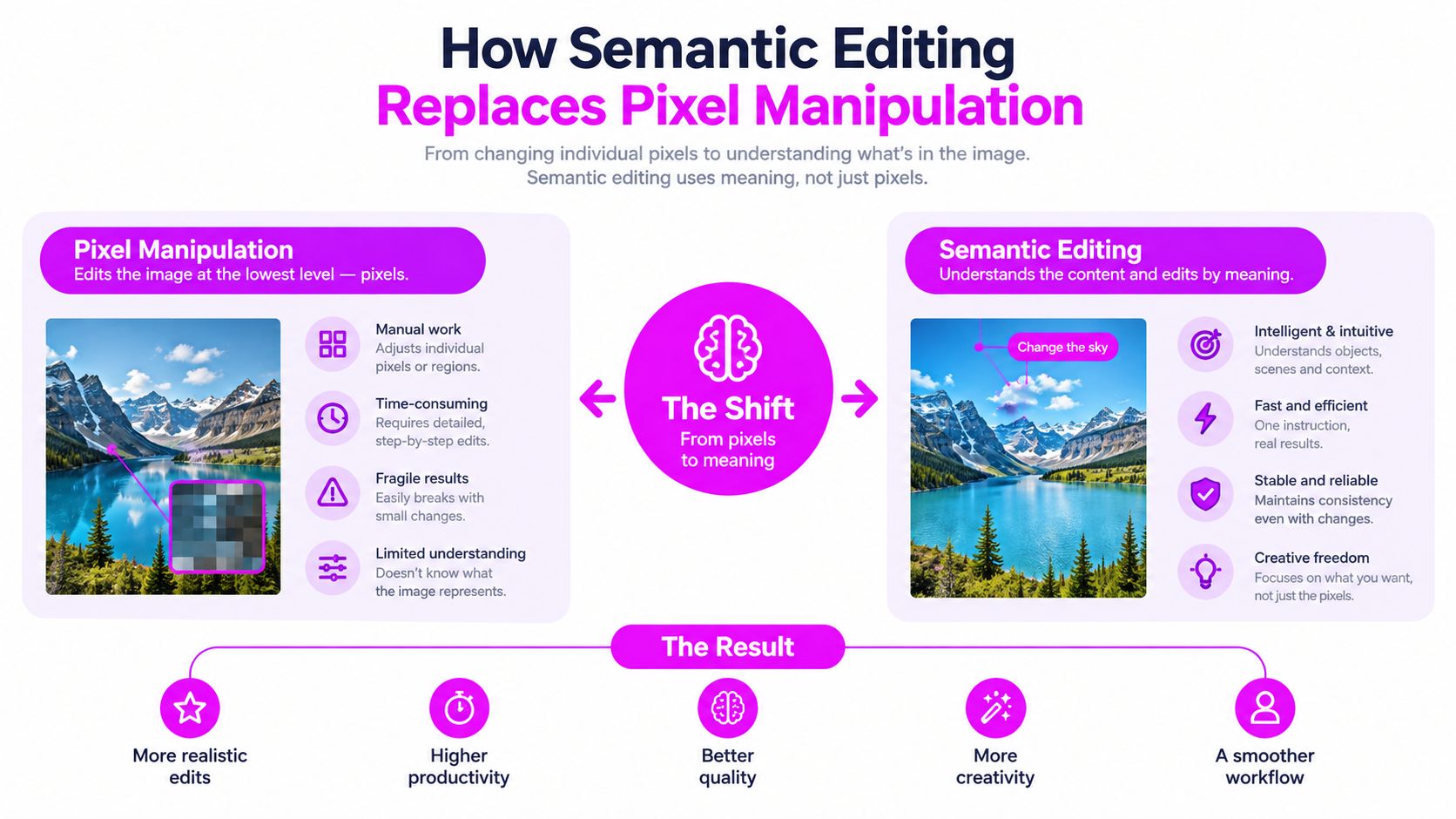
Traditional editing asks the operator to define pixels. You create a selection, refine an edge, build a mask, adjust a layer, and protect areas that shouldn't change. That approach offers precise control, but it also requires the operator to understand the image as a collection of technical regions rather than as a meaningful scene.
A semantic editor starts from a different question: what should change, and what must remain intact? An instruction such as “remove the background, preserve the bottle label, and place the product on a neutral studio surface” describes objects, relationships, and constraints. The system then interprets those elements and generates an edit around them.
Plausibility isn't the same as correctness
Semantic editing is powerful because it can understand that a face belongs to a person, a label belongs to a product, and a shadow belongs to the object casting it. It can attempt a lighting adjustment without requiring a designer to paint every affected region. It can also support more involved operations, including controlled face replacement or background changes.
But a visually convincing result can still be wrong. A generated label may contain altered text, a hand may gain an incorrect finger, or the editor may “improve” skin, fabric, or product details that were supposed to stay unchanged. This is why professional evaluation has moved beyond general visual inspection.
The ImgEdit benchmark uses a 1.2 million-pair dataset and separates instruction adherence, editing quality, and detail preservation. Its structure reflects a practical reality: an editor needs to follow the request while protecting non-target regions, especially across multi-turn workflows where small errors can accumulate.
Apple's GIE-Bench takes a similarly grounded approach. It evaluates functional correctness and content preservation across over 1,000 editing examples, spanning 20 content categories and using spatial object masks. For marketing assets, that means a system shouldn't receive full credit merely because the image looks polished. It must also make the requested change and leave important surrounding content stable.
What to test before adopting a tool
Evaluate an image AI editor with constrained tasks, not only creative prompts. Give it a product with readable packaging, a portrait with identifiable features, and a composition containing several objects. Ask for one specific alteration, then inspect every non-target area.
A strong workflow should expose:
- Instruction fidelity: Does the tool make the requested change without adding unrelated alterations?
- Boundary control: Does it preserve hair, product edges, text, and fine details?
- Turn-to-turn stability: Can the team make a second edit without losing the first?
- Review visibility: Can someone identify what changed before publishing?
The technology becomes useful when semantic understanding supports operational discipline. Without preservation checks, speed produces more assets that need correction.
Traditional Design Software Versus AI Batch Editors
Layer-based design software and AI batch editors solve different problems. Photoshop, Affinity Photo, and similar tools remain valuable when a designer needs exact compositing, detailed retouching, vector control, or a fully editable construction. An AI batch editor is better suited to repeated transformations across many source files.
The decision shouldn't be framed as old versus new. It should be based on the type of work entering the queue. A bespoke campaign key visual deserves hands-on art direction. A folder of product photos requiring the same isolation and export treatment is a strong candidate for automation.
Workflow Comparison
| Workflow Metric | Traditional Layer-Based Editor | AI Batch Image Editor |
|---|---|---|
| Initial setup | Build selections, masks, layers, and export settings manually | Define an instruction, select source assets, and set output rules |
| Repeated edits | Reapply actions, templates, or scripts, then inspect each result | Apply the same semantic operation across a batch |
| Background removal | Manual selection or automated masking followed by edge cleanup | Prompt-driven or automated subject isolation with review |
| Resizing | Reframe each canvas and correct composition manually | Generate required dimensions or aspect ratios in a repeatable run |
| Consistency | Depends heavily on operator discipline and saved presets | Depends on model behavior, instructions, and QA controls |
| Fine compositing | Strong control over layers, masks, typography, and exact placement | Less suitable when every element needs deliberate manual positioning |
| Scale | Efficient only when actions and templates are carefully managed | Designed for repetitive production across many related assets |
| Best use | Bespoke artwork, complex retouching, final precision work | Batch cleanup, variations, enhancement, resizing, and controlled edits |
The practical advantage of an AI editor isn't that it makes every design decision better. It reduces the number of manual handoffs between source image and publishable asset. That can make production more predictable, especially when the team establishes a standard prompt, a fixed output structure, and a human review gate.
Where traditional tools still win
Use a conventional editor when text must remain exact, a legal mark must occupy a precise position, or an image contains intricate compositing that can't tolerate interpretation. A designer should also take over when an AI result changes identity, damages a product feature, or introduces artifacts that are expensive to find after publication.
A hybrid workflow usually performs better than a total replacement. AI handles the repetitive first pass. Traditional software handles exceptions and final polish. The team gains speed without pretending that probabilistic editing offers the same control as a carefully constructed layer file.
Core Batch Workflows for Rapid Post-Production
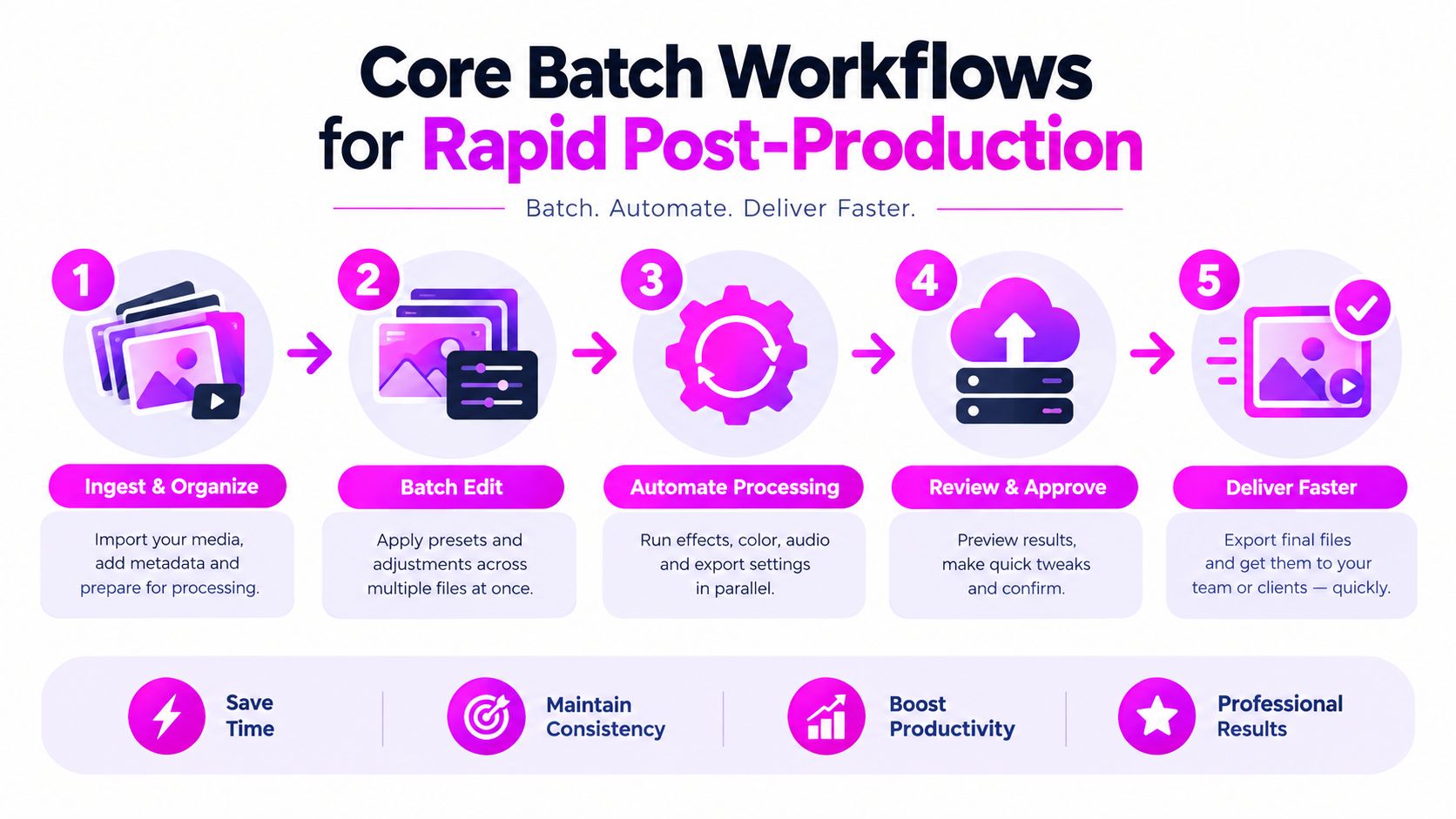
Batch production works best when the team separates ingestion, transformation, review, and delivery. Don't upload a mixed folder containing raw photos, approved masters, and already cropped assets. Group files by task, define the desired result, and keep the original sources untouched.
Background removal for product libraries
Start with a clean source folder and a clear instruction, such as: “Remove the background, preserve the full product silhouette, retain the original label and natural contact shadow, and export a transparent-background version.” The instruction should name both the change and the elements that must remain untouched.
Run a small review sample before processing the full library. Inspect reflective surfaces, thin handles, hair, translucent packaging, and shadows. If the edges look reliable, apply the same operation to the remaining files and save the outputs with a naming convention that identifies the source and treatment.
Face swaps and identity-sensitive edits
Face replacement needs stricter controls than background cleanup. Use only images for which the team has permission, define the target identity and expression clearly, and preserve pose, lighting direction, skin tone, and surrounding anatomy. Review eyes, teeth, hairline, ears, and neck transitions at a useful viewing size.
Don't treat a successful-looking face swap as automatically approved. A person should confirm consent, identity accuracy, and brand suitability before the asset moves into a campaign folder.
Resizing across campaign formats
Prepare a master image with sufficient surrounding context, then request separate compositions for vertical, horizontal, and square placements. Instead of stretching or cropping, specify what should remain prominent: “Keep the product centered, preserve the headline-safe area, and extend the background without changing the product.”
Use an aspect ratio calculator for planning image formats when a campaign involves multiple placements. After generation, compare the focal point, negative space, and text-safe regions across outputs. A technically correct ratio can still produce a poor ad if the subject is pushed too close to the edge.
Global enhancement
Enhancement should correct a known issue, not invite uncontrolled beautification. State whether the task is denoising, sharpening, lighting correction, color balancing, or upscaling, and specify what must not change. For product work, preserve color and surface texture. For portraits, avoid unintended skin smoothing or identity changes.
Teams that need to move approved files into a publishing queue can also use Saucial's upload tool as part of the handoff after review. Keep the delivery folder separate from generated alternatives so that scheduling teams don't accidentally select an unapproved variation.
Practical Templates for Marketers and Creators
Templates turn a capable image editor into a repeatable production system. The template isn't only a visual style. It should define the source image, the instruction, the required aspect ratio, the protected elements, the output name, and the review criteria.
A social media manager might build a campaign template around one approved product image. The instruction can preserve the product and brand palette while generating several contextual backgrounds. The team then adapts those outputs for feed, story, and paid placements without rewriting the entire creative direction for every file.
Templates by audience
- Digital marketers: Build a campaign set with consistent subject placement, palette, lighting direction, and copy-safe space. A prompt library can store approved language for background changes, product enhancement, and seasonal variants.
- E-commerce teams: Use a product photography template that protects packaging, dimensions, labels, and color while varying the environment. The goal is a coherent catalog, not a collection of unrelated studio scenes.
- Branding agencies: Keep client-specific instructions separate. One client may allow expressive styling, while another may require strict preservation of logos, colors, and product geometry.
- Educators and hobbyists: Create coloring pages by controlling line clarity, empty regions, and subject complexity. A reusable template makes it easier to produce a coordinated set rather than isolated illustrations.
- Game creators: Define a visual language for props, characters, environments, and icon assets. The editor can generate variations, but an art director should check silhouette readability and consistency across the set.
Prompt libraries reduce avoidable variation
A useful prompt library has reusable constraints rather than vague style adjectives. Store phrases for subject preservation, lighting, composition, negative space, and export requirements. Keep a separate list of prohibited changes, such as altered labels, extra objects, distorted hands, or modified logos.
Free utilities such as image-to-prompt converters and prompt generators can help teams document an existing visual style. They shouldn't replace a human-written brief. The strongest process uses the tool to create a starting description, then adds the commercial constraints that generic prompts usually omit.
The result is a template that supports both speed and accountability. Anyone on the team can run the same operation, and reviewers know exactly which details require attention.
Navigating the Reliability Gap in AI Editing
The assumption that an image AI editor can execute any simple instruction perfectly doesn't hold up in production. Simple edits often have the strictest success criteria. “Remove the person in the background” allows little room for creativity if the editor also changes the subject's face, clothing, or lighting.
Adobe's research on AI editing reliability found that only about 33% of editing requests could be fully satisfied by the best AI editors. The same research indicates that these systems performed worse on low-creativity tasks requiring exact changes than on open-ended prompts, with identity preservation and unintended touch-ups among the recurring problems.
That finding should change how teams measure productivity. More generated files don't equal more usable files. A batch is successful only when the outputs pass the checks required for publication.
Build review into the operation
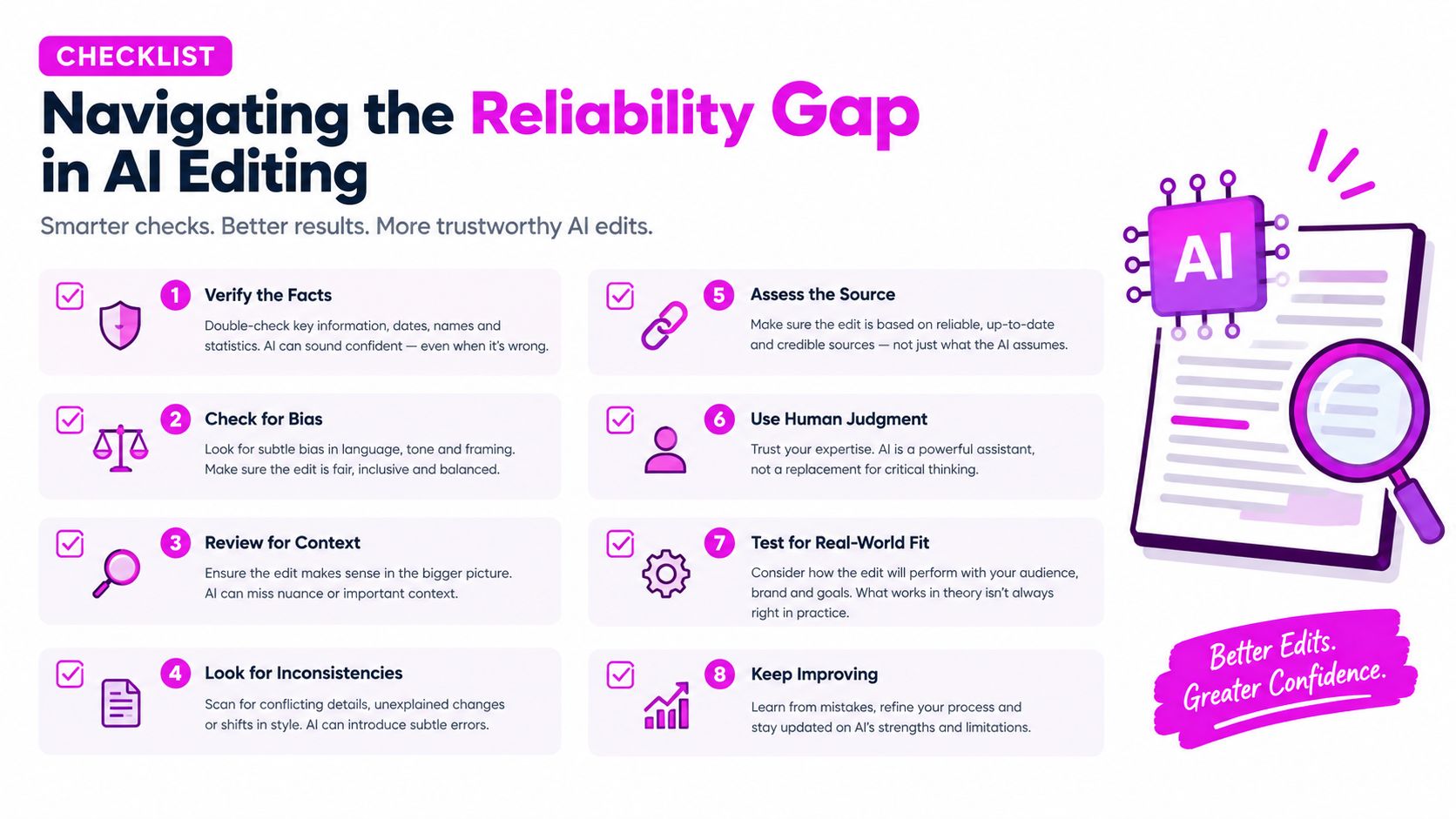
Use a risk-based review model:
- Review the brief: Identify protected elements before editing begins.
- Approve a sample: Test representative images, including difficult edges and unusual compositions.
- Check identity: Compare faces, products, labels, and distinctive marks against the source.
- Inspect boundaries: Look for halos, missing details, invented textures, and broken shadows.
- Verify localization: Check translated text, cultural context, and region-specific product presentation.
- Separate failures: Move rejected outputs into a correction queue instead of mixing them with approved files.
- Record the instruction: Save the prompt, source, output, and reviewer decision.
- Escalate exceptions: Send high-risk or ambiguous edits to a designer or brand owner.
Adobe's 2025 creator data also reports that 86% of global creators use creative generative AI, while editing, upscaling, and enhancement account for 55% of the top use case. Those figures show broad adoption, but they don't remove the need for governance. They make governance more important because the editor is now part of everyday production rather than an occasional experiment.
Human review shouldn't be the emergency brake. It should be a planned stage in the workflow.
Integrating AI Editors into Creative Infrastructure
The market direction supports treating image editing as a core production capability. One industry forecast for the AI photo editor market values the market at USD 2.85 billion in 2025, projects USD 3.37 billion in 2026, and estimates USD 10.46 billion by 2032, with a projected 20.4% compound annual growth rate from 2025 onward. These are forecasts, not guarantees, but they indicate sustained demand for tools that automate recurring visual work.
The historical shift is equally important. Public generative image models reached mainstream practical use in 2022, with DALL·E 2, Midjourney, and Stable Diffusion making image generation accessible at scale. The history of AI image generation from 2020 to 2026 describes 2023 developments such as ControlNet and SDXL as improving control and production quality, while later tools became embedded in design and marketing workflows.
Select for operations, not demonstrations
A polished demo says little about whether a tool belongs in a production stack. Test the editor against your own assets and ask:
- Can it process a clearly defined batch without changing protected details?
- Does it support consistent instructions across multiple source images?
- Can it preserve context through multi-turn edits?
- Does it expose enough output information for review and rollback?
- Can the team separate approved masters from generated alternatives?
- Does it fit the handoff to storage, publishing, and reporting tools?
The workflow automation guide is useful when mapping these decisions beyond the editor itself. The goal is a connected path from brief to source assets, batch operation, QA, approval, delivery, and measurement.
AI editing works best when the organization standardizes inputs and review rules before chasing more generation capacity. Keep master files, define protected attributes, document prompts, and make exceptions visible. With those controls in place, the editor becomes a dependable way to clear repetitive work while designers retain authority over the parts that require judgment.
Bulk Image Generation offers bulk visual creation through Flux 1.1 and GPT-Image-1, alongside batch editing for background removal, resizing, face swaps, and enhancement. Visit Bulk Image Generation to turn repetitive post-production into a more controlled production workflow and explore templates and tutorials for your next campaign.