10 best cool photo ideas for marketing in 2025

Ryan Bennett • November 19, 2025
Discover 10 best cool photo ideas to elevate your marketing, education, and small business visuals in 2025. Fresh, practical, and ready to try.
In a crowded visual marketplace, standing out requires more than just a decent camera or the latest software. It demands creativity, strategy, and a constant stream of fresh, cool photo ideas that capture attention and communicate a message effectively. Whether you're a digital marketer crafting a social media campaign, an educator designing engaging classroom materials, or a small business owner building a memorable brand identity, the right visual concept can make all the difference. Generic stock photos and repetitive visuals often fail to connect with audiences, leading to lower engagement and a diluted brand message. The key is to move beyond the obvious and explore techniques that add depth, intrigue, and a professional polish to your projects.
This guide is designed to be a practical toolkit, not a theoretical lecture. We’ve compiled a comprehensive collection of powerful photographic concepts, from forced perspective and long exposure to light painting and macro photography. Each idea is broken down into actionable components tailored for immediate implementation. You won’t just get a description; you’ll get specific composition tips to guide your shots, ready-to-use AI image prompts for generative tools, and practical suggestions for batch editing workflows. This approach ensures that you can not only understand a concept but also execute it efficiently at scale, creating a cohesive and visually stunning set of images for any purpose. Forget the creative block, let’s dive into ten proven ideas that will elevate your visual content.
1. Forced Perspective Photography
Forced perspective is one of those timeless cool photo ideas that instantly grabs attention by playing with our perception of reality. This technique uses optical illusions to make objects appear a different size or distance than they actually are. By strategically placing subjects at varying distances from the camera, you can create clever, surreal, and often humorous images that engage the viewer’s imagination.
The core principle involves manipulating the relationship between foreground and background elements. A subject close to the lens will appear much larger than a subject far away, allowing you to create illusions like a person "holding" the sun or "stepping" on a distant car. This technique is especially popular in travel and social media content, where it transforms standard photos into memorable, shareable moments.
Composition & Shooting Tips
To master this effect, focus on the spatial arrangement of your subjects and the camera's position.
- Use a Small Aperture: A smaller aperture (a higher f-stop number like f/16 or f/22) increases the depth of field. This keeps both the foreground subject and the distant background subject in sharp focus, which is crucial for selling the illusion.
- Get Low: Shooting from a lower angle often enhances the dramatic effect, especially when making a foreground object appear gigantic. It simplifies the background and emphasizes the scale difference.
- Precise Alignment is Key: The magic is in the interaction. The person in the foreground needs to position their hands, feet, or body perfectly to look like they are interacting with the distant object. This takes trial and error, so take plenty of shots.
AI Image Prompt & Customization
Forced perspective is an excellent concept to explore with AI image generation, allowing you to create impossible scenes without leaving your desk.
AI Prompt: Forced perspective photo, a tiny businessman in a suit standing in the palm of a giant's hand, urban city background with skyscrapers, sharp focus on both subjects, dramatic low angle shot, hyperrealistic, golden hour lighting.
Batch Generation & Use-Case Ideas
This concept is perfect for creating a series of engaging marketing images or educational materials. Use a template to generate multiple variations for a campaign.
- Template: "Forced perspective photo, a [Subject] appearing to interact with a giant [Object] in a [Setting], [Lighting Style]."
- Use-Case: A marketing campaign for a travel agency could feature a series of images where miniature tourists interact with giant landmarks, all generated from a single, adaptable template.
2. Long Exposure Photography
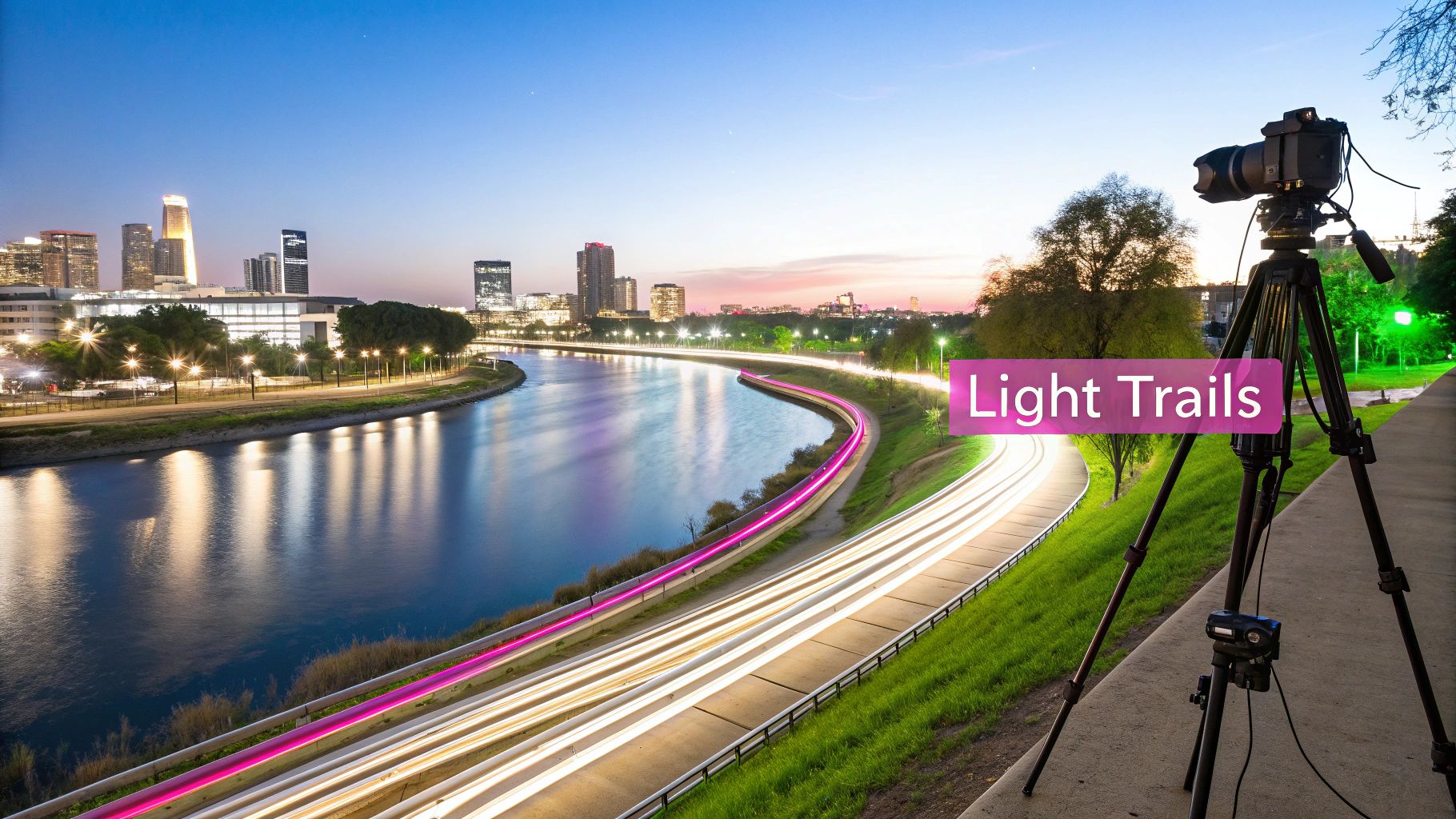
Long exposure is a technique that transforms reality into an ethereal, dreamlike scene, making it one of the most visually stunning cool photo ideas. This method uses a slow shutter speed, from a few seconds to several minutes, to blur moving elements while keeping stationary objects sharp. The result is a surreal image where elements like flowing water, passing cars, or drifting clouds create beautiful, streaking effects invisible to the naked eye.
The magic of long exposure lies in its ability to capture the passage of time in a single frame. It’s a favorite among landscape photographers for creating silky smooth waterfalls and among urban photographers for capturing mesmerizing light trails from traffic at night. This technique elevates a standard scene into a piece of art by revealing the hidden motion in our world.
Composition & Shooting Tips
To succeed with long exposure, stability and light control are your most important tools.
- Use a Sturdy Tripod: This is non-negotiable. Any camera movement during the exposure will ruin the shot. A solid tripod ensures your camera remains perfectly still, keeping the static parts of your image tack-sharp.
- Use a Remote Shutter or Timer: Pressing the shutter button can cause a tiny vibration. Use a remote shutter release or your camera’s built-in two-second timer to start the exposure without touching the camera.
- Add an ND Filter for Daytime: To shoot long exposures in daylight without overexposing your image, you need a Neutral Density (ND) filter. This filter acts like sunglasses for your lens, reducing the amount of light that enters and allowing you to use a slow shutter speed.
AI Image Prompt & Customization
AI tools make it easy to generate the captivating effects of long exposure photography, allowing you to create dramatic scenes that would otherwise require specific equipment and conditions.
AI Prompt: Long exposure photo, car light trails streaking down a futuristic neon-lit city street at night, wet asphalt reflecting the glowing lights, sharp focus on the architecture, cinematic atmosphere, hyperrealistic, wide-angle shot.
Batch Generation & Use-Case Ideas
This concept is ideal for creating a series of dynamic backgrounds or hero images for a website. A consistent template lets you produce various scenes with the same dreamy aesthetic.
- Template: "Long exposure photo, [Subject in Motion] creating light trails in a [Setting] during [Time of Day], [Atmospheric Effect], vibrant colors."
- Use-Case: A tech company could generate a series of futuristic cityscapes with light trails to use as website banners and social media backgrounds, reinforcing a brand image of innovation and speed. For more inspiration, you can find some of the best prompt ideas for AI image generators on bulkimagegeneration.com.
3. Macro and Close-Up Photography
Macro photography is a cool photo idea that transforms the mundane into the magnificent by revealing details invisible to the naked eye. This technique involves capturing extreme close-ups of small subjects, often at a 1:1 magnification ratio or greater. It unveils the hidden textures, patterns, and intricate beauty in subjects like insects, flower petals, water droplets, or even the rust on an old piece of metal, creating profoundly intimate and abstract images.
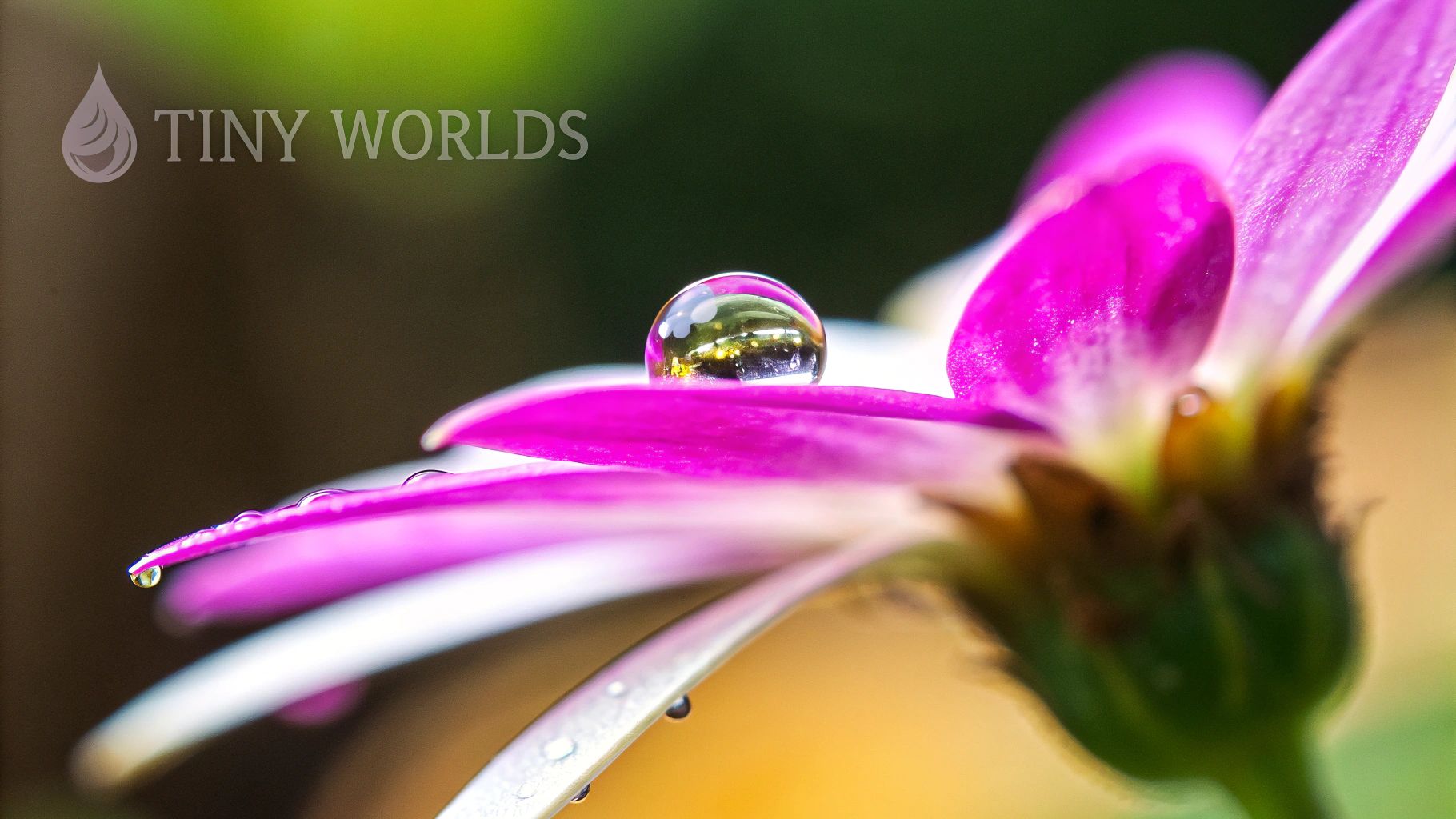
The power of macro lies in its ability to offer a fresh perspective on the familiar world around us. By magnifying tiny elements, such as the compound eyes of a fly or dewdrops on a spider web, you create captivating visuals that feel both alien and recognizable. This approach is highly effective for product shots, educational content, and artistic projects where showcasing fine detail is paramount. For businesses, this can be a powerful tool; you can explore new possibilities with AI product photography on bulkimagegeneration.com.
Composition & Shooting Tips
Mastering macro requires precision and a keen eye for the miniature world.
- Use Manual Focus: Autofocus systems often struggle at such close distances. Switch to manual focus and use your camera’s live view screen with magnification to ensure your intended point of interest is perfectly sharp.
- Employ Focus Stacking: Macro photography has an extremely shallow depth of field. To get more of your subject in focus, take multiple shots, adjusting the focus point slightly on each one, and then merge them together in post-production software.
- Control Your Lighting: A ring light or twin-lite flash provides even, shadow-free illumination that is ideal for small subjects. Diffusing the light is also crucial to avoid harsh specular highlights on reflective surfaces like insect eyes or water droplets.
AI Image Prompt & Customization
AI image generators make it easy to create flawless macro shots of subjects that are difficult to capture in the wild, offering complete control over the environment.
AI Prompt: Extreme macro photo of a jumping spider's face, intricate details of its iridescent compound eyes visible, tiny water droplets on its hairs, sitting on a vibrant green leaf, soft diffused lighting, ultra-sharp focus, hyperrealistic.
Batch Generation & Use-Case Ideas
This concept is fantastic for generating detailed textures, scientific illustrations, or abstract backgrounds for branding and design projects.
- Template: "Extreme macro photo of the texture of a [Subject], [Lighting Style], [Color Palette], detailed and intricate patterns, sharp focus."
- Use-Case: An educational website could generate a series of macro images showing the different stages of plant pollination, or a cosmetic brand could create abstract background images based on the texture of its products.
4. Silhouette Photography
Silhouette photography is a powerful and dramatic technique that stands out among cool photo ideas for its ability to convey mystery, emotion, and mood. This approach involves backlighting a subject so they appear as a dark, solid shape against a much brighter background. By intentionally underexposing the subject, you strip away distracting details like color and texture, focusing the viewer’s attention entirely on the subject's form and outline.
The resulting image is often graphic, bold, and emotionally charged. This technique is especially effective at sunrise or sunset, where the warm, vibrant colors of the sky create a stunning contrast with the dark subject. It transforms a simple scene into a work of art, emphasizing shape and narrative over specific details, making it perfect for creating evocative and memorable visuals.
Composition & Shooting Tips
To capture a compelling silhouette, you need to control the light and position your subject carefully.
- Position Against a Bright Light: Place your subject directly in front of a strong light source, like the setting sun, a bright window, or a full moon. The key is to have the background be significantly brighter than your subject.
- Expose for the Background: Set your camera's exposure based on the brightest part of the scene (the sky), not your subject. This will plunge your subject into shadow. In automatic modes, you might need to point your camera at the sky, lock the exposure, then re-frame your shot.
- Create a Clean Outline: Ensure your subject has a clear and recognizable shape. If you have multiple subjects, separate them so their outlines don't merge into one indistinguishable blob. A profile view often works better than a head-on shot.
AI Image Prompt & Customization
AI tools make it easy to generate perfect silhouette scenes, allowing you to experiment with subjects and settings that would be difficult to capture in reality.
AI Prompt: Silhouette photography, a lone wolf howling at a giant full moon, standing on a rocky cliff edge, deep blue and purple night sky with stars, strong contrast, minimalist, atmospheric, ultra-detailed.
Batch Generation & Use-Case Ideas
The graphic nature of silhouettes makes them highly versatile for branding and creative projects. A template can streamline the creation of a cohesive series.
- Template: "Silhouette photography, [Subject] against a vibrant [Time of Day] sky in a [Setting], [Color Palette], emotional mood."
- Use-Case: A wellness brand could generate a series of silhouette images for social media, featuring people in yoga poses against various sunrise backdrops. This creates a consistent, calming, and inspiring visual theme.
5. Light Painting and Light Trails
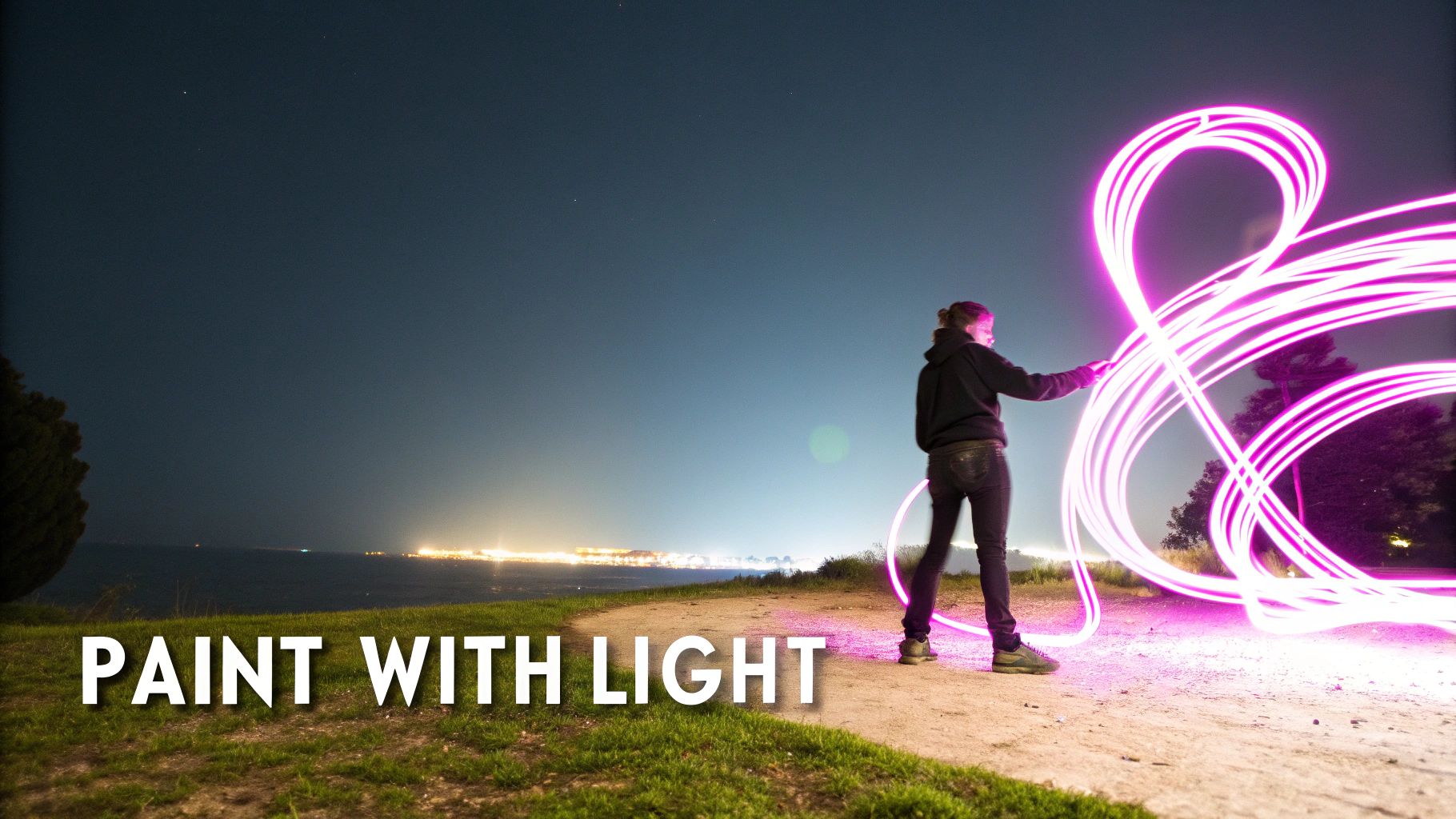
Light painting is a captivating photographic technique that transforms darkness into a canvas for vibrant, ethereal creations. By using a long camera exposure, you can "paint" with a moving light source like a flashlight, LED wand, or even sparklers. The camera records the entire path of the light, allowing you to draw shapes, write words, or create stunning abstract patterns that appear to float in midair, making it one of the most creatively freeing cool photo ideas available.
This method essentially turns motion into a static, visible form. It’s a favorite among artists and night photographers for its ability to produce unique, otherworldly images directly in-camera. From dynamic car light trails streaking through a city to intricate, hand-drawn light orbs in a dark landscape, the technique offers limitless possibilities for artistic expression and visual storytelling.
Composition & Shooting Tips
Mastering light painting requires a tripod, a dark environment, and a bit of practice.
- Use a Long Shutter Speed: Set your camera to a long exposure, typically between 15 to 30 seconds. This gives you enough time to move your light source and create your design. Use "Bulb" mode for even longer, more complex paintings.
- Keep the Camera Still: A sturdy tripod is non-negotiable. Any camera shake during the long exposure will result in a blurry, messy image. Use a remote shutter release or the camera's self-timer to avoid camera movement when you press the shutter button.
- Plan Your Movements: Before you start shooting, practice the shapes or words you want to create. Remember that text needs to be written backward (as a mirror image) for it to appear correctly in the final photograph.
AI Image Prompt & Customization
AI can generate elaborate and perfectly executed light painting scenes, ideal for concept art or marketing visuals that require a magical, high-tech aesthetic.
AI Prompt: Long exposure photo of light painting, a glowing ethereal phoenix created with swirling orange and yellow light trails in a dark forest at night, hyperrealistic, sharp focus, magical and vibrant, volumetric lighting, captured with a DSLR camera.
Batch Generation & Use-Case Ideas
This concept is highly adaptable for creating a themed series of images, such as for an event promotion or a product launch that emphasizes innovation.
- Template: "Long exposure photo, abstract [Color] light trails forming a [Shape or Concept] around a [Product or Subject] in a [Setting], dynamic and futuristic style."
- Use-Case: A tech company could generate a series of ads featuring their new device surrounded by intricate, glowing light trails that form words like "Speed," "Power," and "Innovation."
6. Drone and Aerial Photography
Drone and aerial photography offers a breathtaking bird's-eye view, unlocking perspectives once reserved for helicopters or aircraft. This technique reveals mesmerizing patterns, symmetrical compositions, and unique spatial relationships that are completely invisible from the ground. By capturing images from above, photographers can transform ordinary landscapes, cityscapes, and events into extraordinary visual stories.
This elevated viewpoint is one of the most impactful cool photo ideas for showcasing scale and context. It’s perfect for everything from documenting the intricate geometry of urban architecture to capturing the sprawling beauty of natural formations. The unique vantage point provides a powerful tool for visual storytelling, making it a favorite for real estate, documentary filmmaking, and environmental monitoring.
Composition & Shooting Tips
Mastering aerial photography requires a blend of piloting skill and compositional awareness.
- Follow Regulations: Always check and adhere to local and national drone laws before flying. This includes restrictions around airports, national parks, and private property. Safety and legality are paramount.
- Shoot During Golden Hour: The soft, directional light during sunrise and sunset casts long, dramatic shadows that accentuate textures, patterns, and topography. This lighting adds depth and a cinematic quality to your aerial shots.
- Plan Your Flight Path: Before launching, use satellite maps to scout the location and plan your shots. Pre-visualizing your composition and flight path saves battery life and helps you capture the most compelling angles efficiently. For those looking to invest in the right gear for capturing aerial masterpieces, exploring the best drones for professional photography can provide valuable insights.
AI Image Prompt & Customization
AI can generate stunning aerial views of any location, real or imagined, allowing you to experiment with compositions without a drone.
AI Prompt: Drone aerial photography, top-down shot of a winding river with vibrant autumn trees on the banks, symmetrical composition, sharp focus, beautiful golden hour light casting long shadows, hyperrealistic, 8K resolution.
Batch Generation & Use-Case Ideas
This concept is ideal for creating a cohesive set of visuals for branding or educational content. A template can produce diverse aerial scenes with a consistent style.
- Template: "Drone aerial photography, a top-down view of [Subject/Location] during [Time of Day], revealing [Key Feature], [Lighting Style]."
- Use-Case: A real estate firm can generate a series of stunning aerial images showcasing different property types (e.g., coastal homes, urban apartments, rural estates) to create a high-end marketing portfolio.
7. Double Exposure Photography
Double exposure is a classic and visually striking technique that blends two or more images into a single, dreamlike composition. Traditionally achieved by exposing a single frame of film twice, this effect is now easily replicated digitally, creating artistic and surreal images that tell a complex story. The method involves overlaying separate photos, often a portrait with a landscape or an abstract texture, to evoke emotion and conceptual meaning.
This technique is one of the most compelling cool photo ideas because it turns a simple photo into a piece of art. The magic happens when distinct elements, like the silhouette of a person and the intricate details of a forest, merge into a cohesive and thought-provoking visual narrative. This makes it a powerful tool for editorial content, album art, and marketing campaigns that aim for a deeper, more artistic connection with the audience.
Composition & Shooting Tips
To create a successful double exposure, thoughtful planning and execution are essential.
- Plan Your Concept: Decide on the two images you want to merge and the story you want to tell. A portrait and a relevant landscape (like a musician with a cityscape) often work well together.
- Shoot High-Contrast Silhouettes: For the primary subject, shoot a clean silhouette or a portrait against a simple, bright background (like an overcast sky). This makes it much easier to isolate the subject and use it as a "container" for the second image.
- Complementary Textures & Colors: Choose a second image (the "fill") that has an interesting texture or color palette that complements your primary subject. For instance, the branches of a tree can mimic the veins in a hand.
- Experiment with Blend Modes: In post-processing software, play with different blend modes like "Screen," "Lighten," or "Multiply" to see how the layers interact and find the most aesthetically pleasing result.
AI Image Prompt & Customization
AI tools make creating complex double exposures instant and accessible, allowing for endless creative combinations that would be difficult to photograph.
AI Prompt: Double exposure photography, silhouette of a woman's profile filled with a lush, dense forest of pine trees, misty atmosphere, muted green and brown color palette, fine art style, minimalist background, highly detailed.
Batch Generation & Use-Case Ideas
This concept is ideal for generating a series of branded artistic assets or thematic educational materials. You can create a powerful brand identity with a consistent visual style using a simple template. For those looking to explore this further, you can find a suitable tool to create AI double exposure photos on bulkimagegeneration.com.
- Template: "Double exposure, a [Subject/Silhouette] merged with a [Texture/Scene], [Color Palette], [Overall Style]."
- Use-Case: A wellness brand could generate a series of social media posts featuring silhouettes of people doing yoga, each filled with a different calming natural scene like a tranquil beach, a misty mountain, or a blooming garden.
8. Reflection and Mirror Photography
Using reflective surfaces is a classic technique among cool photo ideas that adds layers of depth, symmetry, and narrative to an image. This approach uses reflections in water, mirrors, glass, or polished surfaces to create compositions that are often surreal and visually complex. By treating the reflection as a primary compositional element, you can juxtapose different scenes, create perfect symmetry, or explore themes of identity and perception.
The magic of reflection photography lies in its ability to show two worlds at once. A puddle can capture the sky, a window can blend an interior scene with the street outside, and a mirror can reveal a hidden aspect of the subject. This technique is exceptionally powerful for storytelling, allowing you to add context, create mystery, or simply produce a beautifully balanced and intriguing photograph that commands a second look.
Composition & Shooting Tips
Mastering reflections involves careful observation of your environment and precise camera positioning.
- Clean Your Surface: For sharp, clear images using mirrors or glass, ensure the reflective surface is spotless. Smudges and dust can distract from the main subject and weaken the overall effect.
- Mind Your Angle: Your position is everything. Experiment with different angles to control what appears in the reflection and what is excluded. Get low to the ground for puddle shots to maximize the reflected scene.
- Use a Polarizing Filter: A circular polarizing filter can help you manage reflections. By rotating the filter, you can either enhance the reflection to make it more prominent or reduce it to see through the surface, giving you creative control.
AI Image Prompt & Customization
AI can generate flawless and imaginative reflective scenes that would be difficult or impossible to capture in reality.
AI Prompt: Street photography, a lone figure holding a red umbrella reflected in a large rain puddle on a cobblestone street, city lights of Tokyo blurred in the background, neon glow, cinematic, hyper-detailed reflection, moody atmosphere, night scene.
Batch Generation & Use-Case Ideas
Reflections offer a fantastic template for creating a cohesive and artistic series of visuals for branding or social media.
- Template: "A [Subject] perfectly reflected in [Reflective Surface] in a [Setting], creating a symmetrical composition, [Lighting Style], [Mood]."
- Use-Case: A cosmetics brand could generate a campaign featuring its products reflected in various polished surfaces like mirrors, water, and chrome, each image reinforcing a theme of clarity, beauty, and self-perception.
9. High-Speed and Freeze-Frame Photography
High-speed and freeze-frame photography is one of the most exciting cool photo ideas for capturing moments that are too fast for the human eye to perceive. This technique uses exceptionally fast shutter speeds, typically 1/1000th of a second or faster, to freeze motion with incredible precision. It reveals the hidden beauty in fleeting events, such as a water splash forming a perfect crown, an athlete suspended in mid-air, or the delicate motion of a hummingbird's wings.
The magic behind this method is its ability to stop time, turning a chaotic burst of action into a static, detailed work of art. By isolating a millisecond of movement, you create dramatic, high-impact images that are both visually stunning and scientifically fascinating. It’s a popular technique in sports, wildlife, and commercial product photography, where clarity and dynamism are essential for telling a powerful story.
Composition & Shooting Tips
To master high-speed photography, you need to control light and anticipate the action.
- Abundant Light is Essential: A fast shutter speed means less light hits the sensor. Shoot in bright, direct sunlight or use powerful studio strobes or flashes to properly expose your image.
- Use Burst Mode: The perfect moment can be over in an instant. Shooting in a continuous burst dramatically increases your chances of capturing the peak of the action.
- Enable Continuous Autofocus: For subjects moving towards or away from you, use continuous autofocus (AF-C or AI Servo) to track the subject and maintain sharp focus as it moves.
- Anticipate the Moment: Success often comes from predicting where the action will happen. Pre-focus on a specific spot where you expect your subject to be and fire the shutter just before it arrives.
AI Image Prompt & Customization
AI can create flawless high-speed moments that would be nearly impossible to capture in a single real-world shot, offering unparalleled creative control.
AI Prompt: High-speed photography, a glass of red wine shattering on the floor, liquid splashing in a dynamic, frozen arc, ultra-sharp details, studio lighting with a dark background, cinematic, hyperrealistic, captured with a macro lens.
Batch Generation & Use-Case Ideas
This concept is ideal for creating dynamic ad campaigns or educational content demonstrating physics principles.
- Template: "High-speed freeze-frame photo of a [Object] in mid-[Action], creating a dramatic splash of [Liquid/Powder], [Lighting Style], against a [Background Setting]."
- Use-Case: A beverage company could generate a series of ads showing different fruits (strawberries, lemons, blueberries) splashing into their drink, each image conveying energy and freshness using a consistent, high-impact template.
10. Bokeh and Depth of Field Manipulation
Manipulating depth of field to create a beautiful bokeh effect is one of the most effective cool photo ideas for adding a professional, artistic touch to an image. This technique involves using a shallow depth of field to keep the subject tack-sharp while rendering the background into a soft, creamy, and dream-like blur. The term "bokeh" specifically refers to the aesthetic quality of this blur, especially the pleasing, soft-edged orbs of light created from out-of-focus highlights.
By deliberately controlling focus and aperture, a photographer can guide the viewer's eye directly to the most important part of the frame-the subject. This separation creates a sense of depth and dimension, making portraits, product shots, and nature macros pop. It transforms a busy or distracting background into a beautifully abstract canvas that complements the main subject without competing for attention, elevating the overall visual appeal.
Composition & Shooting Tips
Mastering bokeh requires understanding the relationship between your lens, aperture, and distances.
- Use a Wide Aperture: The key to a shallow depth of field is a wide aperture. Use a lens with a low f-stop number, like f/1.4, f/1.8, or f/2.8, to let in more light and create maximum background blur.
- Increase Subject-to-Background Distance: The further your subject is from the background, the more out-of-focus the background will become. Create as much physical separation as possible to enhance the bokeh effect.
- Use a Longer Focal Length: Telephoto lenses (e.g., 85mm, 135mm, 200mm) naturally compress the background and produce a shallower depth of field, making them ideal for creating stunning bokeh in portraits.
- Find Backgrounds with Highlights: To get those classic circular bokeh orbs, shoot with a background that has small, bright points of light, such as distant city lights at night, sunlight filtering through leaves, or holiday decorations.
AI Image Prompt & Customization
AI tools can effortlessly generate images with perfect bokeh, allowing you to create high-end product or portrait shots with a professional aesthetic.
AI Prompt: Extreme close-up macro photo of a single dewdrop on a blade of grass, sunrise lighting, background is a dreamy and creamy bokeh with golden light orbs, hyperrealistic, tack-sharp focus on the dewdrop.
Batch Generation & Use-Case Ideas
This technique is incredibly versatile for branding and marketing, offering a clean yet artistic look.
- Template: "Product photography of a [Product] on a wooden table, the background is a soft-focus [Setting] with beautiful bokeh, [Lighting Style]."
- Use-Case: A small business selling handcrafted jewelry can use this template to generate a consistent series of product images. Each photo would feature a different piece of jewelry in sharp focus against an elegantly blurred background, creating a cohesive and high-end brand aesthetic.
Top 10 Cool Photo Ideas Comparison
| Technique | Implementation Complexity | Resource Requirements | Expected Outcomes | Ideal Use Cases | Key Advantages |
|---|---|---|---|---|---|
| Forced Perspective Photography | Low–Moderate — precise alignment and timing | Minimal gear; space planning, optional tripod | Convincing scale illusions and playful compositions | Travel shots, social media, creative portraits | Low cost, highly shareable, creative impact |
| Long Exposure Photography | Moderate — exposure control and composition skills | Tripod, ND filters (day), remote release, stable conditions | Smooth water, light trails, ethereal motion blur | Night cityscapes, waterfalls, star trails, landscapes | Dramatic motion rendering; striking visual effects |
| Macro and Close-Up Photography | Moderate–High — precise focus and technique | Macro lens/extension tubes, lighting, tripod, stacking software | Extreme detail, very shallow depth of field | Insects, flowers, product detail, scientific imaging | Reveals hidden detail; unique, intimate compositions |
| Silhouette Photography | Low — simple exposure strategy and positioning | Strong backlight (sun/window), basic camera gear | High-contrast shapes, minimalist and dramatic images | Portraits, landscapes at golden hour, conceptual images | Bold, iconic visuals; simplifies composition |
| Light Painting and Light Trails | Moderate–High — choreography plus long exposure | Tripod, portable light sources (LEDs, glow sticks), dark location | Luminous patterns, abstract trails created in-camera | Performance art, creative shoots, night events | Unique, in-camera art; playful and social process |
| Drone and Aerial Photography | Moderate — piloting skills and flight planning | Drone, spare batteries, permits/licenses, good weather | Bird's-eye views, large-scale patterns and compositions | Real estate, landscape surveys, cityscapes, documentaries | Unique vantage points; reveals spatial relationships |
| Double Exposure Photography | High — conceptual planning and blending skills | Camera with multiple exposure or editing software | Surreal layered images that merge concepts and textures | Conceptual portraits, fine art, editorial work | Strong storytelling potential; endless creative combos |
| Reflection and Mirror Photography | Low–Moderate — composition and angle control | Reflective surfaces (water, glass, mirrors), sometimes tripod | Layered, symmetrical or surreal compositions | Street, landscape, portraits, architectural shots | Adds depth and visual interest; works in everyday scenes |
| High-Speed and Freeze-Frame Photography | High — timing, fast gear, and lighting expertise | Fast camera (1/1000s+), fast lenses, strong lighting, fast cards | Crisp frozen motion revealing fine action details | Sports, wildlife, splash/product photography | Reveals motion invisible to the eye; highly impactful |
| Bokeh and Depth of Field Manipulation | Low–Moderate — aperture and distance control | Fast prime/telephoto lenses, controlled subject-background separation | Isolated subject with pleasing out-of-focus backgrounds | Portraits, product, selective-focus and macro work | Professional aesthetic; directs viewer attention efficiently |
Next Steps: Bringing Your Vision to Life
You've just explored a comprehensive toolkit of ten powerful and cool photo ideas, each designed to transform your visual content from ordinary to unforgettable. From the mind-bending illusions of forced perspective to the ethereal beauty of light painting, these techniques are more than just creative exercises. They are strategic tools for capturing attention, telling compelling stories, and building a distinct visual identity.
The journey doesn't end with inspiration. The true power lies in execution. We've moved beyond simple descriptions, providing you with practical shooting tips, ready-to-use AI image prompts, and scalable batch editing workflows. Whether you are a marketer aiming to stop the scroll, an educator creating engaging learning materials, or a small business owner defining your brand's aesthetic, these concepts are your new creative launchpad.
From Idea to Impact: Your Action Plan
The key takeaway is that professional-quality, highly creative visuals are no longer out of reach. With a clear concept and the right tools, you can consistently produce stunning images. The difference between a fleeting idea and a successful campaign is a structured plan.
Here are your actionable next steps to turn these cool photo ideas into tangible assets:
-
Select Your Starting Point: Don't try to master all ten techniques at once. Choose one or two ideas that align most closely with your immediate goals. Are you looking to showcase product details? Start with Macro Photography. Need to create a dramatic mood for a branding campaign? Focus on Silhouettes or Long Exposure.
-
Refine and Customize Your Prompts: The AI prompts provided are excellent starting points. Now, tailor them to your specific needs. Inject your brand's colors, specific product names, or unique environmental details. Experiment with different styles, from photorealistic to illustrative, to see what resonates with your audience.
-
Plan Your Batch Generation: Think in terms of campaigns, not single images. Use the batch workflow suggestions to create a cohesive set of visuals. For instance, generate a series of high-speed freeze-frame shots of your product in action, each with a slightly different angle or background color for A/B testing on social media.
-
Integrate and Distribute: A great image is only effective if it's seen. Once you have a collection of high-quality visuals, it's time to put them to work. Marketers, for example, can leverage these unique photos to create standout content. Once you have mastered these creative techniques, consider how to apply them for effective marketing on visual platforms, such as exploring these 12 Fresh Instagram Post Ideas to Go Viral.
By systematically applying these concepts, you transition from being a passive consumer of visual trends to an active creator who sets them. You build a library of custom, on-brand assets that can be deployed across websites, social media, presentations, and educational materials, ensuring consistency and quality at every touchpoint. This strategic approach to visual content is what separates memorable brands and engaging educators from the rest. The cool photo ideas in this guide are your building blocks; now go and construct your vision.
Ready to scale your creativity? Stop generating images one by one and start producing entire campaigns in minutes with Bulk Image Generation. Use the concepts you've learned here to create hundreds of unique, on-brand visuals from a single prompt or dataset. Bulk Image Generation is your essential tool for turning inspiration into a full-fledged visual content strategy.
