
Bulk Image Processing: A Practical Guide to AI Workflows

Ryan Bennett • October 20, 2026
Learn how bulk image processing works, compare AI platforms vs scripts, and streamline generation and post-production at scale in 2026.
It's late, your campaign launches in the morning, and the file that needs a new background isn't one product photo. It's a folder. Each image needs cropping, resizing, compression, a clean filename, and a version that fits a different channel. You're not stuck because you lack design skill. You're stuck because a one-at-a-time process collapses when volume rises. That's the problem bulk image processing is built to solve.
When One Image Becomes Three Hundred
The marketer is still clicking after midnight because the work looked simple at the start. Remove the background. Center the product. Export a square for the shop, a vertical for social, and a smaller file for email. Repeat that sequence a few times and it's routine. Repeat it across a catalog, with slightly different lighting, orientation, and dimensions in every file, and small delays multiply into an entire lost evening.
You'll recognize the pattern if you've ever renamed files by hand or discovered, after exporting everything, that one setting was wrong. Maybe the crop cuts off a label. Maybe transparent images became white boxes. Maybe the photos look consistent on your screen but uneven once they're placed side by side in a grid. Fixing the mistake doesn't mean correcting one asset. It means reopening the whole batch and checking whether the same error appears everywhere.
That's where junior designers often blame themselves. Don't. Repetition is a systems problem, not a talent problem. A person is good at judging whether an image feels right, spotting an awkward crop, or deciding which variant best represents a product. A person is poorly suited to applying identical mechanical steps hundreds of times without drifting, skipping a file, or saving over the only original.
What changes when you batch the work
A batch workflow moves the decision to the beginning. You define the output size, format, naming pattern, background treatment, and quality checks once, then let software apply those rules consistently. Your job shifts from performing every edit to designing the process and reviewing exceptions. That's a more senior way to work, even if the tool itself feels simpler.
The escape route has four parts. First, understand what belongs inside a bulk workflow, because generation, transformation, and finishing work are often treated as separate jobs. Second, compare scripts, desktop software, and cloud platforms. Third, handle the technical details that make batches look uneven or fail during delivery. Fourth, add provenance and accessibility checks before anything is published.
Don't ask how to edit faster. Ask which decisions you can make once and safely reuse across every file.
You don't need the most powerful setup. You need one that matches your volume, skills, deadlines, and tolerance for maintenance. A solo shop owner, a classroom creator, and an engineering team may all process images in bulk, but they shouldn't necessarily buy or build the same pipeline.
What Bulk Image Processing Really Means
Think of washing dishes. Doing one plate by hand and loading a commercial dishwasher both involve soap and water, but the second changes how you organize the work. You sort items, choose a cycle, load consistently, and inspect the results. Bulk image processing works the same way. The individual operations may be familiar, but throughput, consistency, and error handling become the key design challenges.
At the simplest level, you're applying a defined set of operations to many images as one job. That definition is useful, but it's incomplete. Modern workflows usually combine three activities that travel together, even when different tools handle each stage.
Generation, transformation, and finishing
Generation at scale creates the starting assets. A marketer might produce campaign variants from one concept, while an educator creates a set of coloring pages around a theme. The important point isn't that software makes pictures. It's that the outputs arrive as a related set, so they need consistent style, dimensions, naming, and review from the beginning.
Transformation changes files so they fit their destination. This includes resizing, cropping, format conversion, compression, orientation correction, and color space changes. These steps sound mechanical, yet order matters. Resizing before compression avoids spending effort on pixels you'll discard. Correcting orientation before cropping prevents a technically successful export from looking wrong.
Post-production improves or alters the image itself. Background removal, enhancement, cleanup, and face swapping belong here. These operations need more judgment than a resize because they can change meaning, identity, or product accuracy. A clean cutout around a bottle is routine. A face change or an enhancement that invents detail needs closer human review.
It's also helpful to say what the term isn't. Running a Photoshop action on a folder is one form of batching, but it doesn't cover the full workflow. Asking an AI model for many images isn't the whole answer either. If those files still need resizing, metadata checks, alt text, approvals, and delivery in several formats, the bulk problem remains.
- Marketers need campaign variants that stay recognizable across channels.
- Educators and hobbyists need themed sets, such as coloring pages, with consistent line quality and page size.
- Small business owners need catalog images that align in a grid and load quickly.
Once you see the workflow as a chain, tool evaluation gets easier. Ask where a product starts, where it hands files to something else, and where errors are caught. A tool that performs one step beautifully may still leave you doing midnight cleanup at the joins.
Three Paths to Scale and When Each One Fits
There's no universally superior route. There's the route whose costs you're willing to carry. Scripts cost engineering time. Desktop tools cost attention and local computing time. Cloud platforms cost money and some control. Start with that trade-off, not with a feature list.
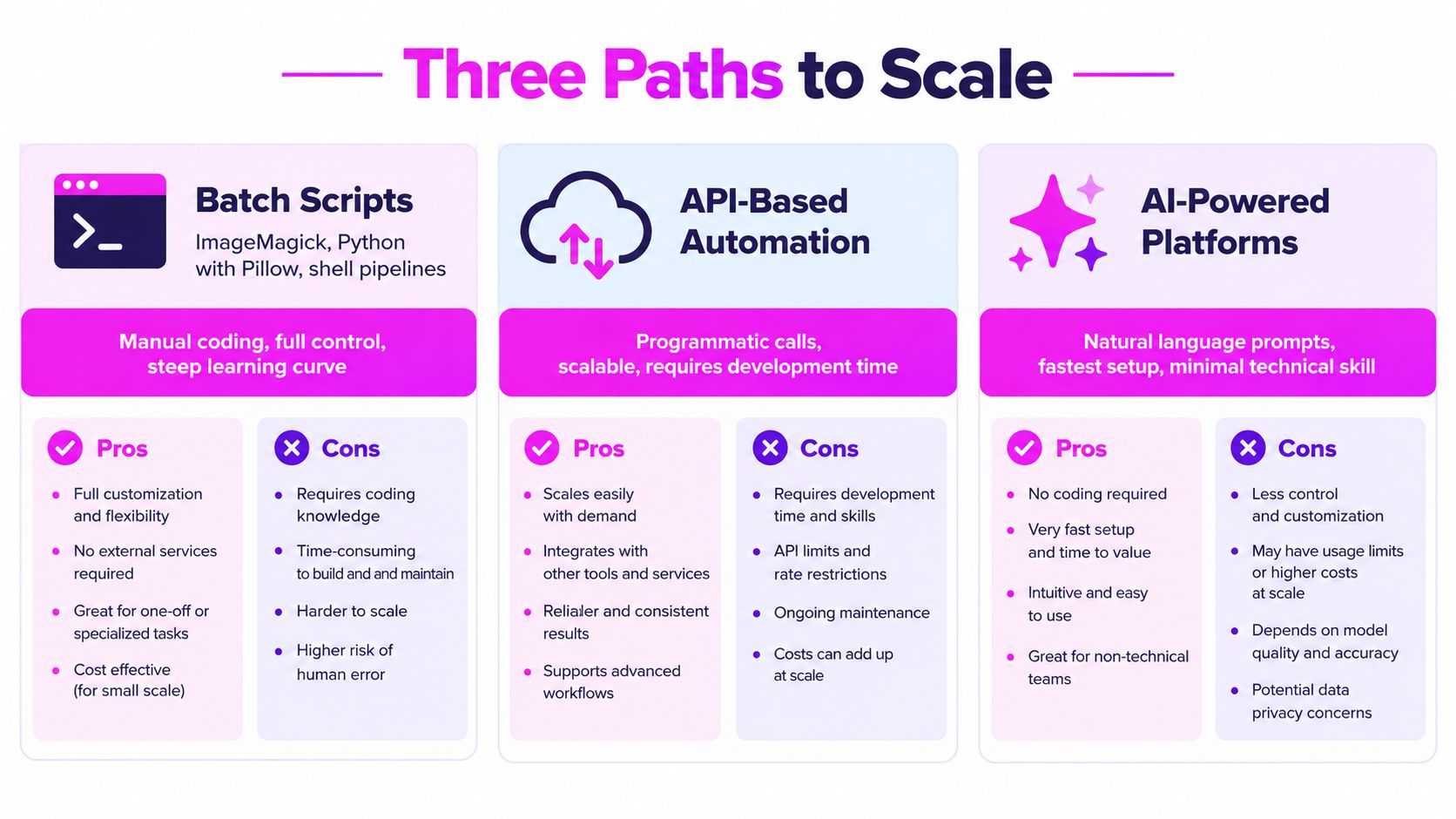
Batch scripts use tools such as ImageMagick, Python with Pillow, or shell pipelines. They give you precise, repeatable control and fit naturally into servers, build systems, and custom validation. If your team needs unusual naming rules, format logic, or integration with a product database, scripts are hard to beat. They break down when nobody owns maintenance. A script written for one campaign becomes fragile when inputs change, dependencies update, or the only person who understands it leaves.
Desktop tools, including Photoshop actions, Lightroom, and Affinity Photo, suit people who already think visually and own the software. You can inspect images closely, refine actions, and intervene without writing code. The limit is that your machine and attention become the queue. Large jobs tie up the computer, actions may fail on an unusual file, and repeating the same setup across teammates can be inconsistent.
Cloud and API-based platforms move the queue elsewhere. You upload or generate files, choose operations, and let parallel workers process them. This is often the fastest route for marketers and small teams that need generation and finishing tools together. The trade-off is less freedom to invent custom steps, plus a need to check privacy, export options, pricing, and what happens to metadata. Good workflow automation guidance for image teams can help you map those handoffs before you commit.
Bulk Image Processing Approaches Compared
| Approach | Setup Time | Learning Curve | Throughput Ceiling | Best Fit |
|---|---|---|---|---|
| Batch scripts | Longer, includes testing | Steep without coding experience | High when properly hosted | Engineering-led teams with custom rules |
| Desktop tools | Fast if software is installed | Moderate, visual and familiar | Limited by one machine and operator | Designers handling smaller, supervised batches |
| Cloud AI platforms | Fastest for a first usable batch | Gentle, often prompt and preset based | High through parallel processing | Marketers, educators, and small businesses |
Use the table as a placement exercise. If your main pain is custom logic, scripts deserve serious consideration. If your pain is visual nuance in a modest batch, desktop software may be enough. If your pain is volume combined with generation, resizing, and cleanup, a platform approach is usually more realistic.
Practical rule: Choose the simplest path that can survive your messiest input folder, not the one that performs best on perfect sample files.
Many mature teams mix paths. They might generate and finish assets in a platform, then use scripts for delivery, archiving, or checks tied to their own systems. That isn't indecision. It's assigning each stage to the tool that handles it with the least friction.
The Technical Layer Most Guides Skip
A batch can finish quickly and still be wrong. Files arrive sideways, colors shift between phones and browsers, transparent edges pick up fringes, and exports that share a quality setting don't look equally sharp. These aren't mysterious failures. They usually come from three layers that need normalization before encoding.
Start with format history. JPEG became practical for large-scale work because standardized, lossy compression made photographic files much smaller while keeping acceptable quality. The specification was approved by ITU-T as Recommendation T.81 in September 1992 and commonly achieves approximately 10 to 1 compression, according to the history and standardization account from ITU. Standard support is why the same archival, conversion, and publishing pipelines can operate across platforms with fewer surprises.
Choose the codec for the stage
JPEG remains a sensible compatibility baseline, but it isn't always the smallest delivery option. Google found WebP files were approximately 25 to 34% smaller than JPEG at equivalent Structural Similarity Index, or SSIM, in its WebP comparative study. Smaller files reduce storage and transfer work across a large catalog. The catch is consistency. You still need to normalize orientation, color space, dimensions, and alpha policy before encoding, then check measured quality on a representative sample.
AVIF pushes compression further but asks for more computing time. A benchmark reported approximately 36 to 52% fewer bytes than JPEG at matched quality for lossless-source images, and about 29% fewer bytes for real photographs, in the JPEG, WebP, and AVIF benchmark. That saving matters for widely distributed assets. It doesn't make AVIF the best choice for previews or urgent variants, where slow encoding can create a queue and CPU contention.
Use a two-stage architecture instead. Produce JPEG or WebP quickly for review and immediate publishing. Queue AVIF asynchronously for assets with heavy distribution or strict bandwidth goals. Bounded concurrency and retryable jobs keep one difficult encode from blocking everything else. If you're connecting these stages through services, an overview of an AI image generation API workflow can clarify where generation ends and delivery encoding begins.
Metadata and color deserve the same discipline. Decide which fields to preserve, remove, or write yourself, and test behavior after conversion rather than assuming it survives. Orientation flags are a common trap because one viewer may honor them while another ignores them. For teams adding analysis steps, this keypoint detection and extraction guide is a useful primer on how feature-based checks can support tasks such as alignment or duplicate detection.
Don't judge quality by a nominal encoder number alone. The same setting can produce clean results on a soft product photo and visible artifacts on text, thin lines, or detailed fabric. Measure output characteristics, inspect representative files, and judge total cost per accepted asset, including encoding time, storage, delivery, and rework.
How AI-Powered Platforms Collapse the Pipeline
The appeal of an AI platform isn't one magical button. It's fewer handoffs. Instead of generating images in one place, downloading them, resizing elsewhere, removing backgrounds in another editor, and then renaming the survivors, you keep the set together. That continuity matters because a batch stays a batch. You can review related variants side by side and apply the next operation without rebuilding the job.

A typical flow starts with a plain-language goal. You describe the subject, use, style, and format you need rather than constructing a separate prompt for every file. Bulk Image Generation, for example, uses Flux 1.1 and GPT-Image-1 and is described by its publisher as creating up to 100 unique visuals in under 20 seconds. Treat that as the generation stage, not the finish line. You still need selection, consistency checks, and delivery preparation.
From generated set to publishable set
First, generate more selectively than you think. Define the campaign, audience, and aspect ratios before you create anything. A product launch may need 1 to 1 catalog images, 9 to 16 vertical social assets, and 16 to 9 banners. If you postpone those decisions, you'll create attractive files that require destructive crops later.
Next, curate before you automate. Remove duplicates, distorted hands, unreadable text, incorrect products, and off-brand compositions while the set is still small enough to understand. Automated finishing can't rescue an asset that shouldn't have survived selection. It can only make the wrong image cleaner and easier to publish by mistake.
Then apply batch post-production. Background removal can standardize products photographed in different settings. Enhancement can improve weak source files, though you should inspect faces, labels, and fine patterns afterward. Resizing creates channel variants, while face swap tools require especially careful consent and identity checks. The publisher states that its batch editor can reduce editing time by half, but your own pilot should measure accepted files, not merely completed operations.
Finally, export with a naming and folder pattern that tells the next person what each file is. Include campaign, subject, ratio, and version in a predictable order. Downloading everything is useful, but so is keeping the batch available for another resize or correction without starting from scattered local copies.
Free companion utilities can lower the risk of trying this model. Aspect ratio calculators help you plan crops, prompt generators support tools such as Flux 1.1, MidJourney, and DALL-E, and image-to-prompt converters help you analyze a reference. Use-case templates for game assets, social campaigns, coloring pages, product photography, and branding materials give you a starting structure instead of a blank prompt box.
The platform path breaks when your requirements become highly custom, when generated results need extensive correction, or when policy prevents uploading certain assets. Name those limits early. A collapsed pipeline is valuable only if its defaults match the work you publish.
The Quality Layer Most Pipelines Forget
Speed multiplies whatever your process already does. If your inputs are rights-cleared, your descriptions are thoughtful, and your approvals are recorded, batching helps you publish responsibly at volume. If those controls are missing, batching produces risk at volume. That's the uncomfortable part many tool comparisons skip.
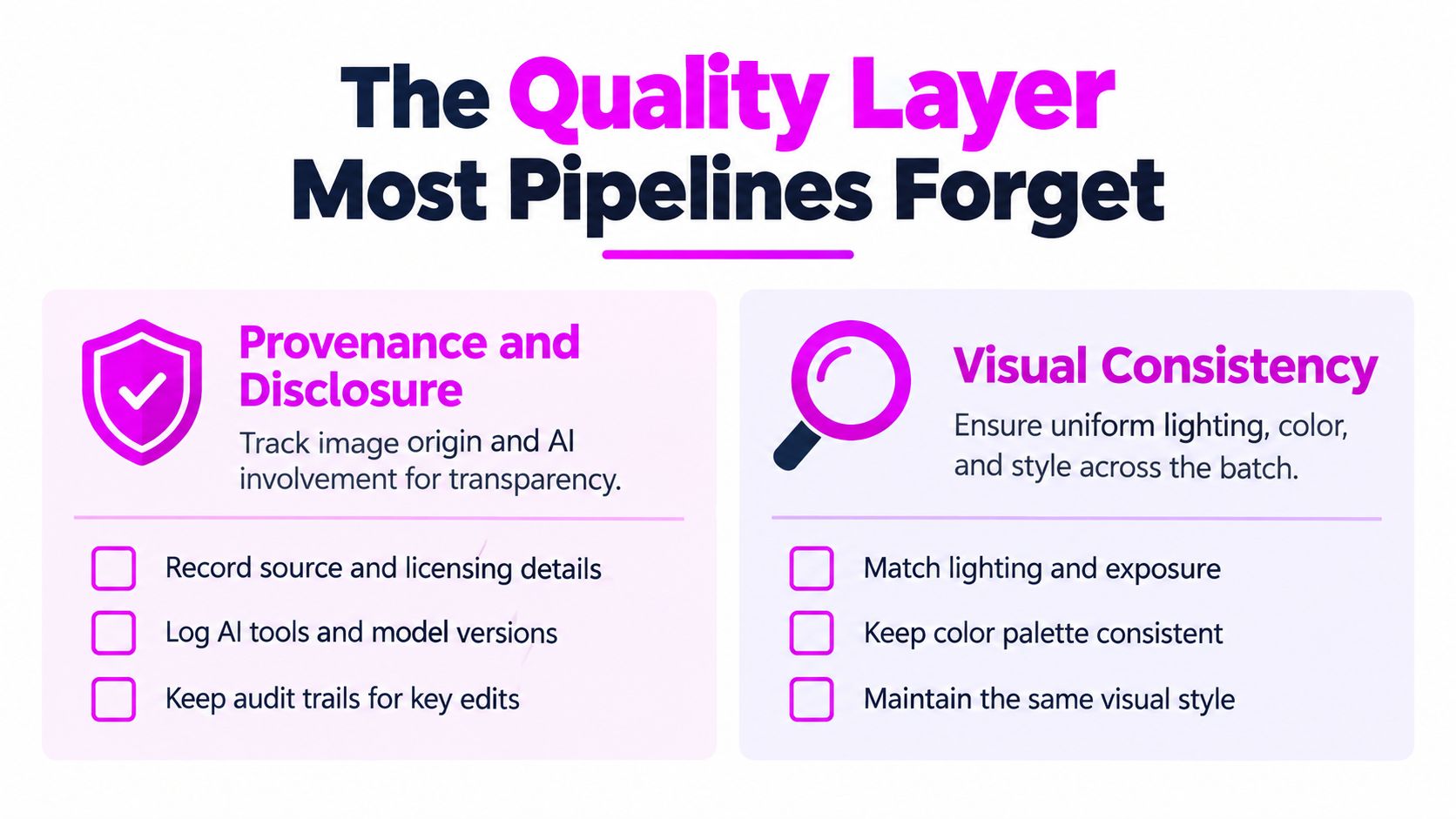
Provenance and disclosure
Provenance means you can explain where an asset came from and what happened to it. For AI-assisted batches, record the prompt, model and version, source assets, licenses, editor, approval, and disclosure status. Keep that record when files are resized, compressed, edited, or converted, because metadata can be stripped during ordinary processing. A sidecar record or exported audit log is safer than assuming embedded fields will survive every platform.
The need isn't theoretical. An empirical study of 50 widely used AI image-generation systems found that only 38% implemented machine-readable watermarking and just 8% applied deepfake labels, while related creator research cited in the same provenance and disclosure analysis found 69% of creators were concerned about content being used to train AI without permission and 28% cited uncertainty about model training as an adoption barrier. Your workflow therefore can't depend on the generator to handle disclosure for you.
Add review gates for recognizable people, trademarks, locations, and claims implied by the image. A synthetic customer enjoying a product may look harmless, but it can mislead buyers if it appears to be evidence. Sellers comparing editor features can use this overview of AI photo editing tools for sellers as context, then add their own rights and approval checks before publication.
Accessibility quality control
Alt text is also a batch quality issue, not a final typing task. Carnegie Mellon summarized a 2025 report showing that 18.5% of homepage images lacked alternative text and 94.8% of homepages had at least one detected WCAG failure, in its discussion of AI and web accessibility remediation. Generating descriptions automatically may fill empty fields, but it doesn't guarantee that those descriptions are accurate or useful in context.
Reviewers should decide whether an image is decorative or informative, verify that named objects and text appear, and adapt wording to the page or lesson. The same product photo may need one description in a catalog, another in an accessibility lesson, and none if it's purely decorative beside a caption. Flag low-confidence descriptions, detect repeated generic text, and involve multilingual reviewers where audiences require them.
Build these checks into the workflow beside resizing and compression. A short set of quality assurance practices for image batches can help turn provenance fields, visual sampling, and accessibility review into routine gates. A batch isn't done when every file exports. It's done when every accepted file can be explained, used, and understood.
Choosing Your Workflow and Getting Started This Week
Match the workflow to your current bottleneck. If you handle modest batches and need close visual control, stay with desktop tools and tighten your presets, folders, and review habits. If volume and variant creation are the bottleneck, test a cloud AI platform with a batch editor. If custom integrations govern your work, keep scripts as the backbone and add platform generation or finishing only where they remove real friction.
Run one bounded pilot instead of migrating everything. Pick a real campaign, product group, or lesson set with messy inputs and a clear publishing destination. Write the output specifications first, including dimensions, ratios, formats, naming, rights fields, disclosure needs, and the person who approves exceptions.
- Process a representative sample through the full chain, not only the easiest files.
- Record provenance for every output before conversion or delivery.
- Review accessibility on a sample, including decorative versus informative decisions.
- Measure accepted assets and total elapsed time, including selection and rework.
- Change one default at a time so you know what improved or broke.
The same planning discipline helps when image batches feed adjacent content. If your stills become clips or campaign sequences, this guide to short-form video batch planning offers a compatible way to think about grouping production work. Keep the principle consistent. Decide once, process predictably, review exceptions, and preserve the record.
Your best workflow won't feel dramatic. It'll feel calm. Files enter in a known state, move through named stages, and come out ready for a person to approve rather than rescue.
Ready to turn a late-night folder of repetitive edits into one controlled batch? Bulk Image Generation brings bulk generation and batch post-production together, including resizing, background removal, face swaps, and enhancement, so you can pilot a complete workflow this week. Start with one real campaign, measure the accepted results, and build from what works.
