How an AI Image Describer Can Transform Your SEO and Workflow

Ryan Bennett • December 11, 2025
Discover how an AI image describer automates alt text and metadata to boost accessibility, improve SEO, and streamline your entire content workflow.
Imagine having an assistant who can look at any image and instantly write a perfect, detailed description. That's the magic of an AI image describer. It’s like a digital storyteller, translating pictures into words and saving you countless hours of manual work.
What Is an AI Image Describer and How Does It Work?
At its heart, an AI image describer is a tool that uses artificial intelligence to automatically spit out a text description for any visual. Think of it as building a bridge between sight and language, letting machines tell us what they "see." This isn't just a cool party trick; it's becoming a crucial piece of any modern digital content strategy.
To really get it, you first have to understand the concept of image description itself. The main goal is to create metadata that makes an image understandable to both people and search engines—a must-have for accessibility and just getting found online.

The Tech Doing the Heavy Lifting
An AI image describer pulls this off by mashing together two powerful types of AI:
- Computer Vision: This is the "eyes" of the operation. It lets the AI process, analyze, and make sense of images. It identifies objects, people, scenes, and even text within the picture, pretty much the same way our own eyes take in the world.
- Natural Language Processing (NLP): Once computer vision has figured out what's in the image, NLP steps in to handle the "so what." This tech helps the AI build grammatically correct and contextually relevant sentences to describe everything it just saw.
This combination of seeing and speaking is what makes the whole thing work. The market for this kind of AI-driven image analysis is absolutely booming, with experts predicting a compound annual growth rate (CAGR) of 28.5% between 2025 and 2031. That’s a clear signal of how important this technology is becoming across all sorts of industries.
By automating the creation of alt text, metadata, and even social media captions, an AI image describer doesn't just save time—it massively expands your content's reach and makes it accessible to everyone.
How AI Learns to See and Describe Your Images
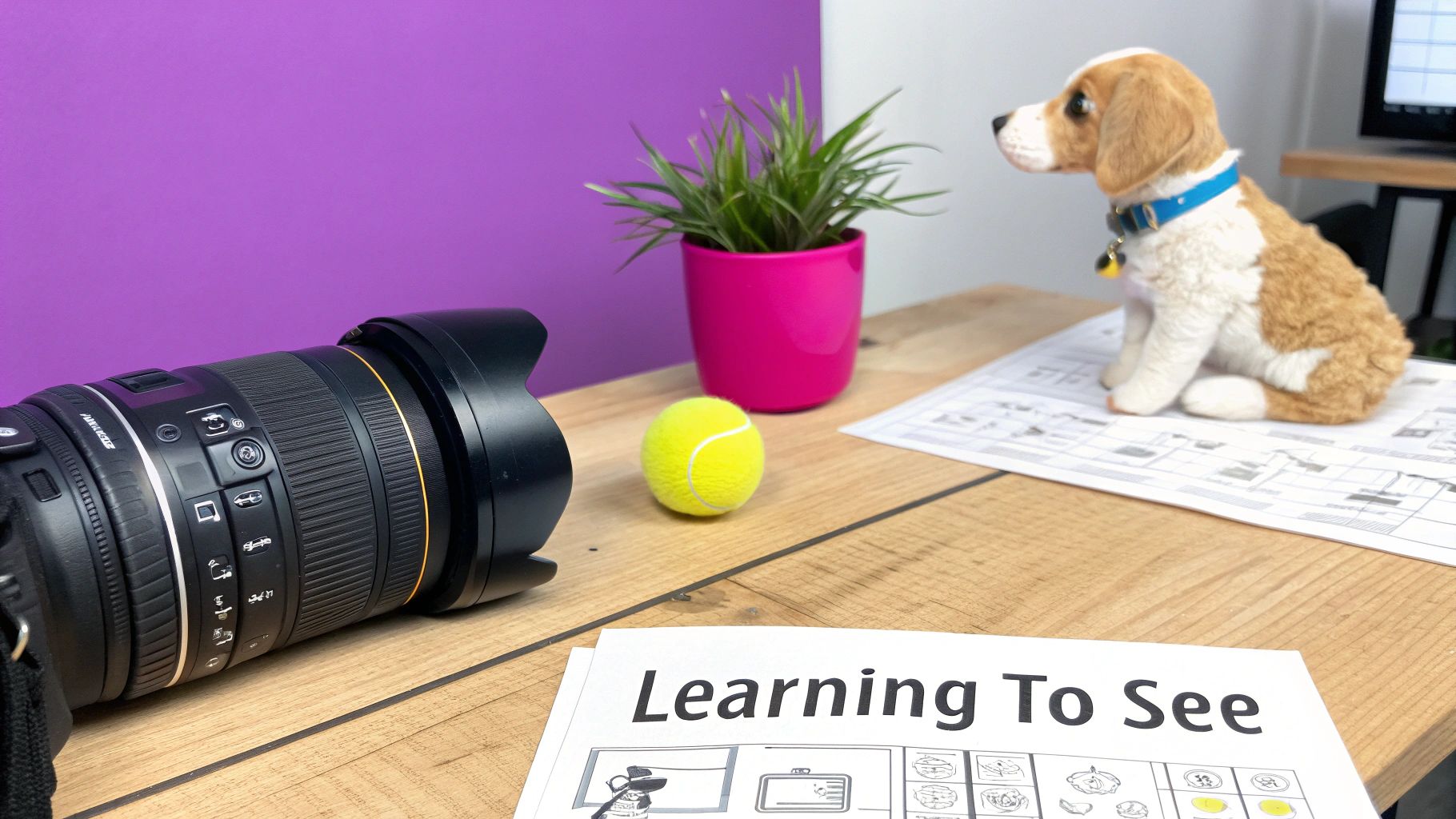
So, how does an AI go from a silent grid of pixels to a useful, human-readable description? It's not magic, but it is a clever partnership between two distinct fields of artificial intelligence: one that teaches the AI to "see" and another that teaches it to "speak."
First up is Computer Vision. Think of it like teaching a child to recognize things. At first, they just see colors and shapes. But with enough examples, they learn to point and say "dog," "ball," or "tree."
Computer Vision works in a similar way. The AI is fed millions of labeled images, learning to identify specific objects, people, and settings until it can confidently recognize what's in a picture it has never seen before.
From Seeing to Speaking
Just knowing what's in the image isn't enough. The AI has to communicate that information clearly. This is where Natural Language Processing (NLP) steps in. NLP is the tech behind chatbots and translation apps—it’s all about teaching machines to understand and generate language like we do.
If Computer Vision provides the vocabulary ("golden retriever," "red ball," "park"), then NLP provides the grammar to build a sentence. It takes that raw list of tags and arranges it into something that actually makes sense. You can see this process in real-time with a good image to text converter.
The real breakthrough happens when these two fields merge. This fusion creates what are known as Vision-Language Models, the true engine of a modern AI image describer.
The Power of Vision-Language Models
This is where things get really interesting. Vision-Language Models don't just see objects and spit out a list. They’re trained to understand the relationships between what's in an image and the words we use to describe it. This lets them capture not just objects, but also context, actions, and even the overall mood of the scene.
This ability is what transforms a basic tag into a rich description that’s incredibly valuable for both accessibility and SEO. It's the difference between a simple, clunky output like "dog, ball, grass" and something far more descriptive:
- Simple Description: A dog is in the park with a ball.
- Advanced Description: A happy golden retriever joyfully catches a bright red ball in a sunny, green park.
That level of detail is a game-changer. For visually impaired users, it paints a vivid picture. For search engines, it provides specific, long-tail keywords that accurately reflect the image, boosting your chances of ranking. This deep contextual understanding is what makes an AI image describer an essential tool for any modern creator.
So, What Can It Actually Do For You?
Knowing the tech behind an AI image describer is cool, but the real magic happens when you see what it can actually accomplish. This isn't just some technical novelty; it's a workhorse for content creation, accessibility, and marketing. It takes over tedious tasks, makes your digital assets smarter, and creates efficiencies you didn't even know were possible.
And this isn't a niche thing. The global market for this kind of AI is exploding, projected to jump from USD 2.6 billion in 2024 to an insane USD 50.7 billion by 2034. That massive growth signals a huge shift in how we handle visual content.
Boost Accessibility and SEO Without Lifting a Finger
One of the biggest wins right out of the gate is automatically generating alternative text (alt text). This tiny bit of text is a powerhouse for two big reasons:
- Accessibility: Screen readers use it to describe images for visually impaired users. Getting this right makes your site inclusive and helps you meet accessibility standards.
- Search Engine Optimization (SEO): Google can't "see" your images. It relies on alt text to understand what they're about. Good alt text means better rankings in image search, which means more free traffic.
An AI image describer wipes out the soul-crushing task of writing alt text for every single image, making sure nothing gets missed. It’s a simple change with a huge impact on both user experience and your search rankings.
Change the Game for E-commerce Product Listings
If you run an online store, you live and die by your product photos. But writing compelling, unique descriptions for hundreds—or thousands—of products is a nightmare. An AI can look at a product photo and instantly generate a detailed description that actually sells.
Imagine uploading a picture of a new handbag. In seconds, you get back a description highlighting its "pebbled leather texture, gold-tone hardware, and detachable crossbody strap." Think of the hours saved. Think how much faster you can get new products listed.
This is where the right AI marketing software stops being a cost and starts making you money. By automating the grunt work, your team can focus on big-picture strategy instead of just trying to keep up.
Finally Streamline Your Social Media Workflow
Social media managers are always on the hunt for the next post. An AI image describer can be a fantastic creative partner. It analyzes an image and spits out relevant caption ideas, engaging questions, and trending hashtags to get more eyes on your content.
For example, it could see a travel photo and suggest, "Golden hour over the Amalfi Coast," then add hashtags like #TravelItaly and #SunsetViews. This doesn't just speed things up; it helps you maintain a consistent, engaging voice across all your platforms.
Build a Powerful Automated Content Workflow
Trying to scale your visual content from a handful of images to hundreds or thousands runs you straight into a wall: manual optimization. Manually writing alt text, titles, and social captions for every single asset is a mind-numbing bottleneck that kills productivity.
But what if you could automate that? By pairing an AI image generator with an AI image describer, you can build a powerful pipeline that does all the heavy lifting for you.
This setup flips a tedious, multi-step manual chore into a nearly hands-off workflow. You start by generating a massive batch of visuals, then feed them right into a system that automatically analyzes, describes, and prepares them for publishing. Minimal human touch required.
The infographic below shows what this looks like in practice, from the initial idea all the way to a published, fully optimized asset.
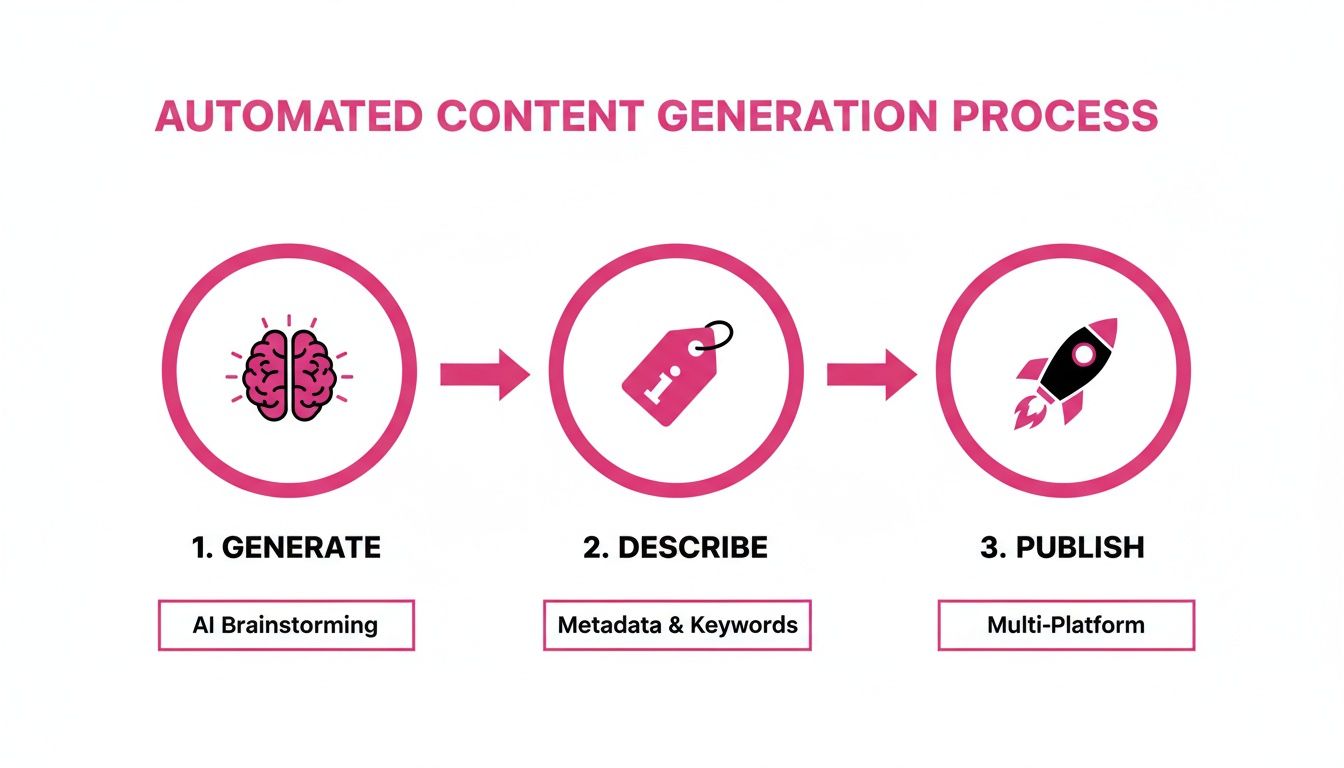
The real magic here is the seamless handoff between AI systems. One tool's output becomes the next tool's input, creating a flywheel of efficiency.
Step 1: Generate Images at Scale
It all starts with creating your images in bulk. Tools like Midjourney or DALL·E are fantastic for this, letting you produce a huge number of unique visuals from simple text prompts. The secret to getting this right is consistency.
If you don't have a clear, repeatable prompt structure, your images will be all over the place. A little planning goes a long way. You can even use a dedicated free AI image prompt generator to help you dial in your inputs for more predictable and high-quality results.
This isn't just a niche trick—it's a massive, growing market. In 2023, the global AI image generator market hit a valuation of around USD 336.3 million and is expected to grow at a 17.5% CAGR through 2032, with e-commerce and retail leading the charge.
Step 2: Automate Descriptions and Metadata
With your batch of images ready, you send them over to an AI image describer, usually through an API. This is where the automation really kicks in and saves you from hours of misery.
For every single image, the AI can be instructed to generate several critical pieces of text:
- Descriptive Alt Text: It writes accessible, SEO-friendly descriptions so search engines and screen readers know exactly what's in the image.
- Engaging Titles: It can dream up compelling headlines or titles based on the visual elements it sees.
- SEO-Friendly File Names: It instantly renames generic files like
IMG_7894.jpgto something descriptive and useful, likegolden-retriever-catching-red-ball.jpg.
Think about it: no more manual data entry. You slash human error and ensure every visual asset is perfectly optimized the second it’s created.
To truly appreciate the efficiency gains, let's compare the old manual process with a fully automated one. The table below breaks down just how much time and effort you save at each stage.
AI Image Description Workflow Comparison
| Workflow Stage | Manual Process (The Old Way) | Fully Automated (AI-Powered Way) | Key Benefit of Automation |
|---|---|---|---|
| Alt Text Creation | A team member writes alt text for each image, one by one. Slow and prone to inconsistency. | AI analyzes image content and generates context-rich alt text in seconds. | Speed & Consistency: Generates thousands of descriptions in minutes with a consistent voice. |
| File Naming | Manually renaming IMG_1234.jpg to blue-suede-shoes.jpg. Tedious and easy to make typos. | AI automatically generates descriptive, keyword-rich file names based on visual analysis. | SEO & Organization: Improves search visibility and makes asset management a breeze. |
| Metadata Tagging | Someone has to brainstorm and apply relevant keywords and tags to each image. | AI identifies objects, scenes, and concepts, then generates a list of relevant tags instantly. | Discoverability: Enhances searchability within your media library and on search engines. |
| Social Captions | A social media manager writes unique captions for each platform, for each image. | AI generates multiple caption options tailored for different platforms (e.g., Twitter, Instagram). | Content Velocity: Drastically speeds up social media content pipelines. |
The difference is night and day. Automation doesn't just make the process faster; it makes it smarter and more scalable.
Step 3: Review and Publish
While the AI handles 95% of the work, a final human check is still a good idea. This quick quality assurance step is your chance to tweak descriptions to perfectly match your brand's voice, catch any small errors, or add specific context the AI might not know about.
After a quick once-over, your perfectly optimized images are ready to go live on your website, blog, or social channels. To get the most out of this, it helps to understand how to properly integrate AI SEO with existing SEO workflows.
This entire end-to-end system gives content teams the ability to produce and optimize visual content at a scale that was simply impossible just a few years ago.
How to Choose the Right AI Image Describer Tool
Picking the right AI image describer isn't just about grabbing the first tool you find on Google. It's about finding a true partner for your content workflow, and the market is crowded with options, each promising the world. To make a smart, future-proof decision, you need to look past the marketing hype and focus on a few key things that separate a decent tool from a great one.
The single most important factor? The quality of the descriptions themselves. Does the tool just spit out a list of objects, or does it actually understand the scene's nuance and context? A top-tier AI image describer moves beyond basic tags to generate text that’s genuinely useful.
Evaluate Accuracy and Detail
Start by running a few of your own images through the tools you’re considering. And don't make it easy for them. Forget simple product shots on a white background; throw in complex scenes, images with text, or photos with subtle emotional undertones. This is the fastest way to see what a model is truly capable of.
You want a tool that can tell the difference between a "dog" and a "golden retriever puppy gleefully chasing a red ball." That level of detail directly impacts the value you get, whether you're creating rich alt text for accessibility or generating specific, long-tail keywords to boost your SEO.
A great AI image describer doesn't just see pixels; it understands relationships. It should be able to describe not only what's in an image but also the actions and interactions taking place.
Prioritize Integration and API Access
Even the most brilliant tool is worthless if you can't plug it into your existing systems. Look for an AI that plays well with others, especially if you're working at scale. The goal is to find a solution that slots neatly into your workflow, not one that forces you to build a new process around it.
Keep an eye out for these connection points:
- CMS and DAM Plugins: Check for pre-built integrations for platforms like WordPress, Shopify, or whatever Digital Asset Management (DAM) system you use. These can turn a complicated setup into a few simple clicks.
- A Solid API: For any custom workflow, a well-documented API is absolutely non-negotiable. This gives your developers the power to build a direct, automated pipeline between the image describer and your own software.
Seek Customization and Control
Your brand has a unique voice, and your image descriptions should reflect that. Generic, robotic-sounding text can cheapen your content and undo all your hard work. The best tools give you ways to steer the output so it aligns with your needs.
This could be features for adjusting the tone (think formal vs. playful) or even the ability to fine-tune the model with your own data for highly specialized industries. This control is what makes the descriptions feel like a natural extension of your brand, not something tacked on by a machine.
Finally, think about where you'll be in a year. Your needs might be small today, but what about tomorrow? Choose a provider with a flexible pricing model that can grow with you. Pay-as-you-go or tiered plans are often your best bet, making sure you only pay for what you use while having the room to handle a sudden spike in volume without a headache.
What's Next? Trends, Dangers, and the Road Ahead
As amazing as AI image describers are right now, we’re only scratching the surface. It’s impossible to talk about the future without getting real about the ethical tightropes we’re walking. Giving a machine the power to interpret our visual world is a huge responsibility, and it comes with challenges we have to navigate carefully.
The biggest elephant in the room is algorithmic bias. AI models are trained on mountains of data scraped from the internet—images and the text used to describe them. If that data is full of human biases and stereotypes, guess what the AI learns? It learns to see the world through that same skewed lens, spitting out descriptions that can misrepresent people and reinforce ugly stereotypes.
Then there’s the privacy issue. When you upload your company’s latest product photos or a folder of personal memories, you need to know—really know—that the service is handling them securely. Are they being stored? Used for retraining without your permission? This is why choosing a provider you can trust is non-negotiable.
The Next Wave of AI Description
Looking forward, the technology is already evolving past simple descriptions of static photos. The next big thing is multimodal AI, which is a fancy way of saying AI that can process and connect different types of information all at once.
Imagine an AI that doesn't just see a video clip, but also listens to the dialogue and the soundtrack. It could then generate a summary that captures not just what happened, but the emotional tone of the scene based on the music and the actors' voices. That opens up a whole new world for content creation and accessibility.
We’re also seeing a shift away from one-size-fits-all models toward highly specialized AIs trained for specific industries. Think about it:
- In medicine: An AI trained on millions of medical scans could describe an X-ray with technical precision, flagging details a human radiologist might miss during a long shift.
- In retail: A model focused exclusively on fashion could identify subtle style details, from the type of stitching on a handbag to the specific fabric of a dress, going way beyond what a general tool can do.
These advancements are incredibly exciting, promising a future of even smarter and more useful tools. But they also make it crystal clear that we’ll always need thoughtful human oversight to steer this technology in the right direction.
Your Questions, Answered
Jumping into new tech always brings up a few questions. Let's clear up some of the most common ones about using an AI image describer so you know exactly what to expect.
Just How Accurate Is This Stuff?
The short answer? It depends on the tool and the picture. For straightforward photos of everyday objects—a person walking a dog, a car on a street, a bowl of fruit—modern AI models are shockingly good. They'll nail the key items and actions almost every time.
But they can get tripped up by abstract art, subtle human emotions, or niche technical subjects that require expert knowledge. The AI describes what it sees based on data patterns, not what it truly understands. That’s why it's always smart to have a human give the descriptions a quick once-over.
Think of the AI's output as a fantastic first draft. It does about 90% of the heavy lifting, and a quick human touch adds that final polish for brand voice, SEO, or perfect accessibility.
Can AI Actually Understand the Context of an Image?
Right now, AI is brilliant at identifying objects and figuring out their relationships. It knows a person is riding a bike, not just that a person and a bike happen to be in the same frame. That's a huge leap forward.
However, it completely lacks a human's grasp of deeper meaning. An AI might perfectly list every visual detail in a political cartoon but totally miss the joke. It sees data, not satire or cultural subtext. For any content where the emotional tone or underlying message is critical, that human touch is non-negotiable to make sure the description matches the image's real purpose.
How Hard Is It to Get This Set Up?
This can range from ridiculously easy to moderately technical, all depending on what you need. A lot of services now offer no-code plugins for platforms like WordPress or Shopify, which makes the setup process as simple as installing an app.
If you're running a larger, custom-built system, most providers have a solid API. This lets your developers wire the AI directly into your existing software for a seamless, automated workflow. While this does require a developer, the API documentation is usually very clear and gives your team a straightforward path to follow.
Ready to put your visual content workflow on autopilot? Bulk Image Generation gives you the tools to create and describe images at scale, saving you a ton of time. Start creating for free at https://bulkimagegeneration.com.
