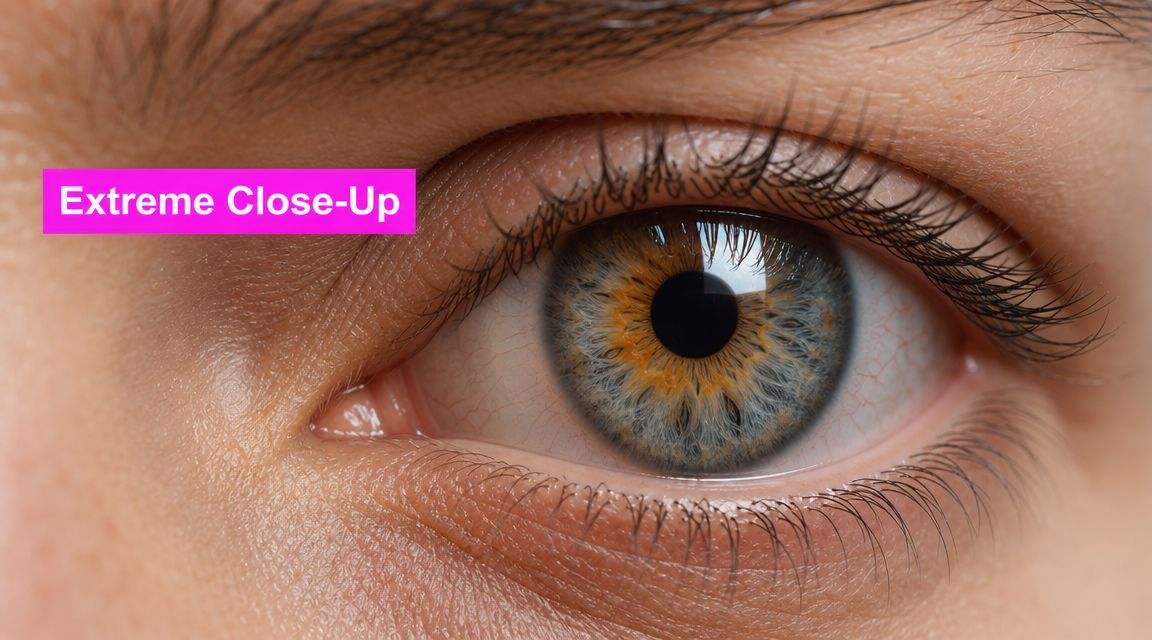
The Extreme Close Up Shot: Your Guide to Powerful Visuals

Ryan Bennett • May 31, 2026
Master the extreme close up shot in photography and AI. Our guide covers techniques, composition, and AI prompts to create impactful visuals for any project.
You're probably looking at a feed full of polished visuals that all feel interchangeable. Clean product shots. Nice portraits. Perfectly acceptable creative that nobody remembers. Then one image stops the scroll because it shows a single bead of moisture on glass, the weave of a fabric, or the tension in one eye.
That's the job of the extreme close up shot.
Filmmakers have used it for years to force attention onto one tiny detail. Marketers can use the same move for product launches, landing pages, short-form video, ad creative, packaging reveals, beauty campaigns, and AI-generated visual systems. The technique is old. The use cases are very current.
In practice, the extreme close up works because it removes choice. The viewer doesn't scan the frame deciding what matters. You already decided for them. If you're building campaigns around tactile value, emotional tension, or product craftsmanship, that control matters. It's also why texture-driven workflows, including AI-generated material studies and surface variations, have become so useful for creative teams working at speed. A resource like this guide to an AI texture generator is helpful when your campaign depends on surfaces looking specific rather than vaguely “premium.”
The Power of the Pixel-Perfect Detail
An extreme close up shot is one of the fastest ways to make a visual feel intentional. Most images show a subject. An ECU shows a decision. It says, this exact detail is the message.
That shift matters in marketing because attention is expensive. A wide shot asks the viewer to process environment, hierarchy, lighting, styling, and subject. An ECU strips most of that away. What remains is texture, emotion, or evidence. Evidence of quality. Evidence of tension. Evidence that the viewer should care.
Where marketers get real value from ECUs
Use the shot when the selling point lives in a detail:
- Craftsmanship: Stitching, brushed metal, embossed packaging, skin texture, food glaze.
- Emotion: Eyes, lips, fingertips, tension in a hand.
- Proof: Product seals, ingredient texture, interface micro-interactions, handwritten notes.
- Story hooks: A clue, crack, scratch, droplet, spark, thread, or button.
A weak campaign often fails because every image tries to do everything. Show the product. Show the lifestyle. Show the context. Show the user. Show the brand. The ECU does the opposite. It narrows the visual argument until the frame can only support one idea.
Practical rule: If the value proposition can be pointed to with one finger, it can probably be sold with an extreme close up shot.
That doesn't make it a replacement for wider visuals. It makes it a force multiplier. A landing page hero might need context. A carousel second slide often needs detail. A social ad opener needs interruption. A product grid needs consistency. ECUs are strongest when they enter that system with a clear job.
What Defines an Extreme Close Up Shot
The cleanest definition comes down to framing scale. An extreme close up isolates a very small portion of a subject, often just one eye, the mouth, a hand, or a specific object detail, so the subject's outer contours are cut off by the frame edges. The tighter framing also makes small focus errors or surface imperfections much more obvious, which is why practitioners recommend manual focus control for these shots, as explained in StudioBinder's guide to the extreme close up shot.

A standard close-up usually gives you the whole face, or most of it. A medium shot keeps more body language and environment. The ECU goes further. It crops so aggressively that context disappears and a fragment becomes the full story.
A simple way to tell the difference
Think of a printed page.
- A medium shot is the whole page on the desk.
- A close-up is one paragraph.
- An extreme close up shot is a single word filling the frame.
That's why ECUs feel so forceful. They don't merely zoom in. They remove alternatives.
Shot size comparison
| Shot Type | Framing | Primary Purpose |
|---|---|---|
| Medium Shot | Subject framed from the waist or chest up, with some surroundings visible | Balance action with context |
| Close-Up | Entire face or a significant part of it fills the frame | Highlight expression and connect viewer to subject |
| Extreme Close-Up | Only a tiny detail such as one eye, the mouth, or a small object feature is visible | Isolate one detail and assign it maximum importance |
The distinction sounds academic until you build a shot list or a prompt library. Then it becomes operational. If you ask for “close-up” when you really need “extreme close-up,” the system often returns too much face, too much bottle, too much packaging, too much room. The image may look good and still fail the brief.
What the frame is really doing
An ECU is less about proximity than prioritization. The frame cuts away enough information that the viewer must infer the rest. That inference is part of the effect. It creates curiosity, pressure, and emphasis all at once.
An ECU works when the missing context helps the image. It fails when the missing context makes the image unreadable.
That's the line marketers and image teams need to watch. Tight framing can create elegance. It can also create confusion if the audience can't identify what they're looking at in time.
The Creative Power of the ECU
The extreme close up became recognizable in early cinema because it let directors isolate tiny facial details or objects that would disappear in wider framing. Modern film guides describe it as the closest shot size, often showing only an eye or mouth and deliberately removing spatial context to heighten emotion or importance, as outlined in WFCN's article on the history and purpose of the extreme close-up.

That same logic applies to modern campaigns. If a wider shot says, “Here is the product,” an ECU says, “Here is the reason this product matters.”
Emotion without explanation
An eye in an ECU doesn't just show a face. It shows strain, attention, fear, desire, fatigue, relief. The viewer reads all of that faster than they read copy. In beauty, fashion, and wellness work, this is why detail shots often outperform more generic polish. They feel less like broad branding and more like direct sensory evidence.
The same principle works on objects. A cracked chocolate shell, a wet citrus surface, a pen tip touching paper, or a thumb pressing a textured switch can communicate mood faster than a staged hero scene.
Suspense through omission
ECUs are useful because they hide almost as much as they reveal. You only show part of the evidence. The viewer completes the scene mentally.
That makes the shot effective for:
- Launch teasers: reveal material, not full product form
- Product storytelling: isolate what makes a premium object feel premium
- Educational content: focus on a tiny mechanism or step
- Narrative ads: hold back context until later frames
A lot of creative gets weaker when every idea is fully explained in the first image. Suspense needs restraint. The ECU gives you restraint by default.
Why detail can say more than scale
The strongest ECUs don't just magnify. They assign meaning. If you show the zipper teeth on a bag, you're not only showing hardware. You're signaling durability, finish, precision, and price positioning. If you show a fingertip pressing into foam or cream, you're not only showing texture. You're communicating sensory payoff.
The detail itself isn't always the story. Often it's the proof behind the story.
That's where many marketers underuse the format. They treat the ECU as decoration. It works better as argument.
Technical Guide for Capturing Perfect ECUs
The camera setup for an extreme close up shot is usually simple in theory and unforgiving in practice. A director of photography may use a long lens at close range for tighter framing, while more extreme versions often require a macro lens. As a baseline, standard close-ups are often shot with 50mm to 100mm lenses, while ECUs go further by isolating a single feature such as an eye or mouth, according to NFI's breakdown of how to create an extreme close-up.

Lens choice changes the feel
A long lens at close range helps compress attention. It's a good choice when you want a controlled, flatter rendering and don't need microscopic detail. A macro lens is the better tool when the frame depends on tiny texture being clean and sharp.
Use the long lens when:
- You're shooting faces: especially eyes, lips, and hands
- You want a cinematic falloff: with soft separation around the focal plane
- You need a little working distance: useful for talent comfort and lighting placement
Use a macro lens when:
- The product detail is the subject: fibers, grains, droplets, seams, powder, metal finishes
- Small objects need edge-to-edge detail
- Educational or technical visuals require legibility
If you want to study the visual language before shooting, it helps to review examples made with AI tools for cinematic videos, especially for macro-lens perspective, shallow depth of field, and steady-camera staging.
Focus and lighting decide whether the shot works
ECUs punish lazy focus. If the story is in one bead of water, one eyelash line, or one embossed letter, there's no room for approximate sharpness. Manual focus is often the safer option because autofocus can hunt or lock onto the wrong plane.
Lighting should support the material, not flatten it. Texture needs shape. Faces need controlled softness. Packaging often needs highlights that feel deliberate rather than accidental.
A practical setup:
- Lock the focal point first. Pick the one detail that must be sharp.
- Reduce distractions. Clear reflections, dust, stray fibers, and clutter.
- Angle the key light for texture. Front light can kill dimension. Side-biased soft light usually reads better.
- Check edge crops. If the crop feels accidental, the frame feels amateur.
- Shoot variations. Tiny shifts in angle can completely change readability.
Product teams need repeatability
The hidden challenge isn't making one good ECU. It's making a series that feels consistent across SKUs, channels, and campaigns. That means repeating crop logic, lighting direction, background behavior, and focus placement. If you're building product content systems, this guide to AI product photography is useful because it translates visual standards into scalable production habits.
Crafting ECUs with AI for Modern Marketing
AI can generate striking extreme close up visuals fast, but this format exposes errors faster than wider compositions. Tight framing increases the risk of artifacts and ambiguity, which is why ECU workflows need standardized prompt language and quality checks, especially when marketers need consistent outputs at scale, as noted in Backstage's discussion of technical reliability in extreme close-ups.

Translate camera language into prompt language
Most bad AI close-ups fail because the prompt is too broad. “Close-up of a luxury bag” invites the model to decide what matters. You need to specify the subject fragment, texture behavior, lighting, angle, and what should stay out of frame.
A durable ECU prompt formula looks like this:
[subject detail] + [shot scale] + [material/texture] + [lighting] + [focus behavior] + [background simplicity] + [commercial intent]
Examples:
-
Luxury goods
- “Extreme close up shot of the stitching on a luxury leather handbag, fine grain texture, soft studio lighting, shallow depth of field, razor sharp focus on seam detail, minimal background, premium commercial photography”
-
Food and beverage
- “Extreme close up shot of a single drop of honey falling from a spoon, macro detail, warm directional light, crisp texture, dark soft background, premium food advertising look”
-
Beauty
- “Extreme close up shot of glossy lip texture, clean skin, soft diffused lighting, precise highlight control, shallow depth of field, editorial beauty campaign”
-
Tech product
- “Extreme close up shot of a brushed metal volume dial, tactile grooves, controlled specular highlights, dark minimal background, sharp product detail, cinematic product advertising”
Build a batch workflow instead of prompting one image at a time
Single-image prompting is fine for experimentation. Marketing teams need systems. The practical move is to create a prompt matrix with fixed and variable fields.
Keep fixed:
- Shot scale
- Lighting style
- Aspect ratio
- Brand mood
- Background treatment
Vary:
- Product detail
- Material
- Colorway
- Angle
- Campaign theme
That gives you a family of images instead of a pile of unrelated outputs.
Quality control matters more with ECUs
At wider framing, small oddities can hide. In an ECU, they become the entire image. Review every batch for:
- Identity clarity: Can a viewer tell what this is quickly?
- Texture realism: Does the material look physically believable?
- Edge integrity: Are crops intentional or broken?
- Focus logic: Is the right detail sharp?
- Artifact risk: Repeated patterns, warped geometry, fake text, merged surfaces
If you're comparing platforms and workflows, this roundup of top AI tools for e-commerce visuals is a useful reference point for how different tools approach commercial image generation.
Prompt templates marketers can reuse
Keep the object name near the front of the prompt. In ECU generation, subject priority matters.
Try these templates:
-
For apparel
- “Extreme close up shot of [fabric detail], visible weave, realistic textile texture, soft directional studio lighting, premium fashion campaign, shallow depth of field”
-
For packaging
- “Extreme close up shot of [label embossing or seal], crisp edges, luxury packaging finish, controlled highlights, clean commercial product image”
-
For skincare
- “Extreme close up shot of [cream, serum, droplet, skin texture], clean beauty aesthetic, soft diffused light, high realism, editorial skincare visual”
-
For education
- “Extreme close up shot of [tool part or scientific detail], precise focus, neutral background, clear instructional visual, realistic texture and scale”
If AI is part of your content pipeline, it also helps to understand the broader category of AI marketing software so your image workflow fits with the rest of your campaign stack.
Common Mistakes to Avoid with Extreme Close Ups
The most common ECU mistake isn't technical. It's strategic. Teams use the shot because it looks dramatic, not because the detail carries meaning.
Wedio notes that close-ups can exaggerate performance and warns actors not to “punch it up” because subtle behavior reads better. The same source also notes that ECUs are often reserved for only a few moments because they dominate viewer attention, which is why overuse weakens them instead of strengthening them in practice, as discussed in Wedio's article on the extreme close-up.
Mistake one: using ECUs everywhere
If every asset is a detail shot, nothing feels important. A campaign needs rhythm. Wider frames establish. Mid frames explain. ECUs punctuate.
Do this:
- Use ECUs for emphasis
- Place them at emotional or commercial peaks
- Pair them with wider shots in carousels, landing pages, and edit sequences
Not this:
- Build an entire campaign from fragments with no orienting images
Mistake two: cropping until the image becomes abstract
Abstraction can work in fashion or art direction. It usually fails in performance marketing if the viewer can't decode the subject quickly.
Watch for these warning signs:
- The product loses recognizability
- The detail could belong to anything
- The frame depends on a caption to make sense
Mistake three: chasing intensity with performance
On faces, the ECU magnifies everything. A slight squint can read as pain. A minor lip movement can feel theatrical. That's why restrained expression almost always works better than pushed expression.
Subtle performance reads louder in an extreme close up shot than most teams expect.
Mistake four: accepting soft focus because it feels “cinematic”
Softness only works when it's clearly intentional and the focal plane still tells the story. If the wrong eyelash is sharp, if the seam falls off, or if the label edge drifts out of focus, the frame loses authority.
A quick decision test helps:
| If your image needs to do this | Avoid this |
|---|---|
| Show craftsmanship | Hazy detail and flattened texture |
| Convey emotion | Overacting and exaggerated facial tension |
| Reveal a clue or feature | Ambiguous crops with no readable focal point |
The shot is powerful because it's selective. Respect that selectivity.
Final Thoughts on Mastering Detail
The extreme close up shot has lasted because it solves a problem that hasn't changed. Audiences miss things unless you decide what they should see. Whether the frame comes from a cinema camera, a product photography setup, or an AI image workflow, the principle is the same. Remove the nonessential. Let one detail do the work.
For marketers, that makes the ECU more than a film reference. It becomes a practical device for selling texture, emotion, craft, and significance. It can make a product feel tactile. It can turn a small design decision into a premium signal. It can make a campaign feel sharper because the visual hierarchy is sharper.
For AI workflows, the lesson is even more useful. The tighter the frame, the less room there is for vague prompting, weak quality control, or visual drift. Good ECU generation depends on specificity. Name the exact detail. Control the lighting. Define the focal point. Keep the background simple. Review outputs for realism and clarity.
That discipline is what connects classic cinematography to modern content production. Film language already solved the question of where attention goes. AI just gives creative teams a faster way to generate and test those choices.
Use the extreme close up shot when a single detail can carry the message better than a full scene. That's when it stops being a stylistic flourish and starts working like real visual strategy.
If you need to create large sets of product details, texture studies, or campaign-ready close-up variations without writing endless prompts by hand, Bulk Image Generation is built for that kind of workflow. It lets teams generate professional-quality images in bulk, refine them with batch editing tools, and move from idea to usable visual set much faster than a manual one-by-one process.
